Question
Can I connect MIC IP 7000i to an analog CCTV system using Virtual Port for PTZ control through 3rd party decoder?
Answer
This article could be useful if you’re looking for a solution to connect a MIC7100i to an analog CCTV system, using a 3rd party decoder.
If you need to know on what port the MIC7100i receives the serial protocol information (3rd party protocol control for MIC IP 7000i), you can find this information below.
Requirements: CPP 7.3 Firmware : v6.60.0065 and above
Execute the below command in sequence (replace the IP):
-
Set the camera protocol to Pelco D
http://192.168.0.101/rcp.xml?command=0x09a5&type=P_OCTET&direction=WRITE&num=1&payload=0x80000201D5020003 -
Allow serial port data to work while a password is enabled
http://192.168.0.101/rcp.xml?command=0x0b1a&type=T_OCTET&direction=WRITE&num=0&payload=1 -
Set the camera address ID to 1
http://192.168.0.101/rcp.xml?command=0x09A5&type=P_OCTET&direction=WRITE&num=1&payload=0x85000201F0030001 -
Enable Bi-directional
http://192.168.0.101/rcp.xml?command=0x09A5&type=P_OCTET&direction=WRITE&num=1&payload=0x8500020350030001 -
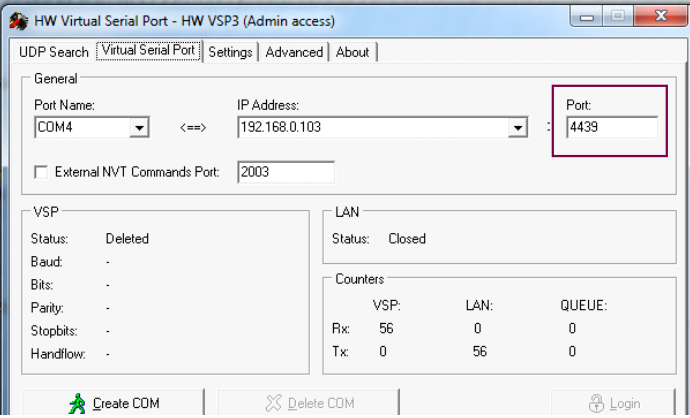
Enable VSP TCP number to 4439
http://192.168.0.101/rcp.xml?command=0x0ca8&type=T_WORD&direction=WRITE&num=1&payload=0x1157 -
Reboot the camera
http://192.168.0.101/reset
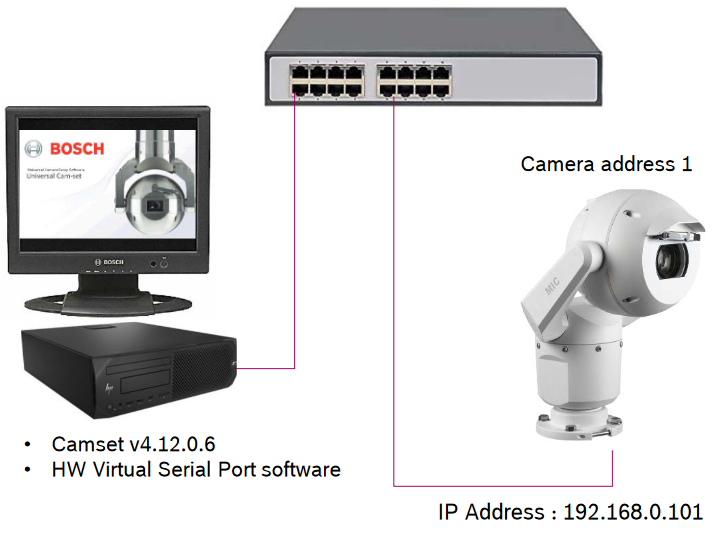
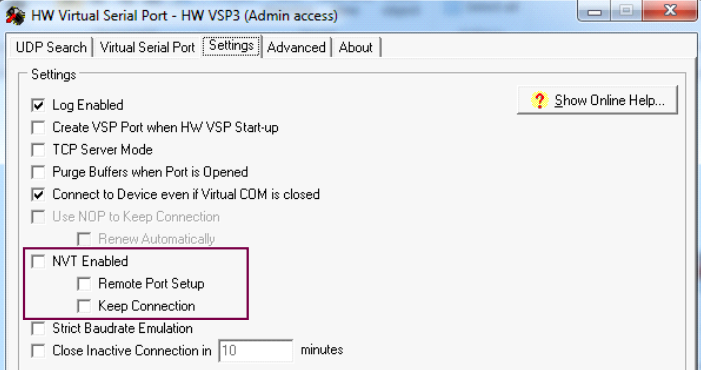
HW Virtual port configuration setup:
-
https://www.hw-group.com/software/hw-vsp3-virtual-serial-port
-
Default Password : admin