
Question
Do you know about Embedded Login Firewall of Bosch IP cameras?
Answer
Embedded Login Firewall | Intelligent Access Protection and Anomaly Detection
As the number of IoT devices have increased globally, so too has their exposure to the threat from cyber-attacks. Attacks can range from simple attempted log-in using a dictionary attack to more sophisticated attacks such as cross-site scripting.
Since most cyber-attacks are based on unauthorized access and control of devices, the first line of defense is credential check and how log-in attempts are treated.
There are several methods in which credential checks can be implemented, and these can vary from vendor to vendor.
One method is to simply increase the lock-out period with every wrong attempt, like e. g. a standard Linux system does.
While in most cases this provides a reasonable obstacle for an attacker, it also has some drawbacks for clients with a wrong or incomplete configuration, and for installers working to set up a system.
But such a login lock can become a real disadvantage, as – e. g. in case the user has a typo in his password - he may be locked out for a few minutes before he can try again. If this happens to an installer, it means valuable but non-productive time, and potentially lost money for him and his customer.
Some vendors even lock out a user completely after a certain number of wrong attempts. For an installer, this means he has to factory default a device, not only dismissing the passwords but also all previous configuration settings that need to be done again.
Implementing a solution that locks out clients, configuration tools and installers is counterproductive, so we implemented a more intelligent solution.
Embedded Login Firewall
The Embedded Login Firewall of all Bosch IP cameras, introduced with firmware version 6.30, consists of a two-level system which makes use of two integrated functional modules.
The logging module
The logging module observes clients’ log-in attempts and gathers information about these clients and their behavior:
► What server or service is targeted with the attempted log-in (RCP, HTTP, Terminal, Web service, iSCSI, FTP, SNMP)?
► Is at least one of the log-in credentials correct in the log-in attempt to any of these servers?
► Are there repeated log-in attempts and failures?
The module logs and memorizes up to the last 32 attempted logins to include client IP addresses, client actions and last access time.
The firewall module
The firewall module blocks access and data traffic from clients which are rated ‘suspicious’ by the logging module.
► TCP-Connections are blocked before they get connected.
► UDP Unicast and Broadcast packets are discarded before being processed by the application.
By blocking access and data traffic on the socket level, the Embedded Login Firewall requires only minimal computational power to handle unauthorized access. This provides additional protection from denial-of-service (DoS) attacks.
The benefits
The Embedded Login Firewall does not require any configuration. It automatically selects the appropriate level of protection to provide full transparency to positively acknowledged clients while blocking unauthorized log-in attempts.
The Firewall operates on a 20 second period which is derived from user tests and balanced against probability. This time period is short enough that a human user would not experience any blocking while he tries to log in. On the other hand, it is long enough to make any attack, and the results of it, unattractive to an attacker. Given the Firewall module and a strongly configured password, password attack times could range from months to years without success.
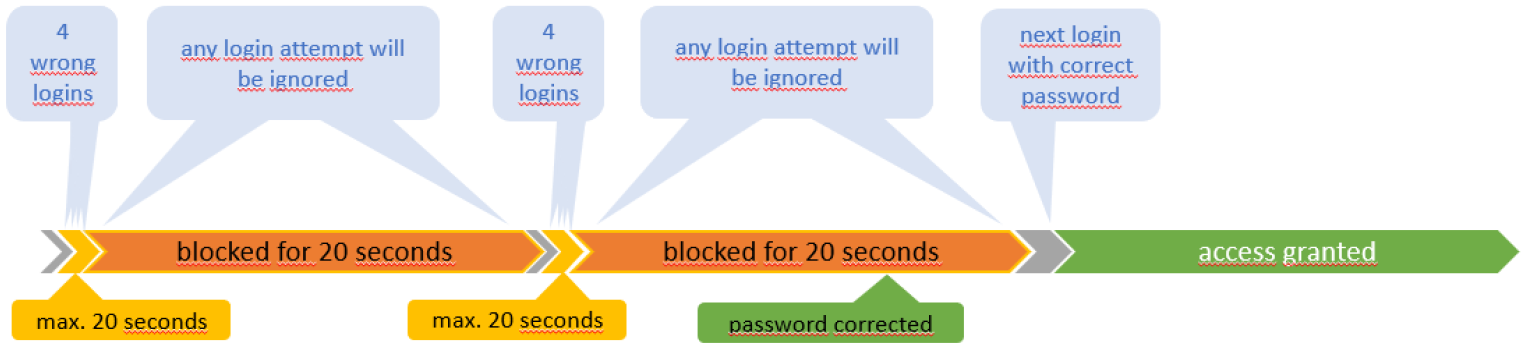
For Configuration Manager, a blocking due to misconfiguration of the password for device access would automatically disappear after 20 seconds once the password had been corrected. Same is valid for any other misconfigured client.
While the Embedded Login Firewall provides reliable access protection in case of an attack, it is quickly „self-healing“ once a password misconfiguration has been corrected, allowing all the “good guys” to seamlessly continue their work.
The decision tree
The intelligence in the Embedded Login Firewall is based on behavioral analysis. If there are 3 or fewer failed log-in attempts to a single server within 20 seconds, the system only observes.
For a human user, this period is typically too short to enter 4 wrong attempts triggering the firewall. Hence, the typical human user will have the chance to continuously try to get his password correct without being blocked.
An automated system, like a configuration tool, e. g. Configuration Manager, or an attacking botnet, will try to get access to a device repeatedly and much faster.
Depending on the number of connected or connecting clients the system choses between two modes:
► Blacklist mode (default)
If all recently active clients can be stored in the history buffer, which can hold up to 32 IP addresses, the Embedded Login Firewall uses the “Blacklist” mode:
IP addresses which have been successfully logged in are put on an “authenticated” list and kept there for 15 minutes. During this period, an accidental wrong authentication is ignored, even if coming in fast, and a following correct authentication is immediately accepted.
Login attempts from unknown IP addresses with a low frequency of less than four failed attempts within 20 seconds will be processed, keeping the possibility to login immediately with correct credentials.
IP addresses which have never been successfully logged in and had four or more failed log-in attempts during the last 20 seconds, are blocked – “blacklisted” - for another 20 seconds.
This ensures that allowed clients are not blocked and that minimum system resources are utilized. It should be noted that a mis-configured system trying to access the camera can display the same behavior as a bot-net while trying to access the device.
► Whitelist mode
When the number of recently active clients exceeds the capacity of the history buffer, in other words, when the number of accessing clients exceeds 32, the Embedded Login Firewall uses the “Whitelist” mode.
This is the first level of anomaly detection as it is not considered ‘normal’ to have so many clients connecting. The system starts protecting itself by reducing the update frequency of the history buffer to 24 hours instead of 15 minutes.
At this point, only IP addresses, which were registered with at least one successful login to any server on the device within the last 24 hours are allowed to access. Access from a maximum of 32 clients which have been considered “good guys” is possible in this mode.
Only the “Whitelist” is considered while all other clients, most probably including all the “bad guys”, are blocked until the number of failed log-in attempts drops below the alarm threshold of 4 wrong attempts within 20 seconds, a maximum of 32 clients are accessing the system, and another client expires from the list of 32 in the history buffer. The next successful login attempt will then claim that free seat.
Once the anomaly situation clears, the Embedded Login Firewall returns to operate in the Blacklist Mode again.
Event logging and history
Each login attempt is logged in the camera’s event logging, both successful and unsuccessful.
The camera provides an internal history buffer for short-term lookups.
In the example below, the log messages and their priority level are shown.
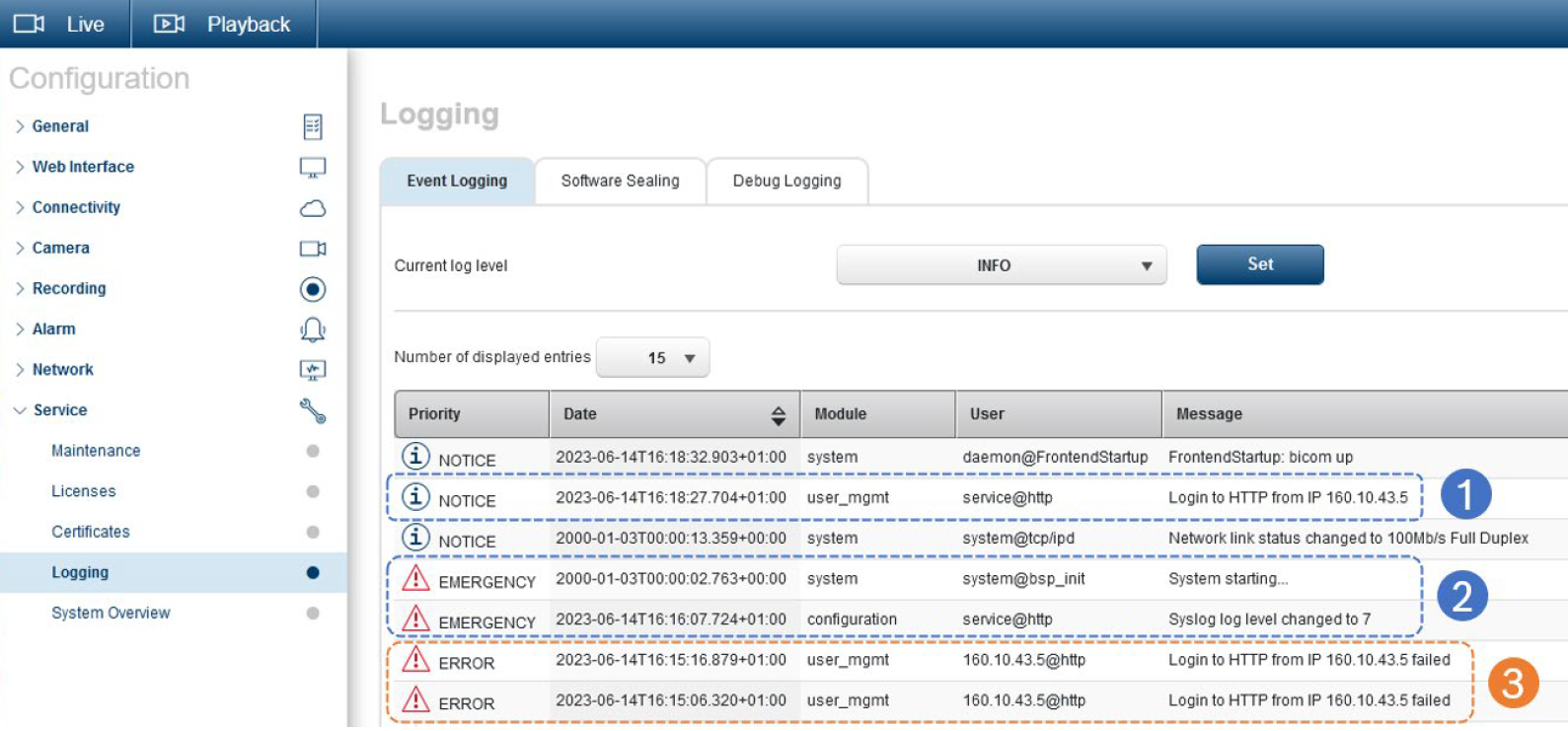
1- A normal and successful login is logged with ‘Notice’ level.
2- System is restarted to clear all Embedded Login Firewall entries, and log level is raised to also show login errors.
3- Logins from the same workstation as before, but with wrong credentials, are logged as login errors.
When a longer log history is required, external logging to a syslog server is advised.
Refer to our tech note about Log Management:
Attack and Anomaly Detection
The Embedded Login Firewall has the ability to actively inform a monitoring system about anomalies in system access or an active attack.
RCP message registration
A monitoring system that integrates our RCP+ protocol can register on the message CONF_LOGIN_LIMITER_MESSAGE to receive a trigger on a relevant change.
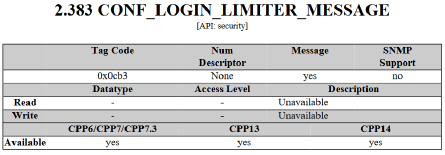
Refer to the RCP+ documentation that is published with every firmware release via our product catalog.
Messages are sent:
► With every first successful login
► From the fourth failed login onwards, but only up to 10 messages to avoid denial-of-service (DoS) situations.
Messages contain only entries for the recent events, like they are also stored in the event log, and not a whole list.
Content of the message in a tagged list format includes status, server name, remote address and user name fields.
SNMP trap
Whenever a RCP+ message is created, the camera checks if a SNMP trap shall be sent.
The SNMP trap contains the same message structure.
Refer to our tech note about SNMP setup and usage.
The win on security
An Anomaly Detection system can analyze the status, repetition, burstiness and content of the messages or traps to protect the installation and help keep the system healthy.
With an installation perfectly optimized, meaning camera access is under control and no camera is loaded with too many access attempts during regular system operation, an attack can be detected easily and very fast due to an immediate report of irregular access patterns, allowing a quick attack response.
Access Scenario Examples
User forgot password
It is not uncommon for system users to mistype or forget a current password, especially in an environment with mandatory password rotation. There are also scenarios where changed passwords have not been synchronized between users and systems. If this happens, application of wrong passwords to a system and its devices is a fact to deal with without compromising security but also allowing authenticated access as soon as possible.
The human user is assumed to type the password repeatedly until he remembers or gives up and retrieves the correct password from a reliable source. Then he expects to be allowed continuing his work.
With the standard login lock as you find it on Linux, Windows, database, or other systems the human user faces a few allowed attempts but then an increase in time to be allowed to try the next password, right or wrong. Number of allowed attempts and lockout times vary dependent on policies and system configuration.
Anyone who has encountered such a situation is aware of the stress of trying the next password and risk to failing again, especially when you may be blocked indefinitely.
For an installer or technician who is blocked by such a situation, it may translate automatically into financial losses.
For an administrator who urgently needs access to a system to fix it or put countermeasures into place against a cyber-attack, this may become more than embarrassing.
Typing a password manually requires a few seconds, typically 3 to 7, which was taken into consideration when defining the timing in the Embedded Login Firewall. A human user, typing wrong passwords repeatedly until he remembers or retrieves the correct one, will not detect an obvious blocking of his account, regardless of how many attempts.
Misconfigured VMS or configuration tool
Video management systems or configuration tools often use pre-configured username-password combinations, securely stored. To quickly retrieve necessary information from connected devices, they often run services or connections in parallel, all starting with login attempts. To a device, it makes no difference if this is normal operation or an attack.
If attempted with wrong credentials, a device with a login lock will lock out a user until the waiting time is over, or if an administrator unlocks the account. Until then, the device will become inaccessible for the system, literally representing a security vulnerability due to unavailability.
With Embedded Login Firewall, once access credentials are corrected in the video management systems or configuration tool, it only takes a maximum of 20 seconds until the device and the related system functionalities become available, without any account unlock action required.
Dictionary attack
A dictionary attack uses pre-arranged password lists that have a high likelihood of being used by people. Such password lists, including their variations determined by cracking algorithms, are available on the Internet and hold millions of entries.
The chance for a dictionary attack to be successful is higher than for a brute force attack.
The chance is also higher the faster the attack can be executed, and the more dictionary entries can be tried.
The Embedded Login Firewall limits effective tries to a maximum of 3 per 20 seconds. Since an attacker is expected to try his dictionary on a higher speed, most of the tries will be blocked, undetected by the attacker since there is no feedback, and thus rendering the attack incomplete and inefficient.

An attack using only 100.000 dictionary entries, checking one entry per second, would miss 20 out of 24 entries, or 83%, and would take almost 28 hours while producing 4166 anomaly detection messages or traps, plenty of time to be detected before finished. It is more likely to happen faster, let’s assume checking an entry every 100 milliseconds, then missing out 200 of 204 entries, or 98%, still taking 2 hours 47 minutes and producing almost 500 anomaly detection messages or traps in an even shorter period.
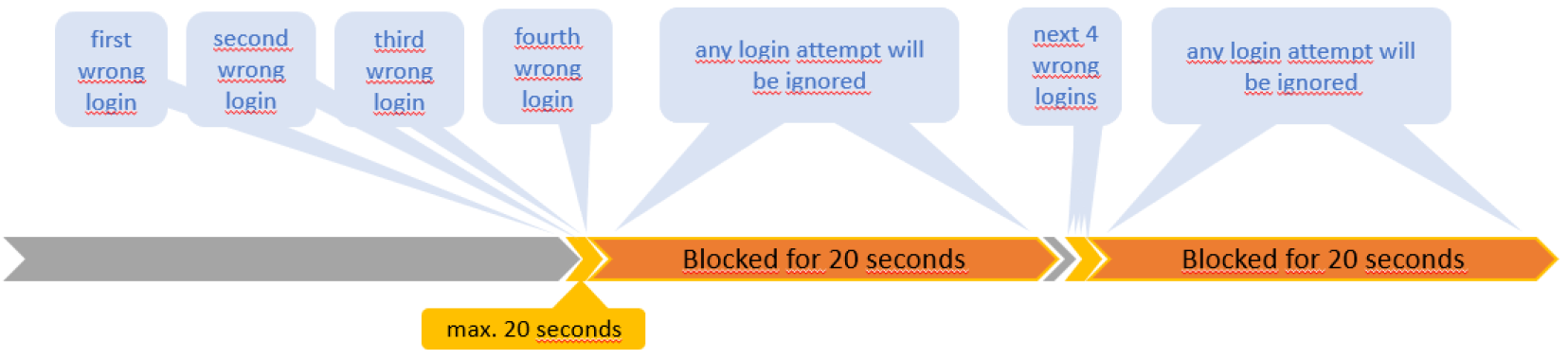
An attack with larger dictionaries would require lasting longer, increasing the likelihood of detection, or be faster, decreasing efficiency to uselessness.
Botnet attack
A botnet attack comprises an attack, either brute force or dictionary, executed by multiple clients simultaneously. Typically, there are hundreds, or thousands of clients combined into a botnet.
Attacked by such a number of clients, the Embedded Login Firewall switches into its self-protecting Whitelist Mode and blocks the botnet clients but keeps communication open for the already authenticated clients, ensuring normal operation to the most extent possible.
Testing the Embedded Login Firewall
Since the Embedded Login Firewall has been designed to appear transparent when there is no real attack it is difficult to test it kicking in.
One possibility is to keep several browser windows open and prepared with login screens and pre-entered passwords, wrong and right.
Setting up an SNMP server that registers and reports a trap sent by the Embedded Login Firewall, or registering for the RCP message, helps checking the correct capturing of block states and client IP addresses.
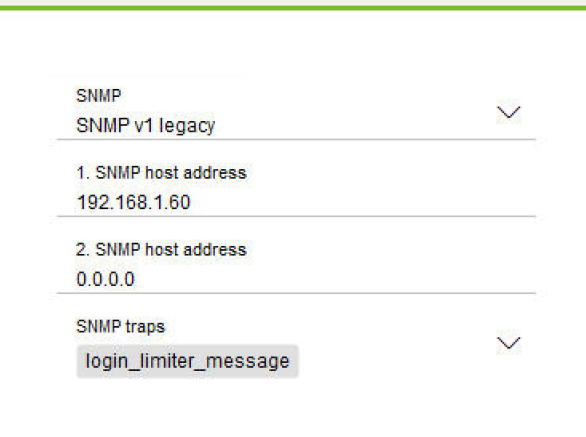
In Configuration Manager, enable SNMP, set the SNMP server address, and enable the ‘login_limiter_message’ trap.
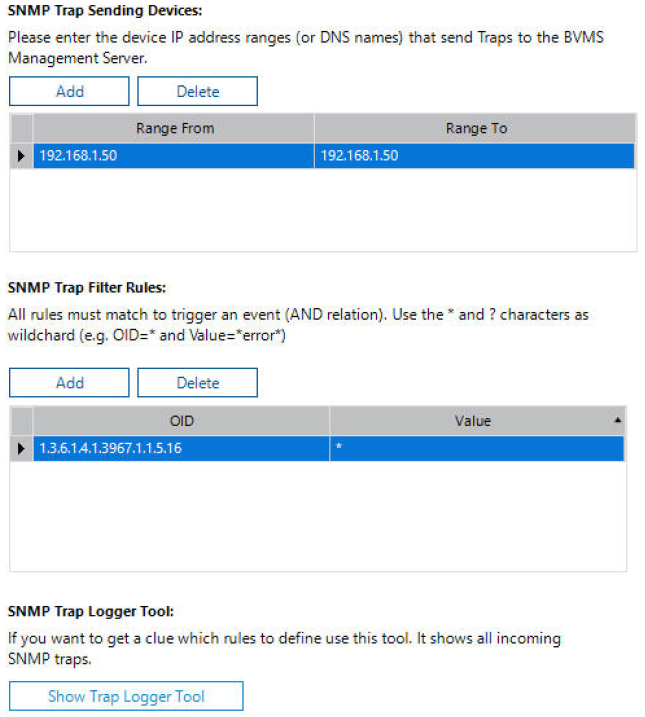
On a separate machine, run your SNMP server, e. g. SNMP Trap Receiver/Logger. Configure the device from which to receive traps and select the proper trap OID, provided in the SNMP MIB file.
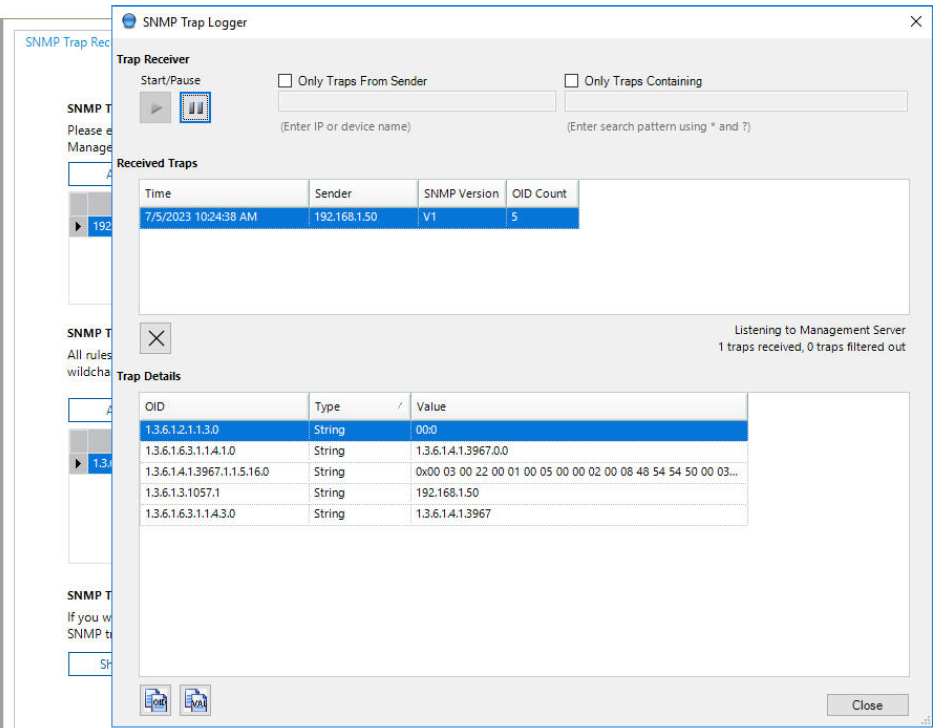
Then start the actual logger tool to show the received traps.
Testing the Blacklist Mode
After setting up the camera with proper passwords and making sure that SNMP traps are enabled if required, reboot the camera to ensure the Whitelist of the Embedded Login Firewall is empty.
Open at least four browser windows to login to the camera and enter wrong passwords. You may want to enter additional windows with wrong or correct passwords. Keep one window prepared with correct password.
If you choose to check the RCP message, use a different PC or workstation, open a browser window, and register on the RCP message CONF_LOGIN_LIMITER_MESSAGE.
If you choose to use an SNMP server, make sure it is running on a different machine than your browser as well.
Then quickly submit at least four of the login forms with wrong passwords within 20 seconds.
After the fourth submission, the XML response to the registered message will appear in the respective browser window on your other machine, or the SNMP trap will be reported.
If you are quick enough to fire off more logins, they will be ignored with correct or incorrect passwords until the 20 seconds since the block has been put are expired.
Wait for the 20 seconds block to expire, then submit the last window with the correct password. This login will now be successful, causing a success message response, or a respective SNMP trap.
Testing to be on Whitelist
If you continue from the above Blacklist Mode test, your IP address already entered the (authenticated) whitelist of the Embedded Login Firewall. If you start with a fresh camera, simply perform a successful login.
Open some browser windows to login to the camera with wrong or correct passwords. False password attempts will be denied while correct password attempts will be immediately accepted during the next 15 minutes from the successful login.
After the 15 minutes expired, the removal from the whitelist will cause a new response on the registered message.
Testing the Whitelist Mode
This test would require at least 33 different machines to approach the camera. Thus, a manual test is hard to achieve, maybe close to impossible for some, and requires some scripting, or even test automation, and possibly several virtual machines.
If you have access to a small network with multiple clients you may connect them to prove the normal operation of the camera, e. g. with video streaming, preferably using multicast.
Let’s assume you have 5 clients connected, continuously getting video streamed from the camera while e. g. your SNMP system is still watching, and sequentially add additional clients with false passwords, you would see the blocking states from the latter appear.
Once there are more than 32 clients attempting to access the camera, all those not on the whitelist are blocked on low level, not wasting system resources with their blocking messages ceasing while the clients on the whitelist continue to function normally.
Glossary
|
TERM / ABBREVIATION |
EXPLANATION |
|---|---|
|
Client |
A software component or tool that connects to a server or service on a host system by using specific interfaces and protocols |
|
Credential |
In IT context, credentials mean secret data that are required to identify, authenticate and/or authorize a user. The data could be e. g. passwords, keys, tokens, or certificates. |
|
Cross-site scripting |
Cross-site scripting (XSS) is a type of computer security vulnerability typically found in web applications. XSS enables attackers to inject client-side scripts into web pages viewed by other users.
|
|
Cyber-attack |
Any type of offensive manoeuvre employed by individuals or whole organizations that targets computer information systems, infrastructures, computer networks, and/or personal computer devices by various means of malicious acts usually originating from an anonymous source that either steals, alters, or destroys a specified target by hacking into a susceptible system.
|
|
Dictionary attack |
In cryptanalysis and computer security, a dictionary attack is a technique for defeating a cipher or authentication mechanism by trying to determine its decryption key or passphrase by trying hundreds or sometimes millions of likely possibilities, such as words in a dictionary.
|
|
Firmware |
Software, that is persistently installed and provides all functionality of an embedded device. |
|
Human user |
A person that behaves, thinks, acts, and reacts, using tools to achieve something within its physical environment. |
|
User |
A person or automated instance, typically assigned with a username or other identification data, which uses credentials to gain access to a system. A client may process those credentials for authenticating a user with a server or host system. |
See documentation:
EmbeddedLoginFirewall_TechNote.pdf