
Question
How can I set the Pan 0° (True North) reference for MIC IP Fusion 9000i?
📚Overview:
Answer
In some installations, a MIC IP fusion 9000i camera is physically mounted on a fixed structure (for example, a tower or pole) where the camera’s mechanical Pan = 0° position does not align with True North (azimuth 0°).
This article explains:
-
Why the Pan 0° position may not change as expected
-
How the camera internally handles pan reference
-
The correct method to define a new North reference
-
Common misconceptions when using RCP+ and the web interface
Typical Scenario
-
Camera is mounted on a fixed structure
-
At Pan = 0°, the camera physically points to azimuth 137°
-
Operational requirement:
Pan = 0° must correspond to True North (azimuth 0°)
Observed Behavior:
Attempts to redefine the Pan 0° position may include:
-
Manually panning the camera to True North using live PTZ control
-
Issuing an AUX ON command via RCP+ to force the current position
-
Using “Force North Point” in the camera’s web interface
Despite these actions:
-
Sending a Pan = 0° command still causes the camera to rotate back to its original azimuth (for example, 137°)
-
The camera appears to ignore the newly defined North position
This behavior is expected based on how the camera handles pan reference internally.
How does the Pan reference work internally?
The MIC IP fusion 9000i uses:
-
An internal pan resolver
-
A factory-defined internal 0° reference point
Key points:
-
The internal 0° pan reference is not automatically linked to how the camera is mounted on site
-
Because the camera can be installed facing any direction, the internal reference remains fixed
-
Absolute PTZ commands always reference this internal 0° unless a valid North point is explicitly defined
North Point vs. Absolute Pan Commands
It is important to distinguish between:
-
Absolute Pan Commands
-
Use the internal pan resolver reference
-
Ignore physical mounting orientation
-
Always return to the internal 0° unless offset values are applied
-
North Point (Compass Reference)
-
Used for azimuth and compass heading calculations
-
Requires precise pan and tilt values
-
Must be explicitly defined with correct telemetry data
Simply pointing the camera toward True North is not sufficient.
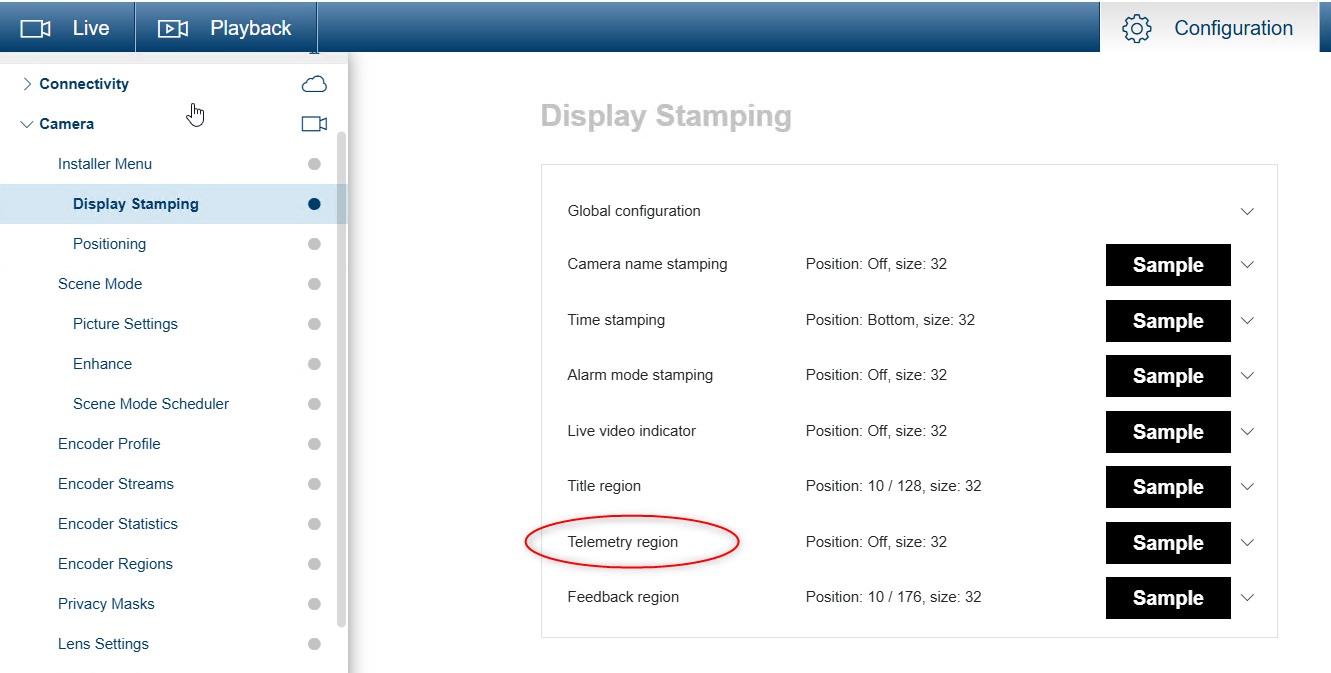
Required Prerequisite: Enable Telemetry region
Before setting a North point:
-
Enable Telemetry Region / On-Screen Display
Telemetry region: Select On to set or to edit the position of the telemetry information (azimuth and elevation (pan/tilt position)) and the zoom factor on the OSD. Refer to the section ”PTZ Settings, page 32“ to set the pan and tilt limits.
-
Verify that Pan and Tilt values are visible on the live video stream
This step is critical because:
-
The camera requires exact pan and tilt values
-
These values must be included in the configuration command payload
Correct method to set a new North Point
To correctly redefine North:
-
Pan and tilt the camera to True North
-
Observe and record the exact Pan and Tilt values shown on the video stream
-
Use these values when issuing the North-point configuration command
-
Ensure the values are properly encoded in the RCP payload
If the payload does not contain the correct pan/tilt values:
-
The camera will continue to use the internal factory reference
-
Pan = 0° will not change behavior
Example Absolute Position Command
Important:
This command alone does not redefine the North reference unless the payload includes the correct pan and tilt values corresponding to the desired North position.
This payload:
-
Moves the camera to a specific internal pan/tilt position
-
Does not tell the camera:
“This position should now be considered North”
Reasons:
-
The pan value is interpreted against the factory internal zero
-
No telemetry-verified pan/tilt values are explicitly declared as North
The camera treats this as a movement command only
The following command can be used to position the camera at a specific pan, tilt, and zoom:
http://<camera-ip>/rcp.xml?
command=0x09A5&
type=P_OCTET&
direction=WRITE&
num=1&
payload=0x80000601d0020000232800000000
Remember!
-
Pan 0° is based on a fixed internal reference
-
Physical mounting orientation does not redefine Pan 0° automatically
-
“Force North Point” requires exact telemetry values
-
Telemetry overlay must be enabled to capture correct pan/tilt data
-
Absolute PTZ commands always reference the internal resolver unless offset correctly
The payload defines where to move, not what North is. Only a payload constructed using telemetry-verified pan/tilt values can redefine the North reference.
The MIC IP fusion 9000i allows accurate azimuth and compass-based orientation, but only when the North point is explicitly defined using correct pan and tilt telemetry values. Without this step, the camera will continue to operate relative to its internal factory reference, regardless of physical installation orientation.
Understanding this distinction ensures predictable PTZ behavior and accurate directional alignment in azimuth-sensitive applications.
