Question
How is the RCP command to establish communication between a PLC and the Videojet 7533 decoder?
Answer
Example of possible Scenario:
-
Goal: enable direct communication between a Programmable Logic Controller (PLC) and the Videojet 7533 decoder. This will allow the PLC to send commands to the decoder, enabling camera switching based on different conditions defined in the PLC logic.
-
Currently, a middleware software is used to send HTTP commands for presets. However, the goal is to bypass this middleware and send RCP commands directly from the PLC using a TCP connection.
For example:
-
Under Condition A, the PLC should set a 2x2 grid and select cameras 1, 2, 3, and 4.
-
Under Condition B, it should set single mode and select camera 7.
When the PLC detects that a specific condition is met, it will establish a connection, authenticate, and send the necessary commands to configure the screen output accordingly.
About the CONNECT_TO Command
The CONNECT_TO connects media streams from a device. For password-protected Bosch cameras, Bosch encoders and Bosch network services, the “user” account will be used for login (least required privileges policy), thus the according “user” account passwords need to be added via REMOTE_PASSWORD.
RCP command | URL/HTTP Format for the CONNECT_TO Command
http://<ip_address>/rcp.xml?command=0xffcc&type=P_OCTET&direction=WRITE&num=1&payload=0xC0A85872000002080101000101010001
-
Replace <ip_address> with the IP address of the decoder.
-
The payload contains the IP address of the camera (in this example, C0A85872 corresponds to the camera’s IP).
-
The payload format and details are explained on page 30 of the attached MW-RCP document.
Important:
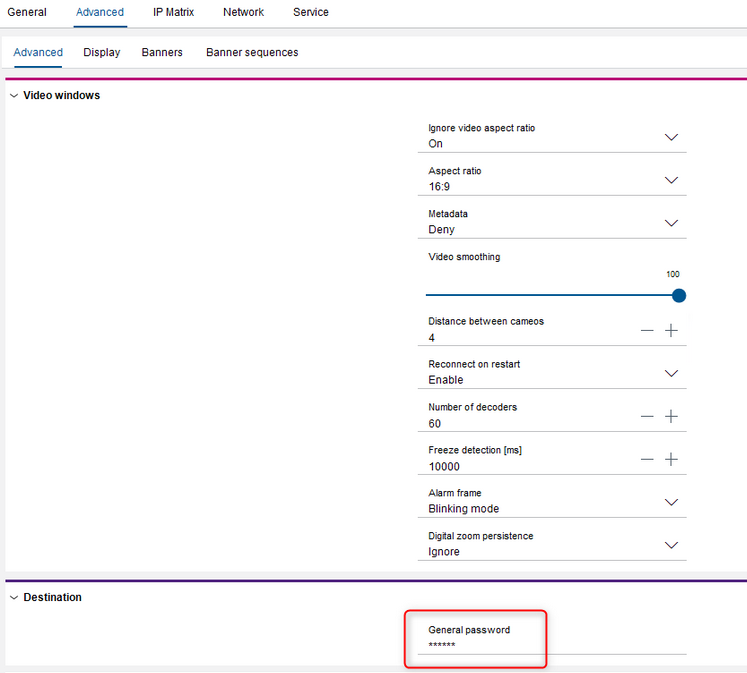
Make sure the destination password is configured in the decoder and matches the “user” account password on the camera, as shown in the attached snapshot.