
MTU stands for "Maximum Transmission Unit."
-
MTU is a networking term that defines the largest packet size that can be sent over a network connection. The MTU is typically limited by the type of connection, but may sometimes be adjusted IT network settings. The typical value of the Network MTU is 1514 Byte. If a system sends packets over an Ethernet network that are larger than this size, the data will be fragmented into smaller packets. When referring to Ethernet MTU this includes 4 Byte checksum.
The 1514 Byte is the interface MTU without the Ethernet Checksum. -
In case there are limitations by the type of connection, the packets will then need to be reassembled on the receiving side (e.g. Bosch video management software or Bosch hardware decoder).
However, it can be beneficial to optimize the packet size on the sender side (e.g. IP camera) to the existing network infrastructure. -
As MTU maximum packet size is layer 1 related, the IP MTU that you can be adjusted at the BOSCH device configuration (Configuration Webpages or with the help for BOSCH configuration software like "Configuration Manager"). The BOSCH GUI refers to this as “Network MTU”. BOSCH products can manage fragmented data.
MSS stands for "Maximum Segment Size"
The MSS value is calculated from the MTU.
MSS = MTU – (layer 3 TCP header [20 Byte] + Layer 2 IP header [20 Byte]+ Layer Ethernet 1 [6+6+2 = 14 Byte])
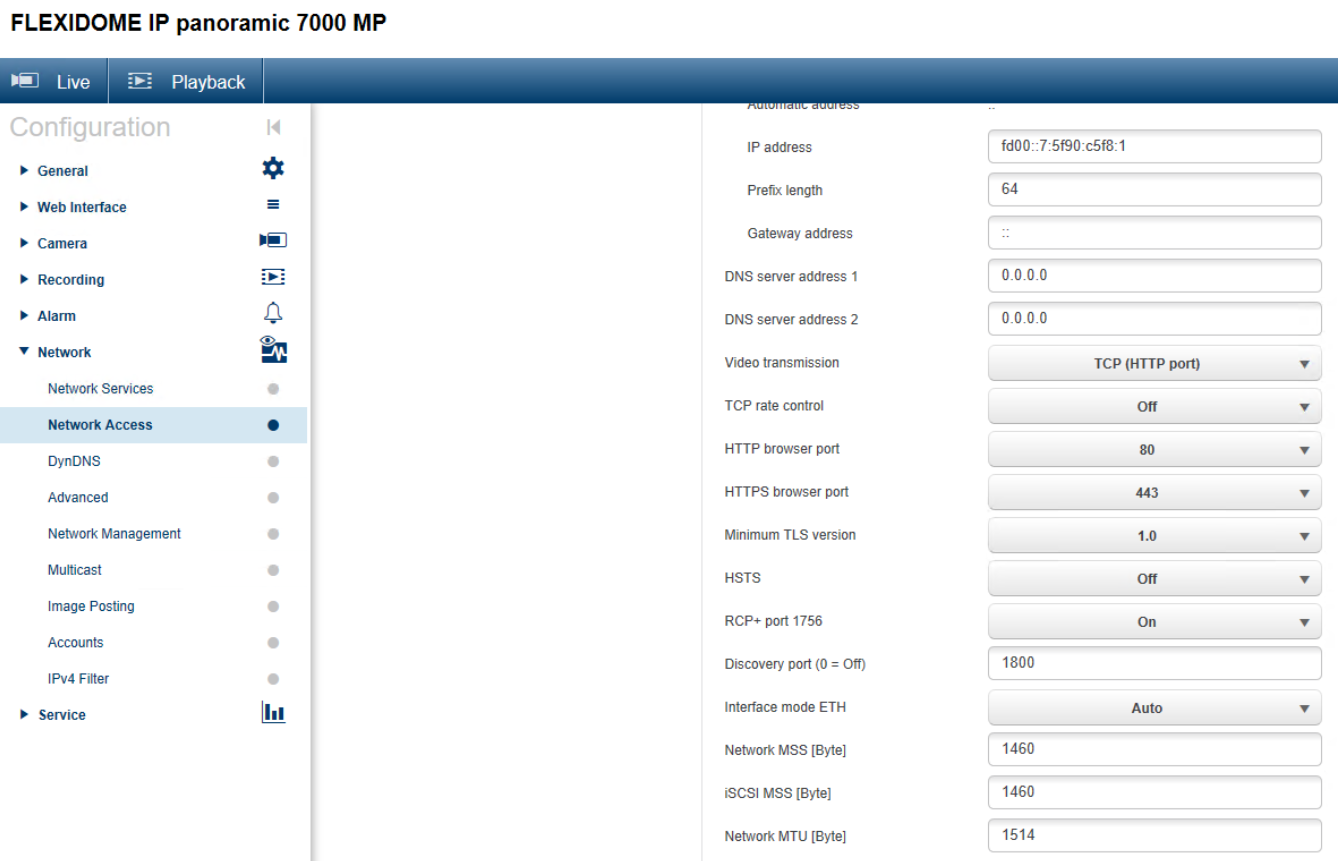
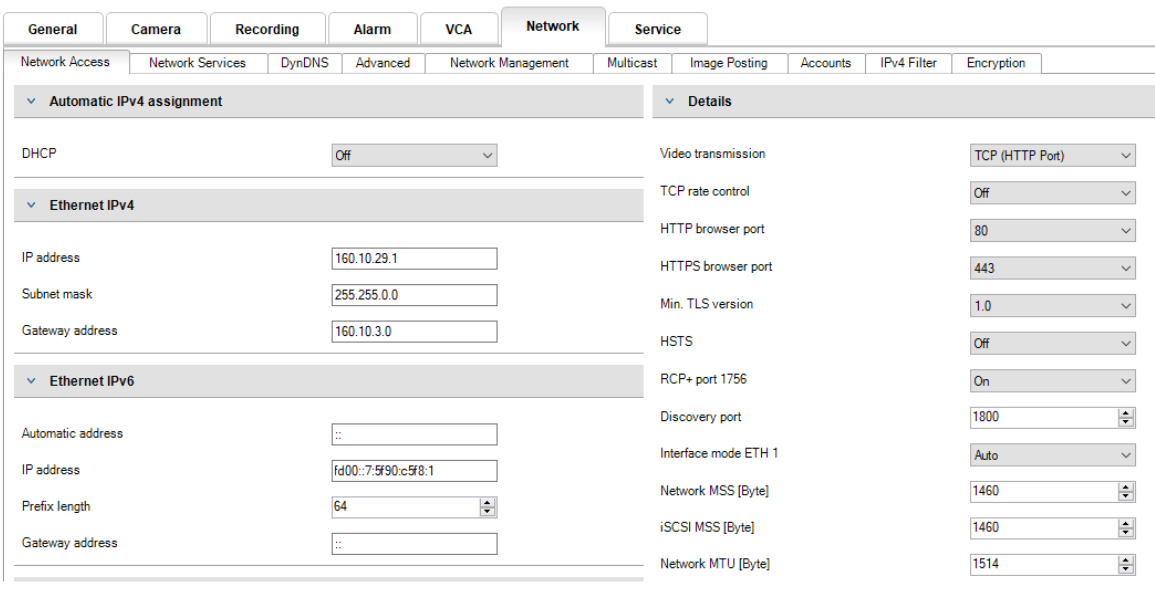
For example looking at CPP 6 Platform – like FLEXIDOME IP panoramic 7000 MP in Firmware version 6.50.0128 you can adjust and find the following values:
-
Network MSS (in Byte) - default value = 1460
-
iSCSI MSS (in Byte) – default = 1460
-
Network MTU (in Byte) – default = 1514
|
MTU and MSS can be adjusted at all released firmware versions 4.x and later. |
CPP-ENC |
CPP3 |
CPP4 |
CPP5 |
CPP6 |
CPP7 |
CPP7.3 |
|
yes |
x |
x |
x |
x |
x |
x |
x |
|
No |
|
|
|
|
|
|
|
Step-by-step guide
Here some screenshots as example based on Firmware 06.50.0128:
Troubleshooting Example: Video Stream Unavailable Due to MTU/MSS Mismatch
If a Bosch IP camera uses the default Network MTU (1514 bytes), but the network path supports a smaller MTU (e.g., 1400–1480 bytes), large video packets may be dropped or blocked. This can lead to situations where:
-
No live video is shown in Remote Portal
-
No stream is shown in Video Security Client (VSC)
-
Even MJPEG preview fails in the camera web interface
-
The camera shows video only in the local network
Testing Procedure
A quick diagnostic test is to temporarily reduce the MTU/MSS on one affected camera:
-
Set Network MTU = 1400 bytes
-
Set Network MSS ≈ 1360 bytes
If the video stream becomes available again, the issue is confirmed to be MTU-related.
Recommended IT Actions
If the system worked previously and stopped without camera configuration changes, the customer's IT should verify the following infrastructure points:
-
Router or gateway MTU settings
-
Firewall configuration (fragmentation handling, blocked fragments)
-
MSS clamping on VPN or gateway
-
ISP path MTU changes
Bosch products can handle fragmented packets, but network components between the camera and client might not. Adjusting MTU/MSS ensures packets fit the available network path.