
Using RCP command 0xD007, you can retrieve the list of Track IDs from a Bosch VRM via a simple HTTP request. Although the response is wrapped in XML, the actual content is binary data that must be decoded according to the Bosch RCP specification.
Understanding the block structure and encoding rules allows you to reliably extract Track IDs, camera names, and related metadata for further integration or troubleshooting tasks.
Step-by-step guide
-
Get the trackId from VRM
-
Rcpp command send via the Http
This is pasted from the VRM Interface Documentation
-----------------------------------------------------
D007
To request the list of tracks from the VRM, send an HTTP GET request to the rcp.xml endpoint using RCP command 0xD007.
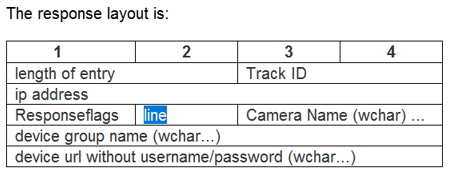
Example Request:
https://172.16.50.102/rcp.xml?command=0xd007&type=P_OCTET&direction=READ
Response:
<str>00 80 00 a0 13 32 10 ac 30 01 00 43 00 61 00 6d 00 65 00 72 00 61 00 55 00 6e 00 64 00 65 00 72 00 54 00 65 00 73 00 74 00 4f 00 6e 00 65 00 00 00 4c 00 6f 00 67 00 69 00 73 00 63 00 68 00 65 00 72 00 20 00 42 00 61 00 75 00 6d 00 7c 00 56 00 52 00 4d 00 00 00 68 00 74 00 74 00 70 00 73 00 3a 00 2f 00 2f 00 31 00 37 00 32 00 2e 00 31 00 36 00 2e 00 35 00 30 00 2e 00 31 00 39 00 00 00 80 00 9f 16 32 10 ac 30 01 00 43 00 61 00 6d 00 65 00 72 00 61 00 55 00 6e 00 64 00 65 00 72 00 54 00 65 00 73 00 74 00 54 00 77 00 6f 00 00 00 4c 00 6f 00 67 00 69 00 73 00 63 00 68 00 65 00 72 00 20 00 42 00 61 00 75 00 6d 00 7c 00 56 00 52 00 4d 00 00 00 68 00 74 00 74 00 70 00 73 00 3a 00 2f 00 2f 00 31 00 37 00 32 00 2e 00 31 00 36 00 2e 00 35 00 30 00 2e 00 32 00 32 00 00 00 6c 00 9c 1d 32 10 ac 30 01 00 43 00 61 00 6d 00 65 00 72 00 61 00 20 00 31 00 00 00 4c 00 6f 00 67 00 69 00 73 00 63 00 68 00 65 00 72 00 20 00 42 00 61 00 75 00 6d 00 7c 00 56 00 52 00 4d 00 00 00 68 00 74 00 74 00 70 00 73 00 3a 00 2f 00 2f 00 31 00 37 00 32 00 2e 00 31 00 36 00 2e 00 35 00 30 00 2e 00 32 00 39 00 00 00 a0 00 a3 74 32 10 ac 30 01 00 43 00 61 00 6d 00 65 00 72 00 61 00 20 00 31 00 31 00 36 00 00 00 4c 00 6f 00 67 00 69 00 73 00 63 00 68 00 65 00 72 00 20 00 42 00 61 00 75 00 6d 00 7c 00 46 00 6f 00 6c 00 64 00 65 00 72 00 7c 00 7c 00 4c 00 6f 00 67 00 69 00 73 00 63 00 68 00 65 00 72 00 20 00 42 00 61 00 75 00 6d 00 7c 00 56 00 52 00 4d 00 00 00 68 00 74 00 74 00 70 00 73 00 3a 00 2f 00 2f 00 31 00 37 00 32 00 2e 00 31 00 36 00 2e 00 35 00 30 00 2e 00 31 00 31 00 36 00 00 </str>
How to read it.
There are 4 Blocks in this response.
Block 1:
-
Length - 00 80 => 80 bytes
-
Track id - 00 a0 (hex) => track id is 160 (decimal) (see Hex to Decimal Converter)
-
Ip 13 32 10 ac => 19.50.16.172 Please note the network byte order of IP address here
-
00 => Flags
-
01 =>Line => this is the video input 1 (coax) of a multichannel encoder. (= always 1 in case of a camera)
CameraUnderTestOne (in UTF-16: see From Hex - CyberChef) = 00 43 00 61 00 6d 00 65 00 72 00 61 00 55 00 6e 00 64 00 65 00 72 00 54 00 65 00 73 00 74 00 4f 00 6e 00 65
________________________________________
00 43 00 61 00 6d 00 65 00 72 00 61:
43 = C
61 = a
6d = m
65 = e
72 = r
61 = a
Together → "Camera"
