Question
What is VRM and how is the block allocation done for the camera?
Answer
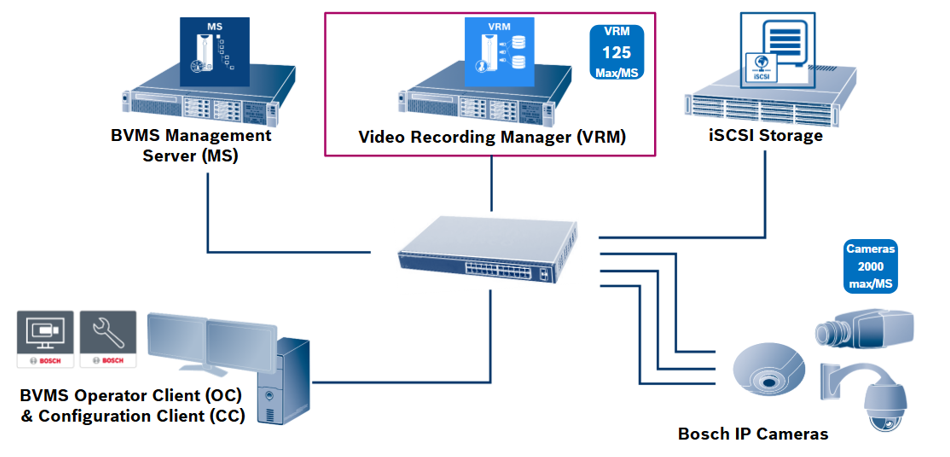
The VRM manages all cameras for recording and also all iSCSI storage devices.
It is possible to deploy up to 125 different VRM instances as a maximum under the supervision of one BVMS management server.
Due to the fact that one VRM can manage already 2000 cameras, the need for more VRM instances is mostly driven by system segmentation or deployment on multiple distributed sites.
What does VRM do - in short?
-
It helps you to easily manage large data volumes with maximum reliability while lowering costs
-
Video data streams directly to storage without the need of network servers
-
Allow easy expansion of your surveillance system
-
VRM automatically balances the video stream load using available storage most efficiently
-
Less need for redundant storage
-
Easier to meet required retention times
VRM – What happens before recording can start?
Let’s assume the VRM server is configured and knows IP Address of all assigned cameras and iSCSI Storage devices.
-
So the first step that the VRM takes is to check and format the available storage on the iSCSI targets. That way makes it aware of the amount of storage available and by formatting into small 1GB blocks the VRM is able to segment the large amount of data storage.
When this is ready, the VRM has a list of storage addresses and know how to reach all the 1GB blocks on the iSCSI-Storage. -
This leads to the second step, because that list of blocks is now distributed among all cameras.
Each camera gets a certain amount of 1GB blocks addresses and those addresses can be used by the camera in step three for recording.
After the list has been transmitted to the camera, it knows how to reach the 1GB blocks on the iSCSI targets and can start immediately recording.
By default continuous recording takes place in BVMS.
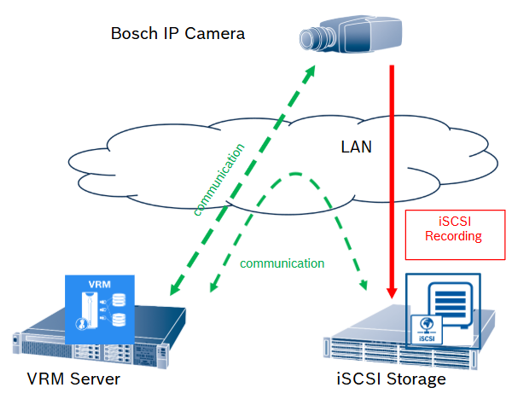
Basic VRM Functionality: Block (Span) allocation example
Let’s have a closer look to the block allocation on the camera, which was in the previous second step above.
The VRM assigns a list of addresses of blocks to the cameras, and here on this diagram you can see how it looks like inside a camera.
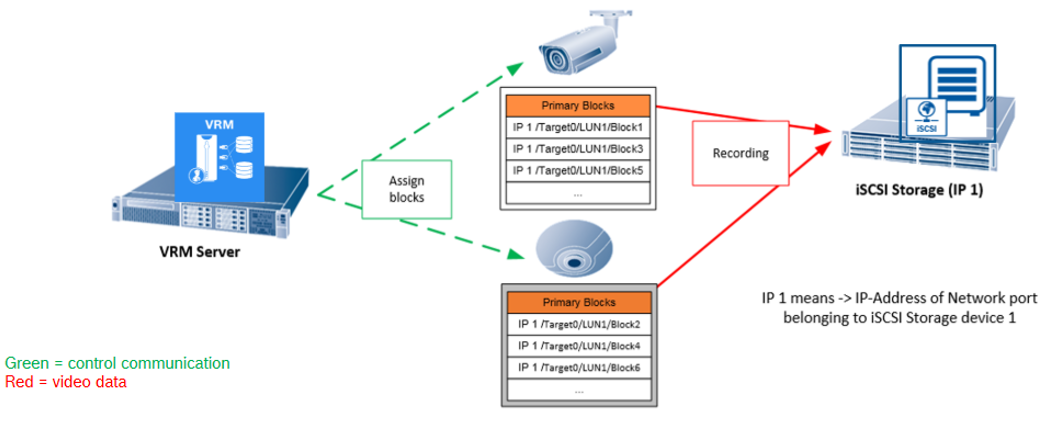
The bullet camera on the top, has a list of primary blocks which is the IP address, the target ID, the LUN number and the block number, and it has several of those blocks. It will start recording on block number one first, this 1 GB block consumed is going to continue with block number 3 and afterwards with the block number 5 and so on.
The other camera, the panoramic, has also a certain amount of blocks in the list but of course different ones. It will start at first with block number 2, continue with block 4 and then block 6.
This system design, that way of working, enables a very high reliability for recording.
So recording can continue up to 7 days without the VRM server supervision.
What does this mean?
Even if the VRM server would be unavailable, the cameras can record up to 7 days independently to the iSCSI target.
Why?
Because the camera knows already the amount of blocks and the addresses of blocks where to record. This is why recording can continue up to 7 days without the VRM supervision. The amount of days in the future, 1–7, is a VRM configuration parameter.
Let’s summarize:
Bosch VRM and camera firmware: A unique, high resilient, recording architecture on the market.
Summary on VRM facts
One VRM does the following:
The VRM manages the cameras, up to 2000 of them.
It provides blocks to the cameras.
It makes sure enough blocks are given to the cameras for independent recording.
Furthermore the VRM manages the storage:
Up to 4 Petabyte of storage can be assigned to the VRM.
There can be also up to 120 iSCSI storage targets assigned to it, although it is recommended to have just 40.
The VRM manages the recording bandwidth.
Balances automatically the video stream load of the cameras across the different iSCSI storage targets.
It uses the available storage most efficiently.
Finally, the VRM offers flexibility and scalability for expansions.
The unique system architecture of the VRM on the market means the responsibility is split between the VRM, working as manager, and the camera firmware working as the executing recording device, allows for easy expansion of cameras and storage in the system. You just add more cameras to the system by configuration or some more storage, and the VRM takes care, everything works fine.
VRM Server
VRM Server is an intelligent storage management service for recording and playback.
It has the following main tasks:
-
It manages the storage utilization and assigns blocks to the cameras for their recordings.

Video data is then directly stored on the iSCSI storage.
And data flows between IP camera and iSCSI storage. -
Answers playback location request from Operator Client, for example: “Where is the recording from yesterday?”

Operator Client sends the request to VRM Server’s recording index database, which sends information on where on the iSCSI storage the video can be found, back to Operator Client.
Data flows from Operator Client, to VRM Server, back to Operator Client. -
Provides Video Data from iSCSI to Operator Client, for replay of video data.

VRM acts as proxy for the Operator Client, in order to get the video data from iSCSI for replay, per the default setting.
Data flows from iSCSI Storage, to VRM Server, to Operator Client.
Note
There is also another possibility for the Operator Client to get the video, where VRM Server is not involved here. This is called “direct iSCSI replay”, and can be configured on Workstation level.
Data then flows from iSCSI Storage directly to Operator Client.
There is a clear distinction between point 2 and 3:
In the case of point 2, Operator Client requests the information on the recording timeline from VRM Server’s database. This step is mandatory for playback.
With this information, Operator Client can now take the next step: it knows the recording is there, and requests to playback it back; this is point 3. This can either be done through VRM, by default, or with direct iSCSI replay.
VRM is not involved in Live video request. This goes directly from IP camera to Operator Client.
Storage Product Overview
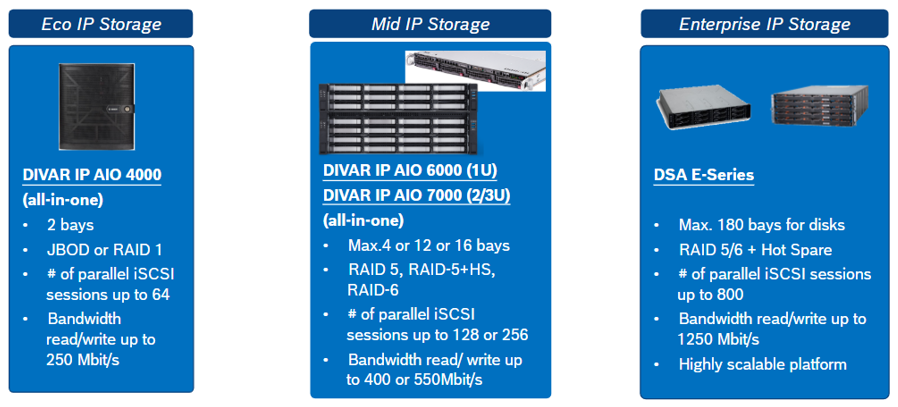
All AIO products are based on Microsoft operating system and can be operated in 3 different modes:
-
Storage only
-
VRM + Storage
-
BVMS (MS) + VRM + Storage
The DSA E-Series is a storage only product as it is not based on Microsoft OS.
Check out specification details on our website.