
Question
What should you do if alarms don’t appear in the Operator Client when using a user from the Operator group?
Answer
If alarms do not appear in the Operator Client when logging in with a user from the Operator group, but work correctly with a user from the Admin group, the following settings should be done:
-
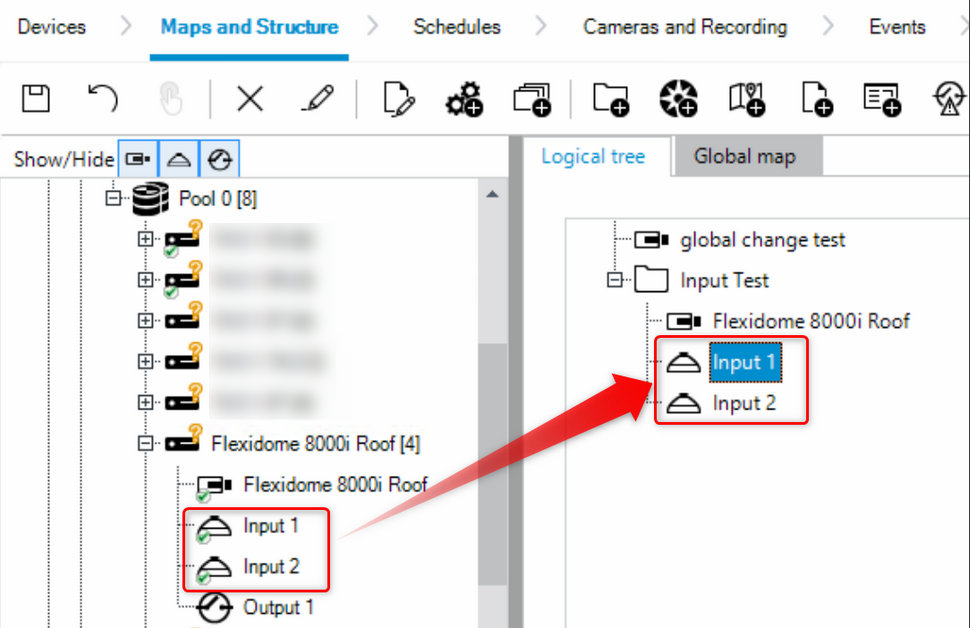
Add Alarm Inputs to the Logical Tree
-
Open Configuration Client and go to Maps and Structure.
-
Add the required alarm inputs to the Logical Tree.
Note: This step is mandatory for the Operator group. Users in the Admin group receive alarms even if the inputs are not part of the Logical Tree.
-
Ensure that all required permissions are granted to the Operator group via User Groups-> Device permissions → Events and alarms.
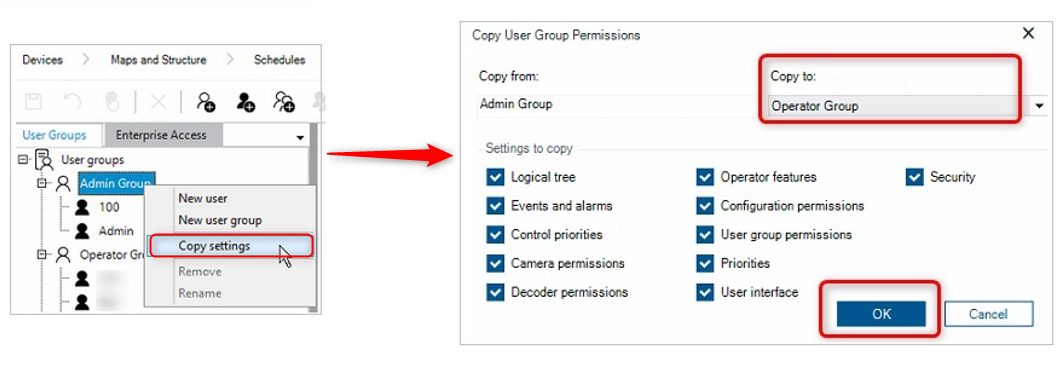
If needed, you can copy and paste the Admin Group settings to the Operator group as follow:
-
Select the Admin Group -> right click -> Copy settings
-
In the Copy User Group Permissions select Operator Group for Copy to → OK
After completing these steps, alarms should appear correctly in the Operator Client for users in the Operator group.