
Question
Which CCL commands are supported in BVMS?
Answer
CCL (Camera Control Language) commands are the original Allegiant text-based control commands used to operate cameras, monitors, and PTZ functions, and BVMS still supports them for compatibility with older systems.
Because BVMS implements CCL based on an older interpretation from many years ago:
-
Not all historical CCL commands work exactly as described in old Allegiant manuals.
-
Some commands, such as REMOTE-ACTION, follow BVMS’s simplified format rather than the original Allegiant two-byte scheme.
-
Supported CCL commands are listed in the file:
BVMS_Allegiant_CCL.xlsx
Troubleshooting: REMOTE-ACTION Commands do not work after moving from Allegiant to BVMS:
When replacing an Allegiant system with BVMS, users can notice that PTZ control works normally, but REMOTE-ACTION commands do nothing, even though BVMS shows that it received the command.
This can be confusing, especially when the biphase interface and manual PTZ control work fine.
Below is an easy explanation of why this happens and how to fix it.
-
What does work?
In most migration projects:
-
Commands like LCM+ and Preposition work.
-
Manual PTZ control from the BVMS Client works.
-
Why REMOTE-ACTION does not work?
The problem is not the interface, it’s the command format.
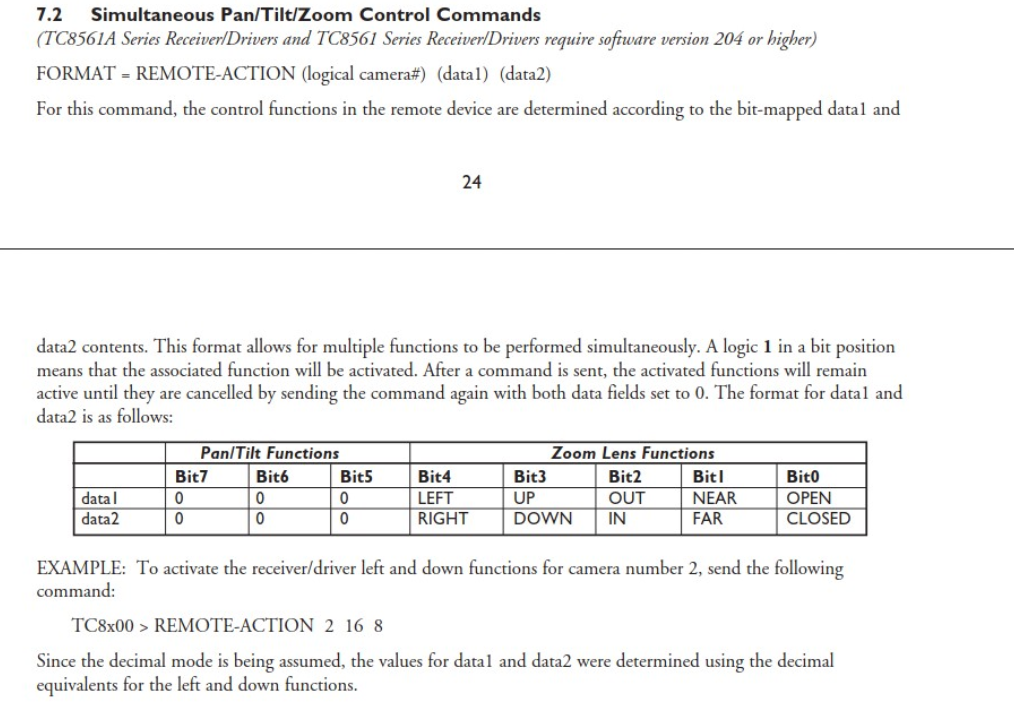
Allegiant originally used REMOTE-ACTION and the Allegiant manual describes REMOTE-ACTION as:
REMOTE-ACTION camera data1 data2
Where data1 and data2 contain bit-mapped functions (left, right, up, down, zoom, focus, etc.).
Many older systems used this format successfully.
How does BVMS use REMOTE-ACTION?
In BVMS, REMOTE-ACTION works exactly like the REMOTE CONTROL (R/C) command:
REMOTE-ACTION [cam #] [Opcode #] [Data]
This means:
-
It expects valid opcodes, not bit-mapped PTZ values.
-
If the opcode is not valid, BVMS will acknowledge the message but won’t send any PTZ movement.
Examples that do NOT work
The following values are invalid in BVMS:
REMOTE-ACTION 9 16 0
REMOTE-ACTION 9 0 0
Since 16 and 0 are not valid opcodes, BVMS ignores the command.
-
What Commands are supported?
BVMS still supports Allegiant CCL commands, but only in the opcode/data format.
For example, this does work:
REMOTE-ACTION camera 2 1 → Moves the camera to preposition 1
A complete list of supported commands is available in the file BVMS_Allegiant_CCL.xlsx attached at the beginning of this article.
-
PTZ fix:
To make pan/tilt/zoom work:
Adjust the external control system so it sends REMOTE-ACTION commands using the opcode/data format that BVMS supports.
Note
No changes will be made in BVMS, since Allegiant integration is legacy.