
Question
What is the difference between Automatic mode and Failover mode in VRM?
Answer
The Pool parameters of VRM are important to be understood to determine how the Pool behaves when the VRM could become unavailable.
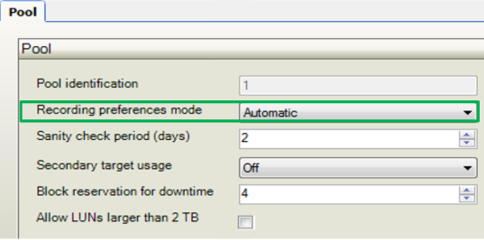
The Recording preferences mode has 2 options:
-
Automatic, which is the default setting
-
Failover
-
In automatic mode, VRM decides how the storage in the pool is managed.
It provides automatic load balancing over its available storage, and it decides which storage box to assign blocks from to each camera. -
In failover mode, it is possible to define per camera which storage box is its primary target to record to, and which is its secondary target.
Only when the primary target is unavailable for any reason, the camera will record to the secondary target.-
As a consequence, the automatic load balancing that VRM normally manages, is switched off as we are manually defining the targets per camera.
-
Automatic mode is generally recommended instead of Failover, due to the complex nature of the failover process.
-
Failover requires each camera to be set up for recording separately; so more configuration time required.
-
This requires much more manual system design than when using Automatic mode and also puts more responsibility on the design.
-
You can leave the second list empty. In this case no failover is possible but the number of required iSCSI sessions is reduced and no disk space on secondary target is allocated. This reduces system overhead and extends the system retention time.
Automatic mode
In the below picture, you can see that there are 4 storage targets and 2 cameras. Then the storage targets and cameras are added to the Pool, VRM will take two steps.
-
First, it will assign a storage target per camera, or two storage targets per camera when Secondary target usage is turned on.
-
In the second step, VRM will assign blocks from the storage target or targets to the camera.
In this picture, you can see that one camera receives blocks from target 1 and 2 and the other camera receives blocks from target 3 and 4. The advantage of this automatic load balancing mode are:
-
it is across all arrays
-
no manual configuration required
-
recommendation for single array or single storage location
-
and VRM ensures that the maximum bitrate limits of the storage targets are not exceeded.
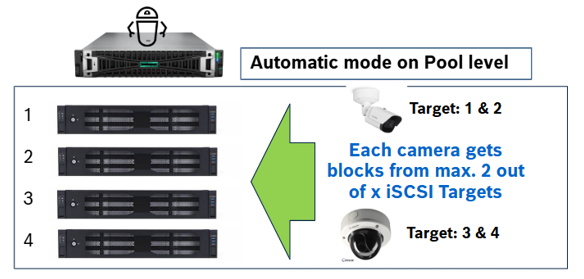
Load balancing is automatically done by the VRM; it takes care that the iSCSI targets are not overloaded, are equally distributed, and cameras are equally distributed among all storage targets.
In the majority of deployments, the automatic mode is used and also recommended because there is no need to do any manual interaction on the camera configuration or on the iSCSI devices.
The other recommendation would be for you to have a minimum of 2iSCSI storage targets in one Pool. The reason for this is the added resilience, as the camera will be seamlessly record on the second target if the first one is unavailable, independently of VRM:
-
it will skip the blocks of the unresponsive target in its list
-
write to a block from the secondary target
-
if the issue persists and the camera runs out of blocks from the secondary target, VRM will assign a new block list to the camera.
When the primary target comes back, the camera will try previously skipped blocks when it needs to mount another block and use its assigned blocks on the primary target.
In order to implement this feature, all is needed are 2iSCSI storage targets per pool and Secondary target usage enabled. No additional licenses are required.
Failover mode
Now we will have a look at the second option, failover mode.
Let’s suppose that there are 2 buildings:
-
A camera in building 1 should record on the primary storage as long as there is normal operation, as for example the bandwidth is not very high.
-
If the primary storage fails however, the camera should be able to record on the secondary storage.
-
This solution requires a fixed assignment of camera to storage, and this has to be done on the camera, as the load balancing mechanism of the VRM is switched off in failover mode.
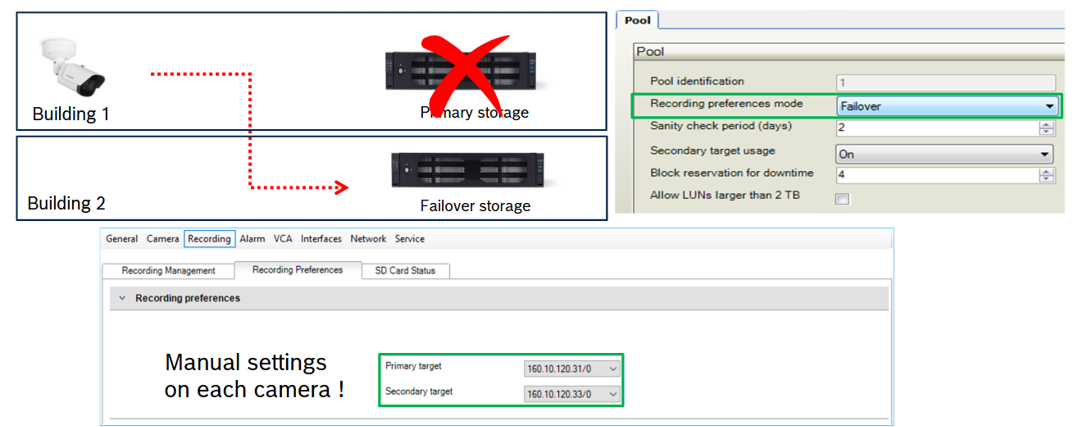
When setting the recording preferences mode in a pool to “Failover”, each camera in the pool requires its Recording Preferences to have both a primary target and a secondary target filled in, as can be seen in the screenshot.
This way, the camera itself knows that it should normally record to the primary IP address and if that primary target fails, it should switch over to the secondary target; hence failover mode.
The tricky part of this configuration is that in both normal and failover situations, neither of the targets should be overloaded at any time. It is required to make load balancing calculations to ensure that both targets can at all times record all their cameras; in normal and failover modes.
In this example:
-
Both storage targets have a bandwidth available of 550 Mbit/s.
-
Therefore, in normal operation, it’s possible to record a maximum of 275 cameras with 2 Mbit/s bandwidth requirement each on both targets. You need to calculate this in advance. Usually it’s not so simple, as cameras often have different requirements each for resolution, frame rate, etc., resulting in different bandwidth requirements.
-
Because you need to keep failover in mind as well, and expect that cameras on target 1 fail over to target 2 and vice versa, the amount of cameras/bandwidth that can effectively be used is roughly halved again, so a maximum of 137 2 Mbit/s cameras per target. This also needs to be calculated in advance of course.
-
Also keep in mind that the bandwidth of the line between the two buildings is sufficient to handle the failover load. This is a factor that is not managed by VRM!
-
Then take into consideration that with each amount of cameras you add to this system, you need to re-do these calculations and possibly the configuration of some cameras.
An advantage of using failover mode is that it makes troubleshooting easier as it is always clear where a particular camera should be recording.
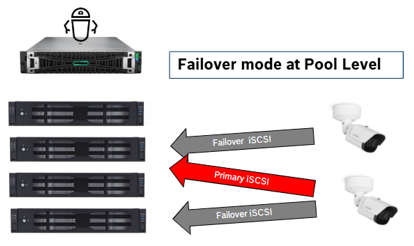
Summarizing failover mode:
-
Each camera receives a fixed primary and secondary (or failover) iSCSI target. The assignment is done manually by the administrator instead of automatic load balancing by VRM.
-
In the normal situation, cameras only record to their configured primary iSCSI target.
-
Then when the camera’s primary iSCSI target is unavailable, it will look to its secondary iSCSI target and start recording there.
-
The camera will continue to do so until the primary target becomes available once more.
-
No automatic load balancing
-
And only 2 targets per camera available
This configuration requires intensive professional design planning calculation and configuration of the cameras, as there is no prevention of iSCSI target overload anymore because that mechanism is switched off on the VRM; so everything has to be ensured by the administrator in the configuration itself.

