
Scenario
User needs to activate a relay when the door is held open, but they do not have an I/O board.
Solution
Create an One Shot Advance I/O event to trigger the relay output desired. See below step by step how to do it.
Create a “Criteria” specifying the event we want to use to activate the relay output
-
Go to “Configuration” and then “Criteria”
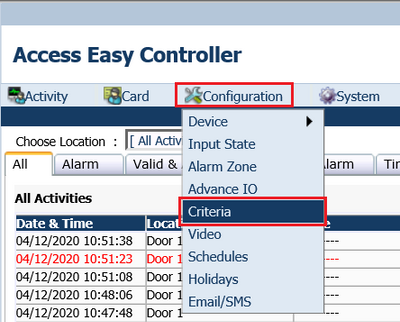
Figure 1.
-
Click the “green plus” to create a new Criteria

Figure 2.
-
Under description assign a name
-
In this example, the user only wants one door to trigger one relay, Click “Selected Devices Only”, select the desired door and add it to the “Selected Devices” column
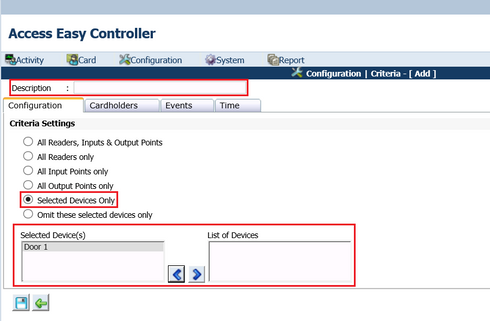
Figure 3.
-
Click the “Events” tab
-
The user only wants the relay triggered by one specific event: “Door held open”. Click “Selected Events Only”. Add the desired event to the “List of Selected Events” column
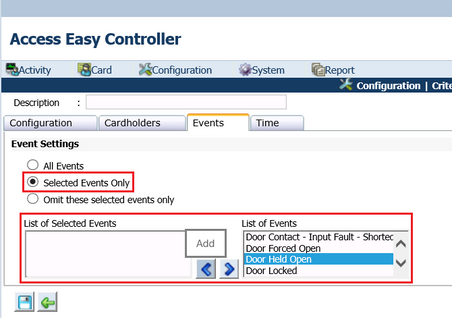
Figure 4.
-
If this action is desired to happen only in one specific schedule, click the “Time” tab and choose the desired schedule.
-
Click Save
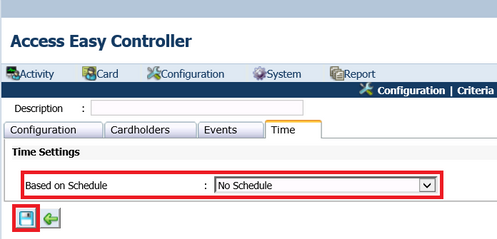
Figure 5.
Create an Advanced IO to assign the Criteria for activating the relay output
-
Go to “Configuration”, and click “Advanced IO”
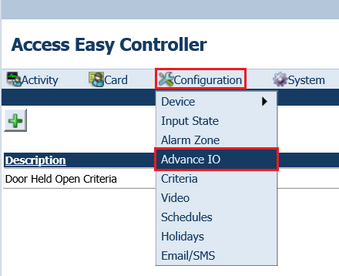
Figure 6.
-
Click the “green plus” to create a new one
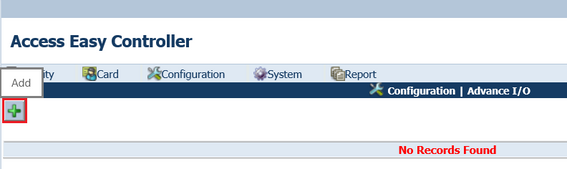
Figure 7.
-
Under description assign a name for the new Advanced I/O
-
The function needed is “One Shot”
-
Select the output duration desired
-
The “Input Control” is the criteria previously created. Click the edit button, select “Criteria” and the name assigned to the Criteria
-
The “Output Link” is the relay output we want to activate. Click the edit button and select the relay output desired.
-
Click the save button
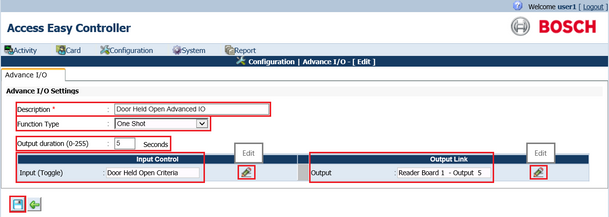
Figure 8.