
Problem:
RPS Fails Network Test to the Cellular IP on one the following panels, GV2 with Firmare 7.06 and higher, GV3 Firmware 8.0x and the FPD-7024 with Firmware 1.03 and higher.
When attempting to connect via IP to the cellular IP address from RPS display Retry Count Exceeded
Steps to resolve:
A Manual VPN Connection needs to be opened on you PC or Laptop for RPS connection to the IP of the Cellular Card when using a B450 on the following panels, GV2 with Firmare 7.06 and higher, GV3 Firmware 8.0x and the FPD-7024 with Firmware 1.03 and higher.
How to Create a VPN on your PC
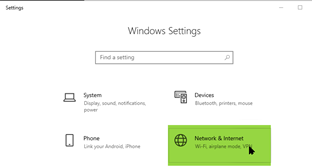
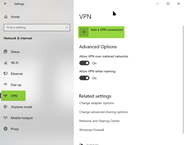
-
VPN Provider: Windows (built-in)
-
Connection name: Name that you will remember example. “Bosch FPD 7024 VPN”
-
Server name or address: vpn-2.onmagneto.com
-
VPN Type: Automatic
-
Type of sign-in info: User Name and Password *
-
Remember my sign-in info: checked
Select: Save
* User Name and Password Credentials are obtains from Bosch Installer Services