
The Bosch Account Assistant is a programming tool used to simplify configuring B Series control panels with Remote Programming Software. When a panel account is opened in the Account Assistant view, a step-by-step programming guide is started to configure the most commonly used RPS parameters. Advanced users may prefer the Panel View over the Account Assistant View when programming control panels.
The default account view is set as Account Assistant when creating new users. Use the following steps to select Account Assistant View or Panel View.
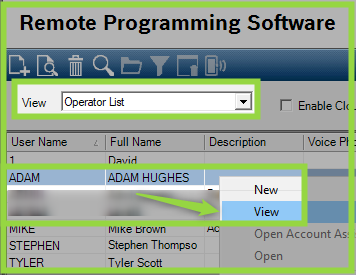
1. Select Operator List from the front page of RPS.
2. Right-click on the operator and select View.
3. Select Edit and then select the Default Account View as Panel View or Account Assistant as needed.
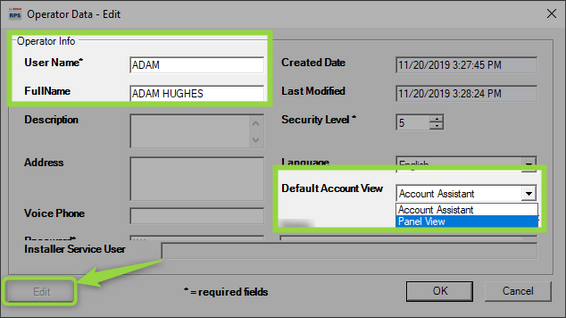
4. Select OK to accept changes.