How to access menu functions on the B915 or B926F or use Icon buttons on the B915 keypad.


Press [CMD] + [8] to access menu operations. 

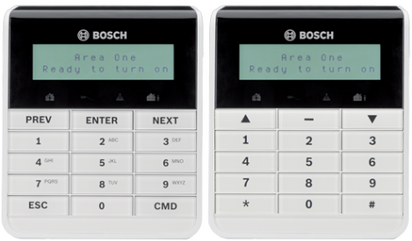
The B915 Basic Keypad is available with English function keys or icon function keys (see figure 1).

  • Press [CMD] + [ 8 ] to access Menu functions on the English type keypad.

  • Press [ # ] + [ 8 ] to access Menu functions on the Icon type keypad.

  • Press the Up Arrow https://community.boschsecurity.com/t5/image/serverpage/image-id/11434i105027DC6D7400D0/image-dimensions/43x21?v=v2   to use the Previous (PREV) function.

  • Press the Down Arrow https://community.boschsecurity.com/t5/image/serverpage/image-id/11436i4C4563EA986B4659/image-dimensions/46x23?v=v2   to use the Next function.

  • Press the Dash button https://community.boschsecurity.com/t5/image/serverpage/image-id/11435i1DAFFDEB77C5AF6E/image-dimensions/40x23?v=v2   to use the Enter function.

https://community.boschsecurity.com/t5/image/serverpage/image-id/1005i513C934CB5F745DB/image-dimensions/412x241?v=v2

Figure 1 B915 Basic Keypad

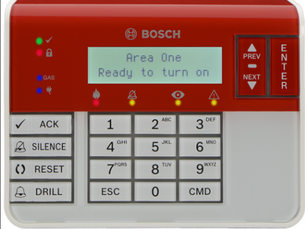
  • The B926F keypad also does not have the Menu button (see figure 2). Press [CMD] + [ 8 ] to access Menu functions
https://community.boschsecurity.com/t5/image/serverpage/image-id/1008iE1919FADE95790B1/image-dimensions/305x229?v=v2

Figure 2 B926F keypad with no Menu button