
Using Remote Programming Software:
-
Browse to PANEL WIDE PARAMETERS/Phone, Auto-Forward and RAM Configuration.
-
Double-click and select: Enable Supervision (System Trouble at CMD CTR).
Using Keypad Programming:
-
Set Phone Line Fault Response Options, nibble 0220, to a non-zero value to enable phone line supervision; Check chart below to view nibble programming options.
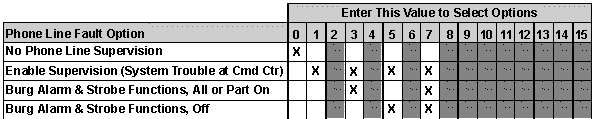
Select one of the following:
-
(1) - Enable supervision
-
(3) - Enable supervision, Burg alarm & strobe functions, All or part on
-
(5)- Enable supervision, Burg alarm & strobe functions, off
-
(7) - Enable supervision, Burg alarm & strobe functions, All or part on, and off
-
When phone line supervision is enabled, the panel monitors for voltage. If voltage drops below 1 V for 40 seconds the panel declares a phone line fault.