How to enable sole path cellular communications on Bx512 control panel?


Step-by-step guide

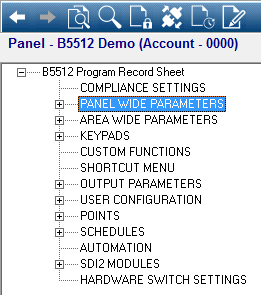
  1. Select Panel Wide Parameters:
    https://ews-na.api.bosch.com/public/contentTSP/images/201901190933BSeriesPrimaryCell0

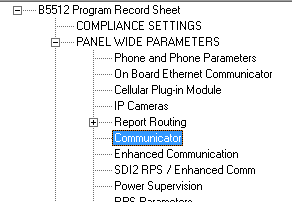
  2. Under Panel Wide Parameters, Select Communication.
    https://ews-na.api.bosch.com/public/contentTSP/images/201901190933BSeriesPrimaryCell1

    https://ews-na.api.bosch.com/public/contentTSP/images/201901190933BSeriesPrimaryCell2

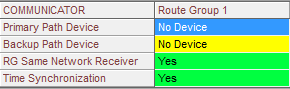
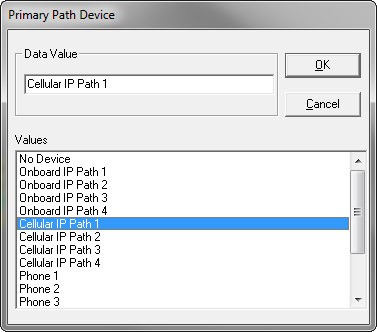
  3. Change your Primary Path Device to Cellular IP Path 1.
    https://ews-na.api.bosch.com/public/contentTSP/images/201901190933BSeriesPrimaryCell3

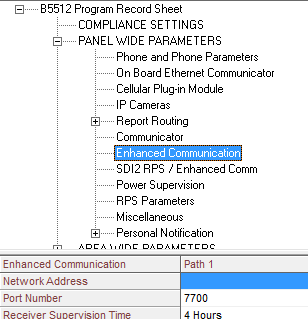
  4. Next, go to Enhanced Communication.
    https://ews-na.api.bosch.com/public/contentTSP/images/201901190933BSeriesPrimaryCell4

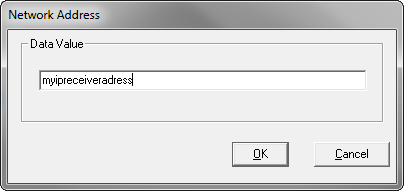
  5. Double-Click the Network address to input your Central Station Receiver’s IP address.
    https://ews-na.api.bosch.com/public/contentTSP/images/201901190933BSeriesPrimaryCell5

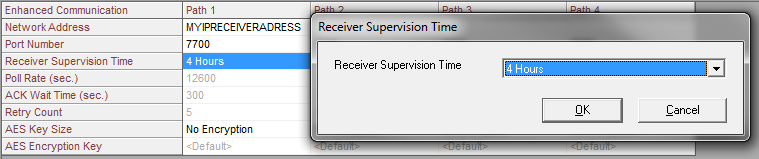
  6. Set your Supervision Time.

Note: this should also match what is in your central station receiver to eliminate erroneous communication trouble.
https://ews-na.api.bosch.com/public/contentTSP/images/201901190933BSeriesPrimaryCell6

⚠️ Be sure to notify you Central Station to add your area 1 account number, supervision rate and enable the receiver for Re-synchronization.