
Solution
-
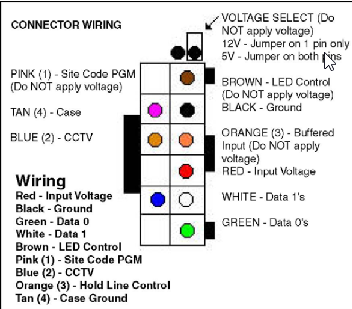
Remove power from the D8229 by disconnecting the Red wire from input voltage
-
Connect the Pink wire to the Black wire.
-
Reconnect power to the D8229 by reconnecting the Red wire to input voltage.
-
Enter a new Site Code between 1-255 and press #.
-
Remove power from the D8229 by disconnecting the Red wire.
-
Remove the Pink wire from the Black wire.
-
Reconnect power to the D8229 by connecting the Red wire and returning to normal configuration
The following WIEGAND output is sent each time the # (enter) key is pressed:
|
Even Parity for bits 2-13 |
Bits 2-9: Site Code |
Bits 10-25: User Pin Number to be entered followed by # |
Odd Parity for Previous 12 Bits |
|||||||||||||||||||||||
|
|
P |
S |
S |
S |
S |
S |
S |
S |
S |
N |
N |
N |
N |
N |
N |
N |
N |
N |
N |
N |
N |
N |
N |
N |
N |
P |
|
BIT |
1 |
2 |
3 |
4 |
5 |
6 |
7 |
8 |
9 |
10 |
11 |
12 |
13 |
14 |
15 |
16 |
17 |
18 |
19 |
20 |
21 |
22 |
23 |
24 |
25 |
26 |
|
D8229 Reader Bit Output |
-
BIT 1 is an even parity for the following 12 bits. The sum of bits 1-13 is even.
-
BITS 2-9 are the SITE CODE.
-
BITS 10-25: This is the number (PIN) entered prior to pressing # (enter).
-
Leading 0's are added as required. Bit 10 is most significant.
-
BIT 26 is an odd parity over the previous 12 bits. The sum of bits 14-26 is odd.
-
Example: Site Code of 004 and a code of 123 entered:
1 0 0 0 0 0 1 0 0 0 0 0 0 0 0 0 0 0 1 1 1 1 0 1 1 1
Note: An error code which sends all binary 1's to your panel is generated by any of the following:
-
Pressing the # key with no preceding digits.
-
Pressing any number of only 0's prior to pressing the # key
-
Pressing 65,535 or any number above 65,535. Do NOT program your panel to accept code number 65,535.