
Solution
Using Windows 8 or 10:
-
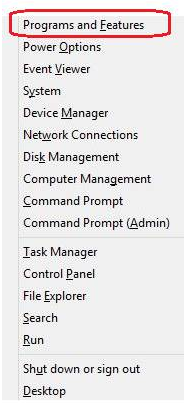
Press the Windows key: + [ x ] key and the below screen displays the below:
-
-
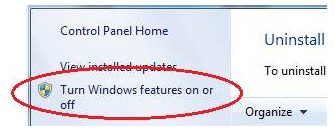
Press [ F ] to select Programs and Features and the below screen displays, select Turn Windows features on or off.
-
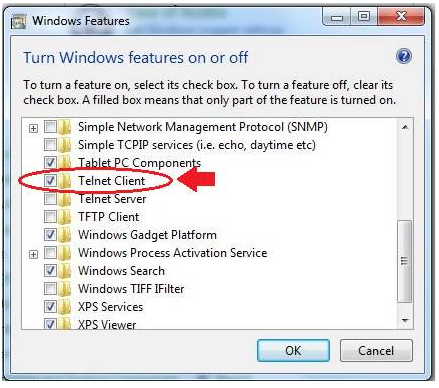
The Windows Features dialog displays (see below). Locate the Telnet Client and check the box to select it. Telnet server is not b and does not need to be selected.
Using Windows 7 and Vista:
-
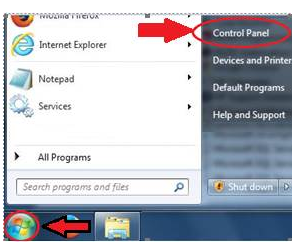
Select Start and Control Panel
-
Access ‘Turn Windows Features on or off’:
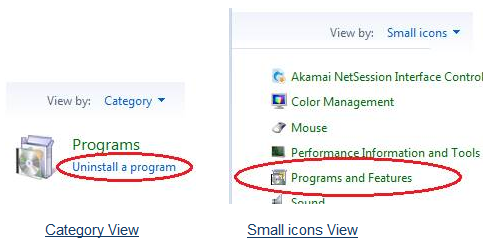
a. Using Category View select: Uninstall a program
b. In Small icons View select: Programs and Features
Category View Small icons View
-
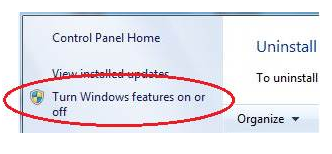
Using either method, locate Turn Windows Features on or off in the left column.
-
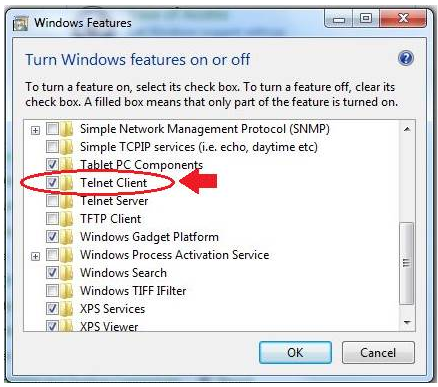
The Windows Features dialog will display (see below). Scroll down to locate the Telnet Client and check the box to select it. Telnet server is not required and does not need to be selected.
-
Press OK to enable the Telnet Client.
Using Windows XP:
Windows XP has the telnet client enabled by default and does not require configuration.