
Network communication in GV3 version 8.10 and higher series control panels is configured in Panel Wide Parameters > Routing and AUXPARM > Enhanced Communications.
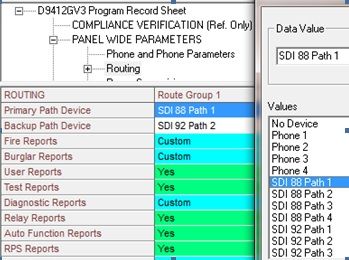
Panel Wide Parameters > Routing:
-
Each Route Group provides parameters for selecting a Primary and Backup Path device for sending reports to a network receiver. In the selected Route Group, select the Primary and Backup device used for sending reports to the monitoring station.
-
Select the SDI address of the network communicator (SDI 88 or SDI 92) and a path (1-4) which will contain the receiver IP address, port and supervision settings.
-
Each Route Group (1-4) provides configuration settings for individual receivers. Upon completing communication to the first configured Route Group, reporting will continue to the next configured Route Group until the last one has completed.
AUXPARM>Enhanced Communications
Enhanced Communications contains configuration settings; receiver IP address, port number and supervision settings, for each of the four paths.
-
Set Enable Enhanced Communications to Yes to allow the control panel to send reports over the SDI bus.
Set the supervision time according to your local requirements:
-
Supervision Interval Listing Poll Rate ACK Wait Retry Count 90 Seconds UL 2050
-
90 Seconds: UL 2050 (High Security)
-
200 Seconds: UL 1610
-
300 Seconds: NFPA 72 2010
-
1 Hour
|
Supervision Interval |
Listing |
Poll Rate |
ACK Wait |
Retry Count |
The supervision interval time is calculated as follows: Poll Rate + Ack Wait + (Ack Wait x Retry Count) = Supervision Time For example, to set a 300 second supervision time:
-
Poll=240
-
Ack Wait=10
-
Retry Count=5
240 + 10 + (10 x 5) = 300 seconds (or 250 + 50 = 300 seconds)
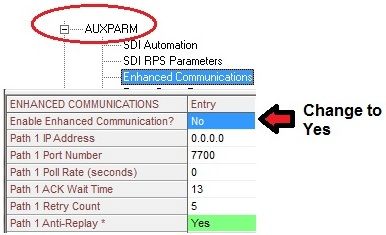
Set Anti-Replay to Yes.