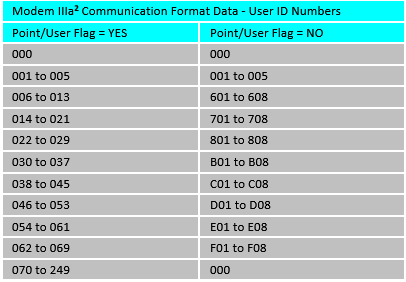
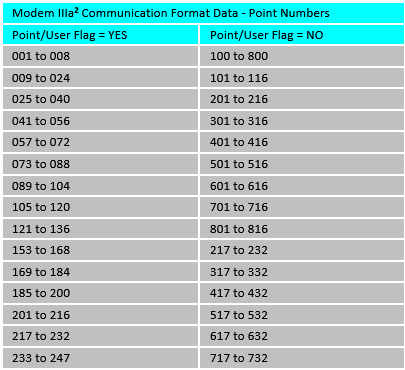
When the Point/User Flag parameter is set to YES in 7000/9000 and G-GV4 panel types , point and user numbers will report in COMEX format which will appear different than normal.
Points 1 - 9 report as 101 - 109 instead of 001, 002, 003..., also users will report in a non-standard format (see below). Change the Point/User Flag parameter from YES to NO to send point and user reports in the standard manner described in the tables below.
The Point/User Flag parameter is located in Panel Wide Parameters under Phone Parameters.
-
The Point/User Flag parameter determines how point and User ID numbers are presented at the D6500/D6600 display, printer, and computer RS232 output. Setting Point/User Flag to NO will configure the control panel to report points as sequential numbers from 001 to the end of the parameter range.
-
Setting the Point/User Flag parameter to YES causes the control panel to send a "flag" with each report telling the D6500/D6600 to convert point numbers and User ID numbers to COMEX format. The conversions are shown in the tables below.