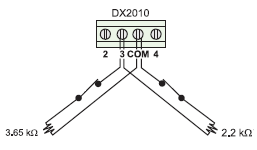
1. On-Board Point Doubling:
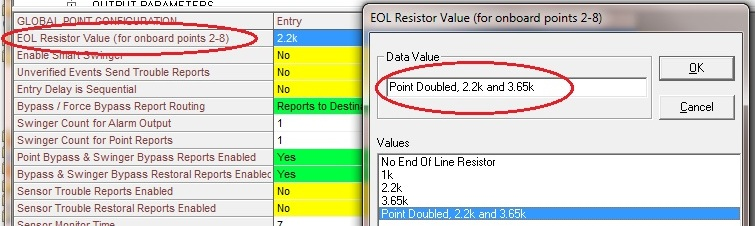
a. Select EOL
i. Under Point Parameters, go to Global Point Configuration and EOL Resistor Value and select Point Doubled, 2.2k & 3.65k
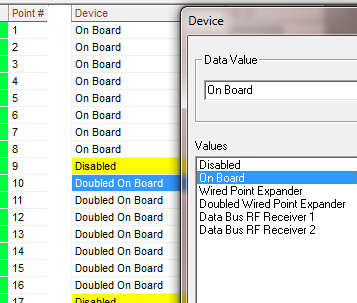
b. Select Device:
i. Under Point Configuration select Device
1. Points 2-8 select Device=On Board. Use a 3.65K EOL for Points 2-8.
2. Points 10-16 select Device=On Board. Doubled On Board will display for points 10-16. Use a 2.2KEOL for points 10-16.
NOTE: Point 1 can not be used for point doubling.
2. Programming for Wired Point Expander (not using point doubling):
a. Select Device using RPS:
i. Under Point Configuration select Device
ii. For points using the DX2010, select Wired Point Expander.
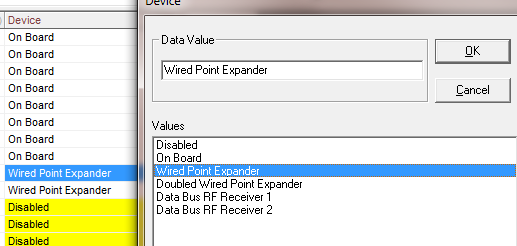
b. Address the DX2010 for the correct group of points.
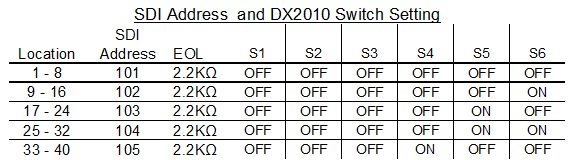
3. Programming for Wired Point Expander using Point Doubling:
a. Select Device.
i. Under Point Configuration select Device.
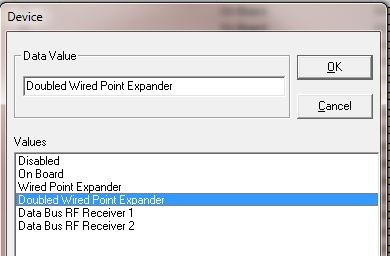
ii. For points using the DX2010 select Douibled Wired Point Expander.
b. Address the DX2010 and select EOL for use with point groups.
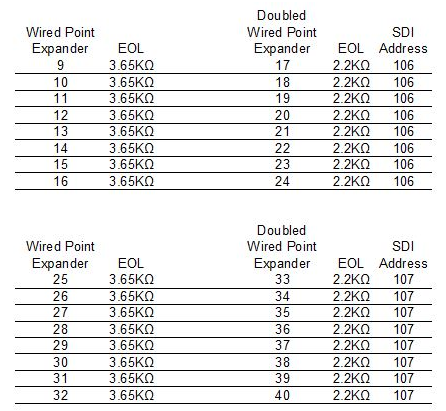
Note:
Never use Normally Open wiring for doubled points. Faulting either point will generate a short on both doubled points.