
Open/Close reporting is enabled for arming All-On but not for arming Part-On.
Open/Close Reports for Part On Modes is controlled in Area Wide Parameters. The panel will send Open or Close reports for All-On arming with default settings however Part On O/C reporting is disabled by default.
Enable Open/Close Reports for Part On Modes in RPS:
Go to the desired area in Area Parameters and select Open/Close Reports for Part On= Yes.
Using Keypad Programming:
Set the required nibble as described in figure 1:
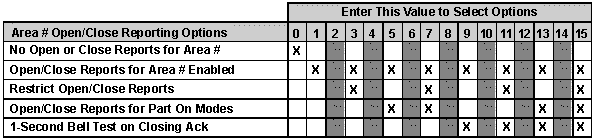
-
Area 1: 0296
-
Area 2 (D6412 and D4412 only): 0318
-
Area 3 (D6412 only): 0340
-
Area 4 (D6412 only): 0362
Default: 1 (for all areas)
To turn on area open/close, and the part mode open/close only, set the above nibble to: 5