
Issue
The D8112 is communicating with the Central Station but they do not receive any Signals.
Solution
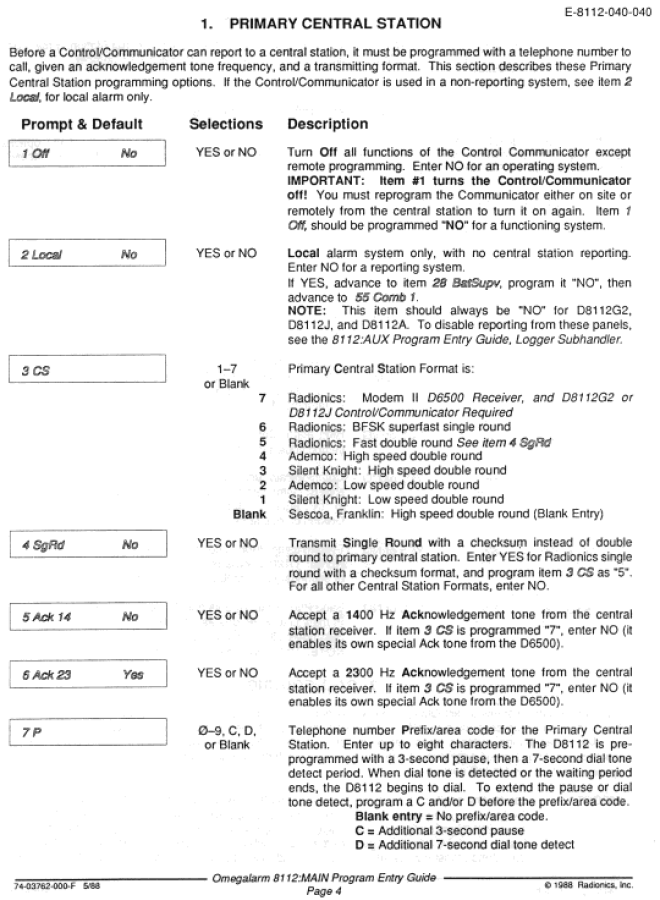
Check what format the panel is sending the Central Station via either a D5200 or RPS. In the program go to MAIN ->PRIMARY CENTRAL STATION->CS. The available selections for this prompt is 0 – 7. If this prompt is programmed as a 7 the panel is communicating in Modem II format (D8112G2 Only) and this would use a 4 digit account number. If it is a 6 the panel is communicating in BFSK format which uses a 3 digit account number. If it is 0 – 5 the panel is communicating in 3 X 1 Pulse format and also uses a 3 digit account number. In any cause where the 3 digit account is used it must be lead with a zero when it is typed in. (0XXX) the X’s representing the account number.
Part numbers D8112, D8112E, D8112E1, D8112G, D8112G1, D8112G2