
-
The D4412 and D6412 provides an ability for individual areas to send reports to only one of the two programmed destinations rather than follow standard routing.
-
The setting described below in figure 1 displays how to Lock Area Programming to either Destination 1 or Destination 2. To revert back to standard routing, select Disabled in this parameter.
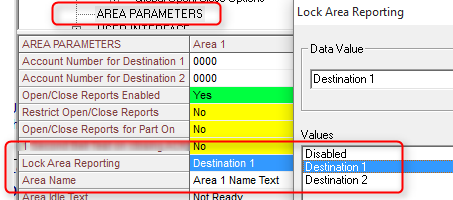
Using keypad programming, make a selection in the desired area as using the programming nibble as described below . Default setting=0 (Disabled).
-
Area 1: 0297
-
Area 2 (D6412 and D4412 only): Nibble: 0319
-
Area 3 (D6412 only): 0341
-
Area 4 (D6412 only): 0363
Nibble Selections:
-
0 = Disabled
-
1 = Destination 1
-
2 = Destination 2