
Question
Can I close the iris of DINION IP starlight 6000 based on a relay trigger: Alarm Task Editor Script?
Answer
DC-Iris
When using a DC-Iris lens you can apply the following script.
a DC_iris lens shall fully close and therefore give black image
lens example: LVF-5005C-S1803
Yes! You can use the following script in the Alarm Task Editor:
|
//script fully close the iris when toggle the relay
//sequence to close iris
//sequence to open iris
if(Relay(1)) then hdroff,maniris,colormode,closeiris else autodn,autoiris; |
|---|
Here it is a demo video of using the script:
|
You can adapt the script to use the camera input instead. So, an external relay can then trigger the camera input for example.
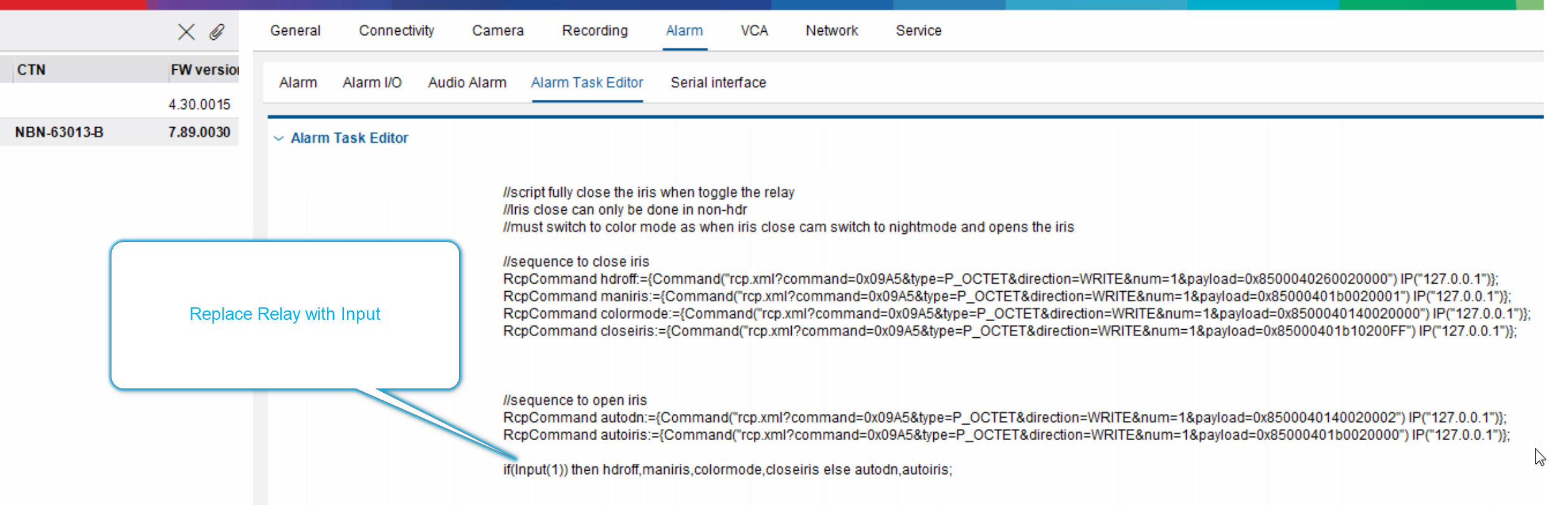
|
|---|
P- Iris
When using a P-Iris lens the lens never fully close.
therefore you must first read at the f value, as this value is different per lens.
this value will than be sent via the script
Example lenses are:
-
LVF-8008C-P0413
-
LVF-5003C-P2713
For cameras with P-Iris lens, please proceed as below:
Step 1:
-
send the bicom command to obtain the max F stop value (hex value).
-
⚠️ This is mandatory step to do a read of the F-stop and modify the script to meet the lens capabilities of the lens used
-
-
see command in top of script
Step 2:
-
modify the script with the value
Step 3:
-
copy-paste the script in the camera
Step 4:
-
test by either close relay or activate the input. You will see the shutter slows down.
|
//script fully close the iris when toggle the relay or Input
//control mode to manual
//control mode to Auto
if(Relay(1)) then maniris,fclose else autoiris;
|
|---|
Here it is a demo video of using the script: