
Question
When Central Support Team provide assistance on a specific topic, at some point, customers may be asked to enable the VSG debug logging option.
This article answers the question: Where is the "VSG debug logging" option to enable/ disable it?
Answer
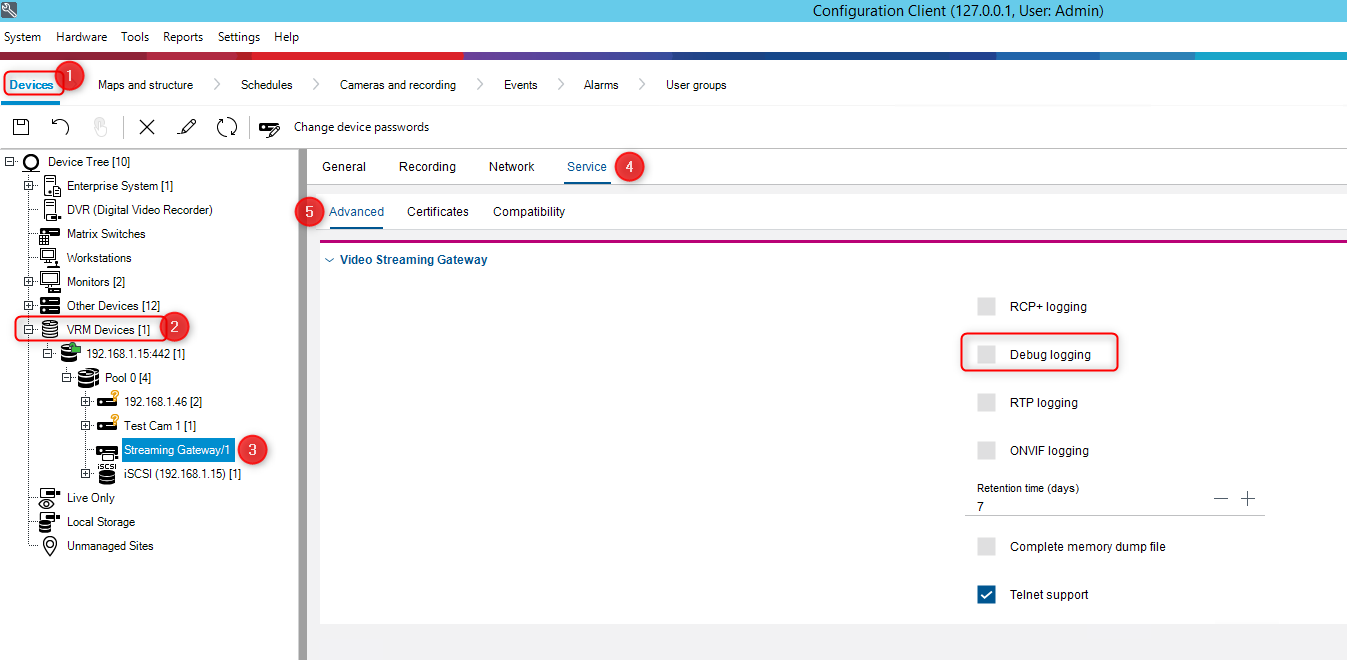
In BVMS Configuration Client, select "Devices" tab and search for your VSG (Video Streaming Gateway).
-
Extend "VRM Devices" menu and select the Streaming Gateway under the Pool menu.
-
Go to "Service" tab > "Advanced" tab > here is the option you are looking for: Debug Logging
⚠️ WARNING!
After you finished collecting the logs, please DO NOT forget to uncheck the box near the "Debug logging" option.