
Please refer to the following pages from BVMS Configuration Manual and be sure that you have connected the Bosch IntuiKey keyboard to BVMS in a proper way. You can connect a Bosch IntuiKey keyboard to the COM port to a hardware decoder via USB connector (e.g. VJD-75x3)
-
p53 (Section 5.3 Connecting a Bosch IntuiKey keyboard to BVMS)
-
p141 (Section 12.8.7 - Configuring a decoder for use with a Bosch IntuiKey keyboard)
-
p151 (section 12.15 Assign Keyboard page)
Note
-
For connecting the Bosch IntuiKey keyboard with a BVMS workstation, use the specified Bosch cable.
-
For connecting the Bosch IntuiKey keyboard with a VIP XD decoder, you need a cable which connects a serial COM port of the keyboard with the serial interface of the decoder.
-
For connecting the Bosch IntuiKey keyboard with a VJD-75x3 decoder, you need to use a Serial to USB converter (Supported drivers are mentioned in the RL)
Step-by-step guide
Please make sure that the COM Port, Baudrate & Data bits are set correctly.
-
Open BVMS Config Client
-
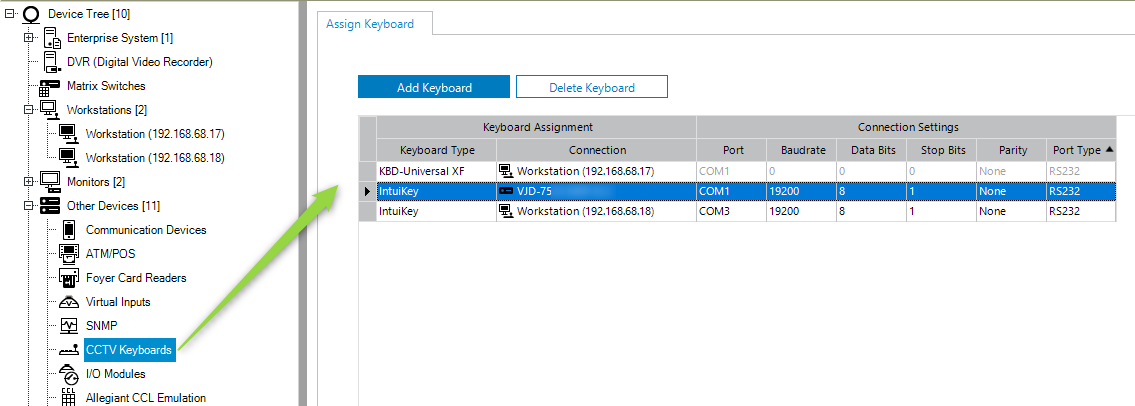
Navigate to Other Devices → CCTV Keyboards
-
Click on Add Keyboard
-
Choose IntuiKey
-
Select the Decoder
-
Ensure that the default COM1 is selected
How to add KBD to BVMS WS: