
Question
How does the ‘Active profile’ work for FLEXIDOME Multi 7000i camera?
Answer
"Active profile" shows the non-recording profile when recording is off. When the "Encoder Streams" menu is accessed while the device is recording, the following message appears at the top of the page: “Recording is currently active".
When recording is on, the "Active profile" shows the recording profile. So in case of recording off, you can change Active profile in the drop-down menu from “Non-recording profile”. When recording is on, the active profile is managed by *“Recording profiles”.
This is working as designed and therefore, selecting alternate active profiles for stream 1 for all cameras will not be possible and you will have to select profile 2: Balanced.
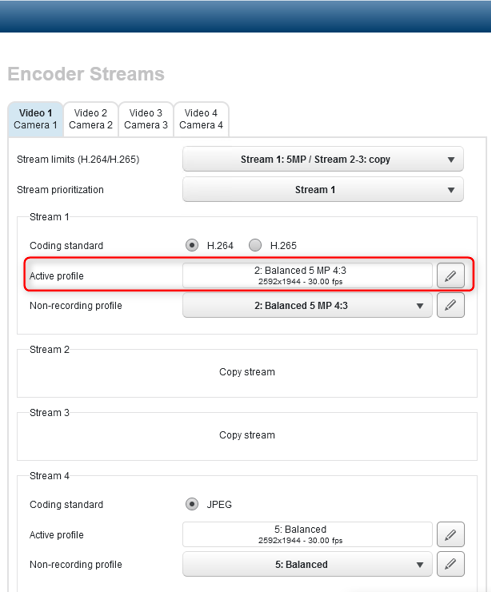
Note: Stream settings can be chosen for each of the 4 cameras separately and each stream has their own active profile.
-
Keep in mind that any settings made to the “Stream limits” affect options for each stream.
-
Stream limits decree what the maximum resolution is for each stream. For stream 2 and 3, lower resolution settings can still be made in the non-recording profile editor.
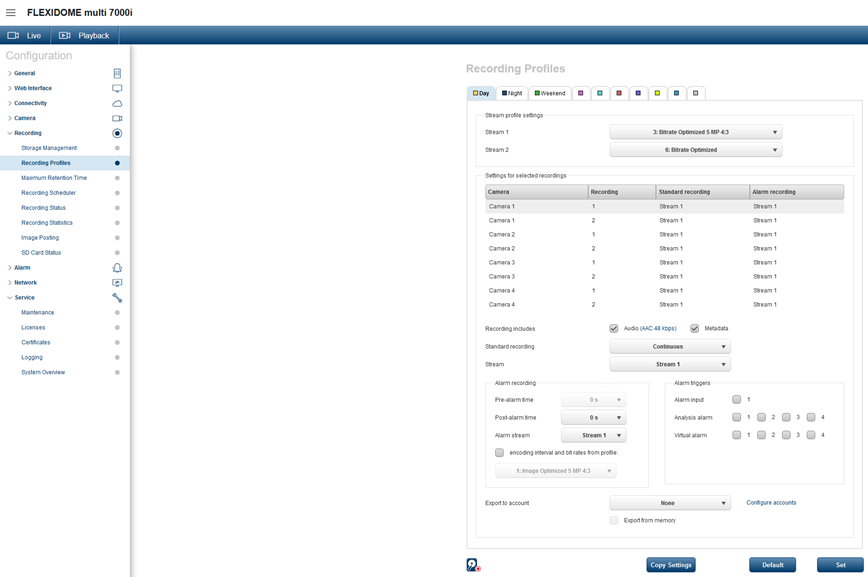
*“Recording profiles" menu:
You can make changes to the recording options on a per-camera basis for both recorders; 8 settings in total.
When you make changes (for example, from continuous recording to pre-alarm recording), there is no way to see that this was changed in the table.
Therefore, to check if everything is set-up correctly, you need to check each camera-recorder combination in the list one-by-one and for each profile.
Good to know:
Below you will find the profile number description, as described in the Operation Manual:
Profile number Description
-
Profile 1 For a high resolution image, the video bit rate and frame quality are adjusted to ensure that the picture quality is the priority.
-
Profile 2 For a high resolution image, the video bit rate and frame quality are adjusted to a median profile for everyday use.
-
Profile 3 For a high resolution image, the video bit rate and frame quality are adjusted to ensure that the bit rate is the priority.
-
Profile 4 For a low resolution image, the video bit rate and frame quality are adjusted to ensure that the picture quality is the priority.
-
Profile 5 For a low resolution image, the video bit rate and frame quality are adjusted to a median profile for everyday use.
-
Profile 6 For a low resolution image, the video bit rate and frame quality are adjusted to ensure that the bit rate is the priority.
-
Profile 7 Ideal for encoding on a DSL uplink where bit rate limitations are critical.
-
Profile 8 Ideal for encoding on a 3G uplink where bit rate limitations are critical.
Stream 1 always runs at maximum selected resolution in stream limits. On stream 2 and 3, you can select various downscaled resolutions.

For a better understanding of using FLEXIDOME multi 7000i cameras, we encourage you to join our online trainings from KEENFINITY Academy!
-
FLEXIDOME Multi 7000i Product Introduction training