
According to the configuration manual (page 230), you will need to follow the below steps to update firmware for multiple devices at the same time:
Step-by-step guide
-
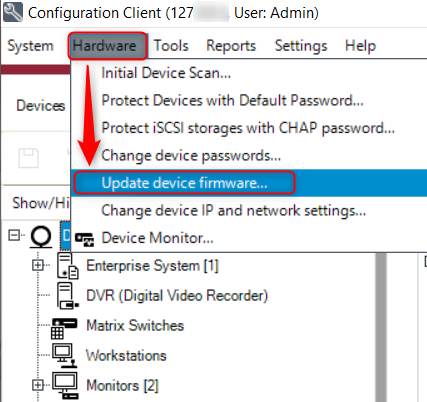
On the Hardware menu, click Update device firmware... .
The Update device firmware dialog box is displayed.
-
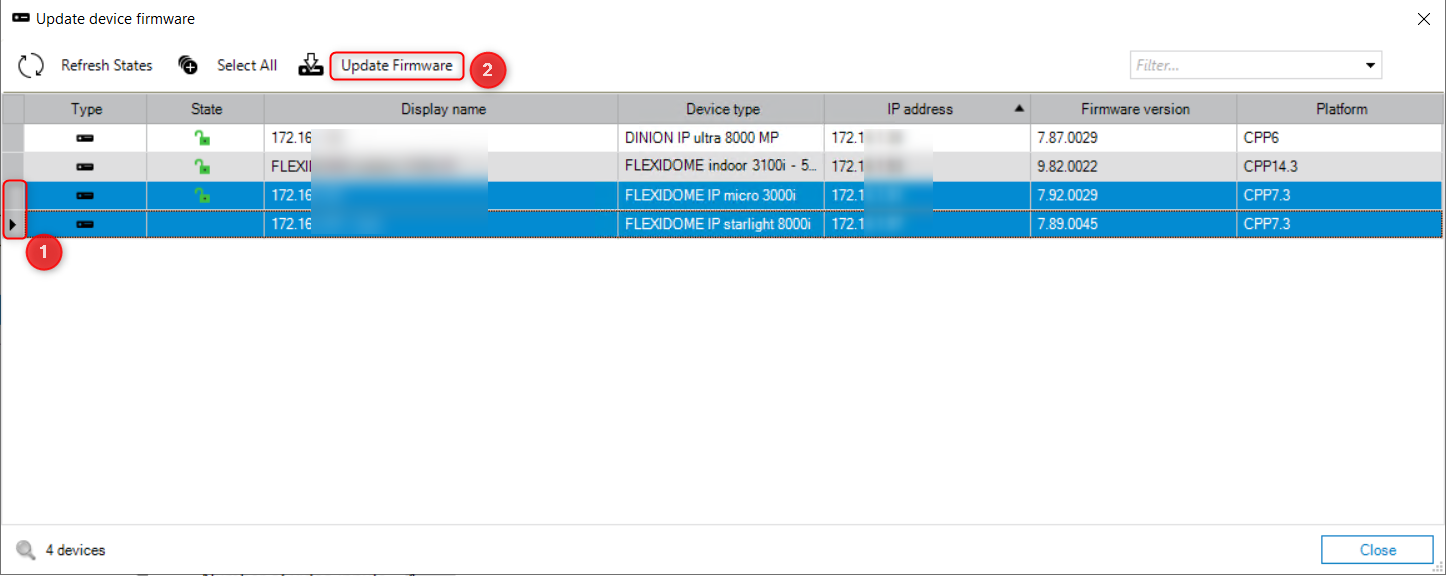
Select the required devices, then click the Update Firmware command.
-
Select the file containing the update.
-
Click OK.
Best practice would be to first update only one camera and in a second step, to update max. 10 cameras in parallel.
Important
Firmware version 6.50 is required as an intermediate upgrade step and is available upon request from the Technical Support Team.
Since intermediate firmware versions may contain vulnerabilities that have been resolved in later releases, it is recommended to continue the upgrade process until the latest available firmware version is installed.
For the latest firmware packages and release notes, please visit the Download Store.

-
The firmware files can be downloaded from the Download Store, under the Firmware → Cameras and Encoders tab.
-
How to upgrade CPP3/4/5/6/7/7.3 IP cameras from firmware < v6.50 to the latest FW available?