Sometimes it is preferable to have a different “user mode” during the day then in the night.
Our cameras by default have the option to switch the user mode e.g. triggered by the camera D/N switch over. But also other triggers can be chosen.
Below an example how to setup the “user mode” switching triggered by the D/N switch over.
Step-by-step guide
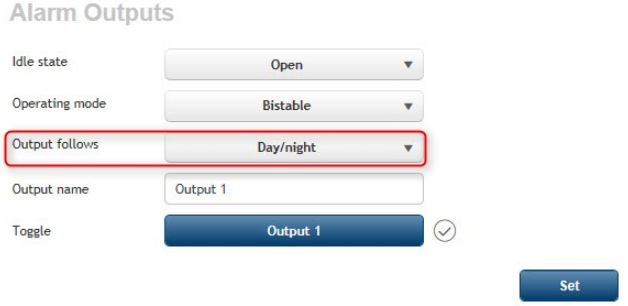
Step 1) Let the output follow the Day/Night switching to genera an alarm:
Interfaces > Alarm outputs > alarm outputs follows > Day/Night
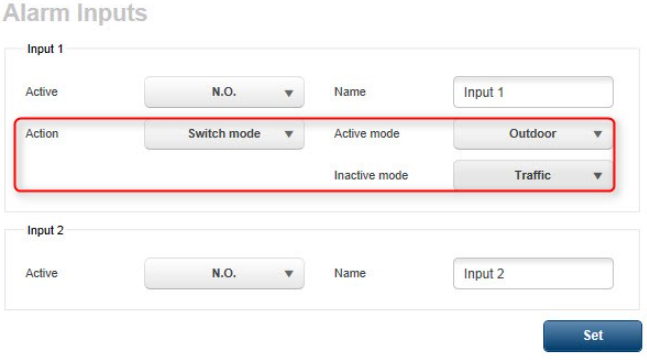
Step 2) Turn on the option to switch user mode based on an alarm:
Alarm inputs > Input 1 > action "switch mode" > select the appropriate modes for “Active” and “Inactive”
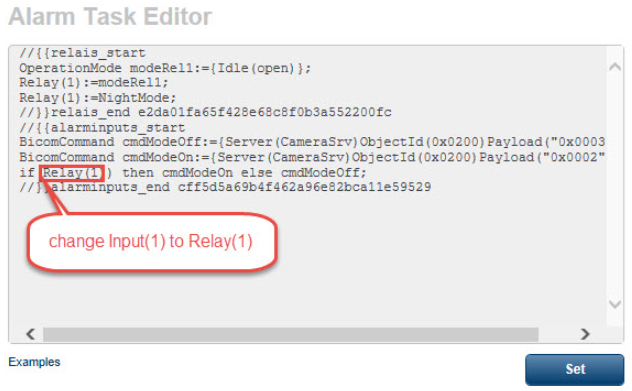
Step 3) a script is now automatic created. Modify this script so the user switch mode is done based on “Relay 1” from step 1 instead of the alarm “input 1” from step 2.