
The purpose of this technical brief is to explain to perform a factory reset on a DVR400/DVR600 series video recorder.
A factory reset of the unit can be performed to bring the unit back to its factory default state.
NOTE: Performing a Factory Reset will reset the following:
Language (English)
Recording Resolution (CIF), FPS (30), Covert(Off), Audio(None)
DVR ID( 01)
VIDEO Will NOT BE LOST
PASSWORDS WILL NOT BE RESET
Note: For more details which settings will set back to factory detault see DVR Operaration Manual
Related Products
DVR 400
DVR 600
DVR 630
DVR 650
DVR 440
DVR 480
DVR600
DVR400
DVR630
DVR650
DVR440
DVR480
Step-by-step guide
Setting Factory Defaults
-
Press the “OSD” key on the front panel and keep it pressed
-
Power cycle the unit
-
Keep the “OSD” key pressed until “System restart is shown”
After restart the system is set back to factory default
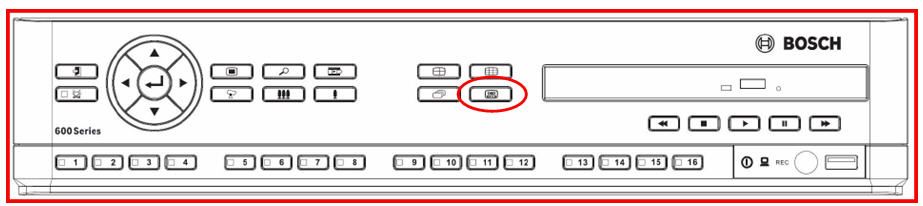
OSD KEY Location “600” Series DVR
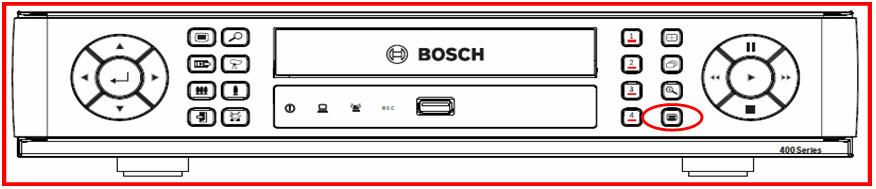
OSD KEY Location “400” Series DVR