
Question
Where you can check the Network Time Protocol (NTP) connection from Bosch IP cameras?
Answer
The unit can receive the time signal from a time server using various time server protocols and then use it to set the internal clock. The device polls the time signal automatically once every minute.
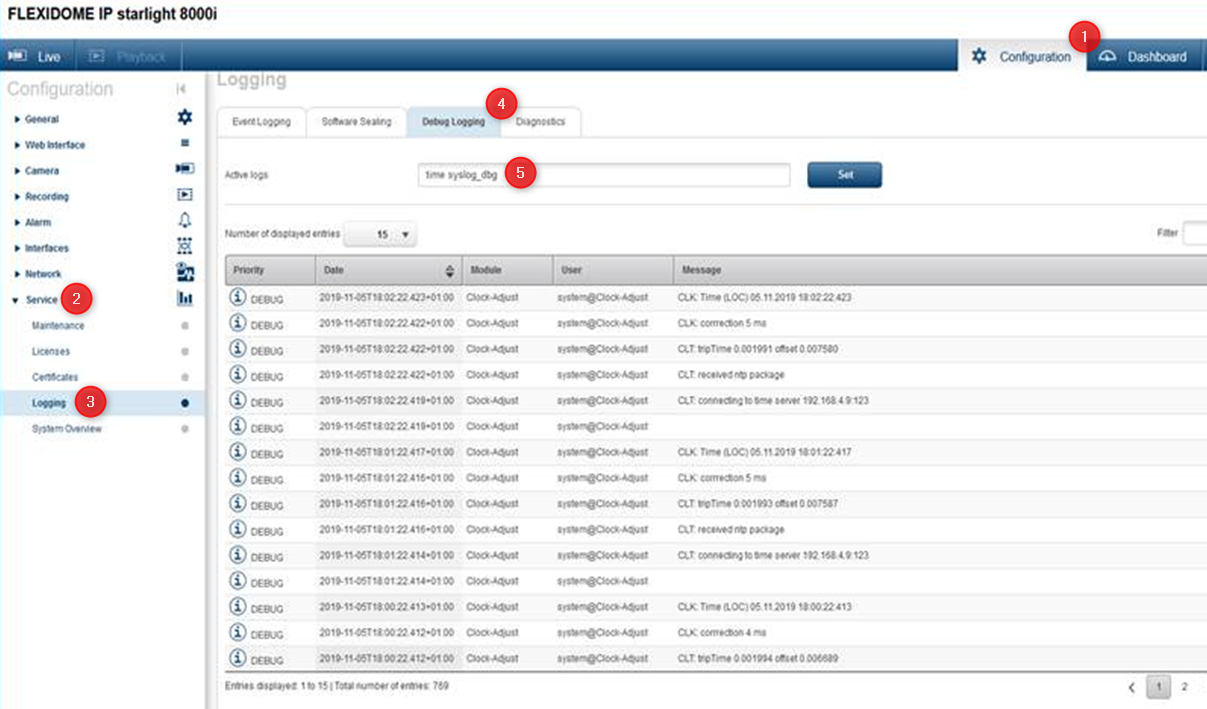
To check the NTP connection from the camera please follow the below steps:
-
Login to camera web interface (http://ipofcamera) and enter its credentials
-
Go to ➤ Configuration ➤ Service ➤ Logging ➤ Select Debug Logging ➤ In Active logs type : time syslog_dbg ➤ press Set and afterwards Reload from the bottom right side of the page or from Diagnostics tab
The camera will query the NTP server every 1 minute.
Note:
We recommend you to check out the following article and learn How to activate and collect Syslog from Bosch IP cameras