
Question
How can I configure the KBD-Universal XF with Virtual Com Port or HID Joystick Mode?
Answer
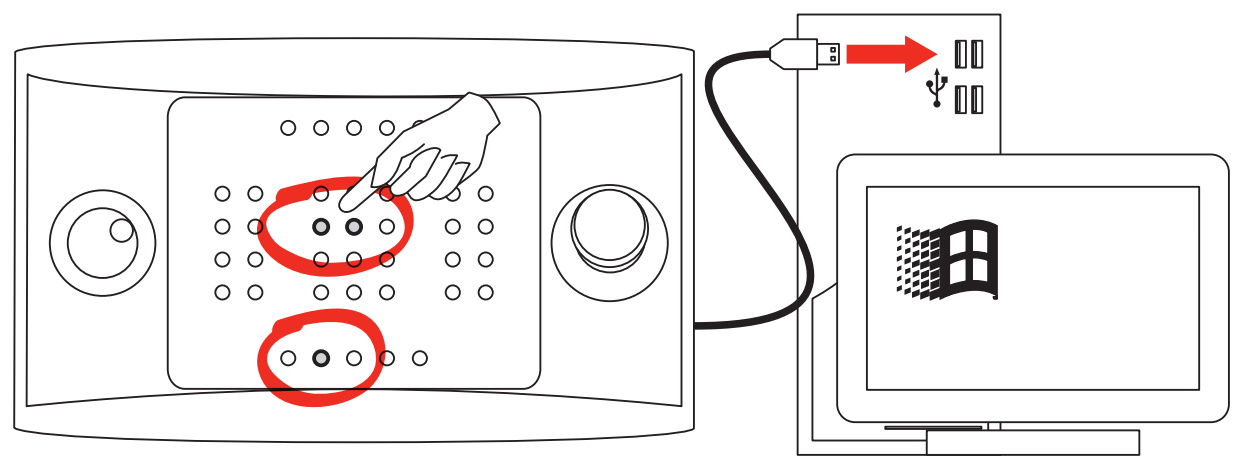
Virtual Com Port Mode
-
Disconnect the keyboard from your device;
-
Press and hold key


-
Connect the keyboard to the USB port and wait for a few seconds;
-
Release both keys;
-
The keyboard will be identified as "Other devices" in BVMS
HID Joystick Mode.
-
Disconnect the keyboard from your device;
-
Press and hold key

-
Connect the keyboard to the USB port
(warning) Please be aware that if your keyboard has the HID mode active, it will not work when it is integrated in BVMS on a DIP / Workstation.
Therefore, please make sure that you switch to COM mode and restart the DIP / Workstation for the keyboard to work properly.

-
What to consider when you cannot control camera with IntuiKey keyboard from OC on the workstation?
-
How to install the KBD-UXF Keyboard and configure the BVMS workstation for Keyboard integration?