
Possible causes and solution(s)
-
Causes
When camera is set to auto track (by web interface) to "auto"-> IVA is detecting an object but camera is not following.
Auto tracking works and metadata is displayed only on a stored preposition.
-
Solution
There was a change introduced starting with FW v.7.70.
The new feature is: i-Track only starts on VCA-Alarm.
You can either program this on presets, e.g a detection field or if you want to have Itrack active regardless of its position, you need to activate "global VCA" and assign task detection area "whole screen"
-
now only activate iTrack "AUXON78" so the eye is in the corner, and your iTrack will always be on sharp
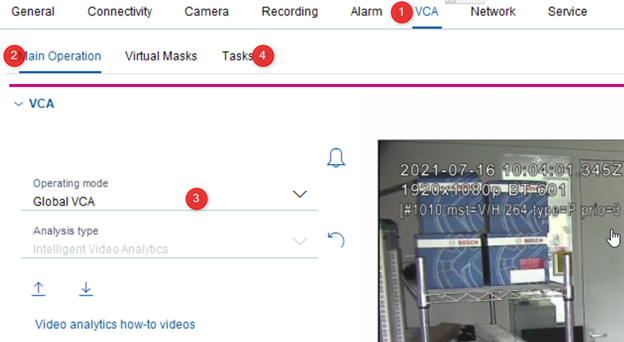
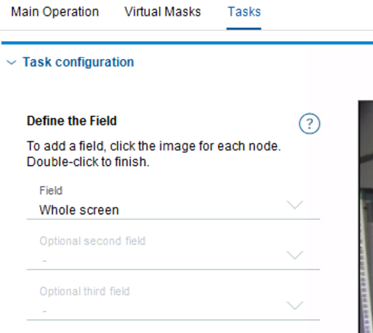
Note: IVA must be active for at least one preset scene in the VCA page on the Settings tab.
-
If IVA is configured for one scene, then all other scenes have Intelligent Tracking enabled by default. If a scene, however, has Motion+ or IVA 5.5 Flow activated, then Intelligent Tracker is disabled for these scenes.
Please refer also to the following document: How to Demo Bosch Intelligent Tracking.pdf
See more KB articles related to video analytics here.