
🕒 This procedure takes ~ 5 min to be complete
If the image performance of AUTODOME 7100i camera is not optimal in terms of sharpness, focus response, or dark video, you can optimize the image performance by ensuring that the camera firmware (FW) is up to date. There have been several revisions to the FW in the past two years.
It is important to understand that the are two different FW versions in the camera that impact the image performance. One is the main FW and the second is a camera block FW. The camera block is the internal HW module that includes the image sensor, lens, and the digital Signal Processor (DSP).
The standard FW upgrade is an automatic process initiated via the Web GUI or the Configuration Manager app. The camera block FW requires extra steps and takes approximately 5 minutes to complete, so it is not an automatic process. Below is a guide for the camera block FW update.
Step-by-step guide
First, check for firmware updates for your AUTODOME 7100i camera in Download Area.
The following FW versions include improvements to image processing algorithms and these will enhance image quality. Ensure that your camera is using this FW version or higher.
Products
NDP-7602-Z40; NDP-7602-Z40L Firmware: Public Release FW 8.94.0041 (Android)
NDP-7802-Z40; NDP-7802-Z40L Firmware: Project Release FW 8.40.0124 (Linux)
NOTES:
-
The next Public Release for all Linux based cameras will not be available until Q3/Q4 2026.
-
You can contact Technical Support and request a Project Release FW for the NDP-7802 series of cameras.
-
The project release FW does require a signature on a special release form acknowledging that the FW will only be used with this camera model and at specific project/locations.
-
-
Starting with firmware v8.91.0028, a new camera block firmware is available. Therefore, please double check if this has been updated.
-
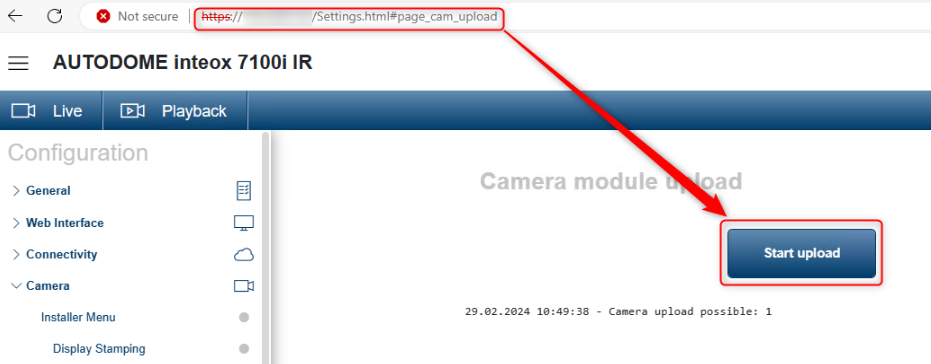
Go to : https://<your_camera_ip>/Settings.html#page_cam_upload
If the button gets active, it says: “Camera upload possible: 1 perform the update”. Click Start upload.
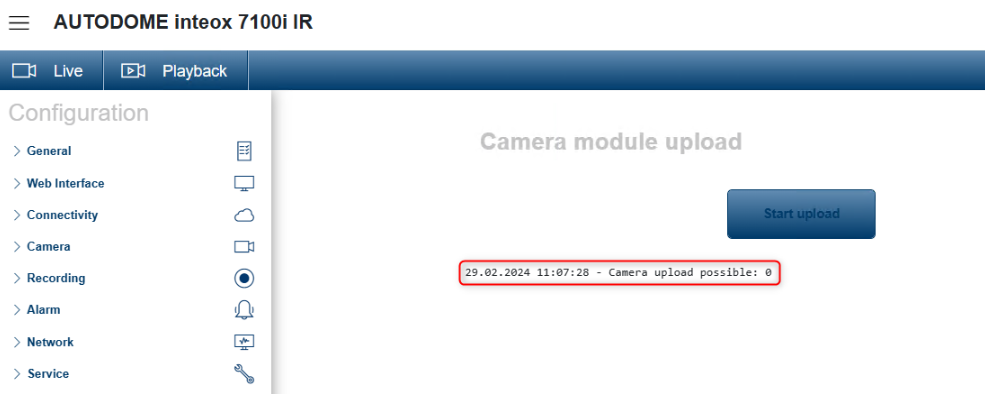
Update takes approx. 10min. Once it is complete, check again if the update was successful by sending the same command again.
If the button is not active and it says: "Camera upload possible: 0", the update was successful.
-
After the FW upgrade is completed, it is important to Default the System Controller portion of the FW. This ensures that all of the video settings are updated to the latest values.
-
After the default is completed, update existing prepositions by moving to the position and then save the preposition.
