
Possible causes and solution(s)
-
Symptoms
By extracting the playback in the MOV or MP4 format using BVMS Operator Client, the video is split into multiple files and not in a single file/ segment.
This behavior became visible after upgrading BVMS to version 11.1.1.65.
-
Causes
Upon investigation, it has been observed that export files are being split when there are changes in the recorded stream parameters. This typically occurs when recording is configured for alarm scenarios, and an active alarm changes the stream parameters, such as frame rate or resolution. The current behavior, observed in BVMS 11.1.1 has slightly changed, due to the changes in the export mechanism, implemented with BVMS 10.0.1.
Prior to BVMS 10.0.1, during the export process to the ASF format video was always transcoded (decoded and encoded back using the specific export engine). Due to this fact, it was possible to maintain continuity of the output file when only frame rate was changing. However, if also video resolution would be changing, even previous ASF implementation would lead to creation of separate files.
-
Solution
With BVMS 10.0.1, ASF export was replaced with MP4 format and internal exporting mechanism was changed as well. Currently, exporting doesn’t require transcoding anymore, resulting in optimization and reduced export time.
However, as a side effect, when frame rate is changing, single output file continuity cannot be guaranteed anymore.
BVMS provides additional means to allow easy handling of the export material even if multiple files are created. A playlist file is also provided as part of the export, so typically opening it in the external player does not require additional effort. Moreover, all the exported files can be compressed to a single ZIP file.
However, understanding the usage of the MP4 export files and additional effort when it is needed to upload these files to an external system, we would like to consider this requirement and improve it in future BVMS releases.
Also, you can refer to this official letter where this statement is described.
Another option to export recordings is through the VRM eXport Wizard Tool, then select the “Convert already exported data to MP4 files” option.
See more details in the following article: How to export VRM recordings of cameras & convert them to mp4-file (VRM eXport Wizard 2.10)?
You can find the VRM eXport Wizard setup file in the BVMS installer zip file.
New Functionality (BVMS 13.0 and later):
-
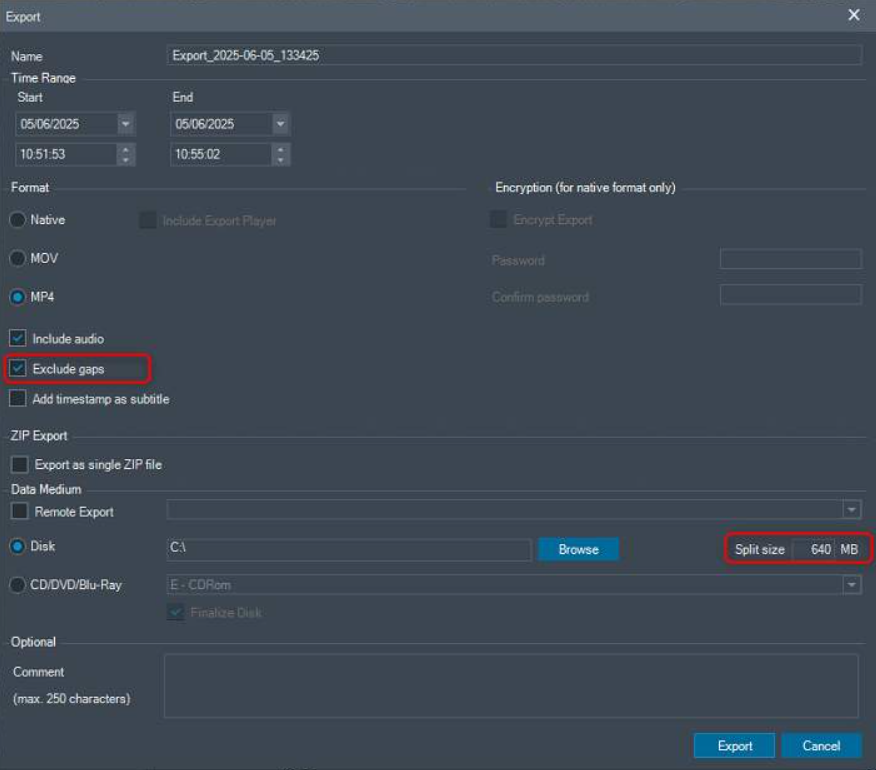
The export dialog now includes a new option: "Exclude gaps.
-
The file size configuration of exported MP4 files is still possible.
-
MP4 export is NOT fragmented into separate files due to recording gaps or changes in frame rate (stream quality)
The export dialog now includes a new option: "Exclude gaps." When this option is checked, BVMS will skip over any recording gaps in the selected time range and export one single, continuous MP4 file. This ensures the export meets the configured file size limit and avoids the inconvenience of managing multiple smaller files.
Also the a frame rate change due to another stream quality triggered e.g. by alarm-recording does not result into fragmented MP4 files during export anymore (but meeting the configured file size).
New parameter:
Exclude recording gaps when exporting video footage to avoid the creation of several MP4 files smaller in size than configured (here 640 MB):
Exclude gaps= disabled. 2x MP4 files with small size are created even file size configured to 640MB:
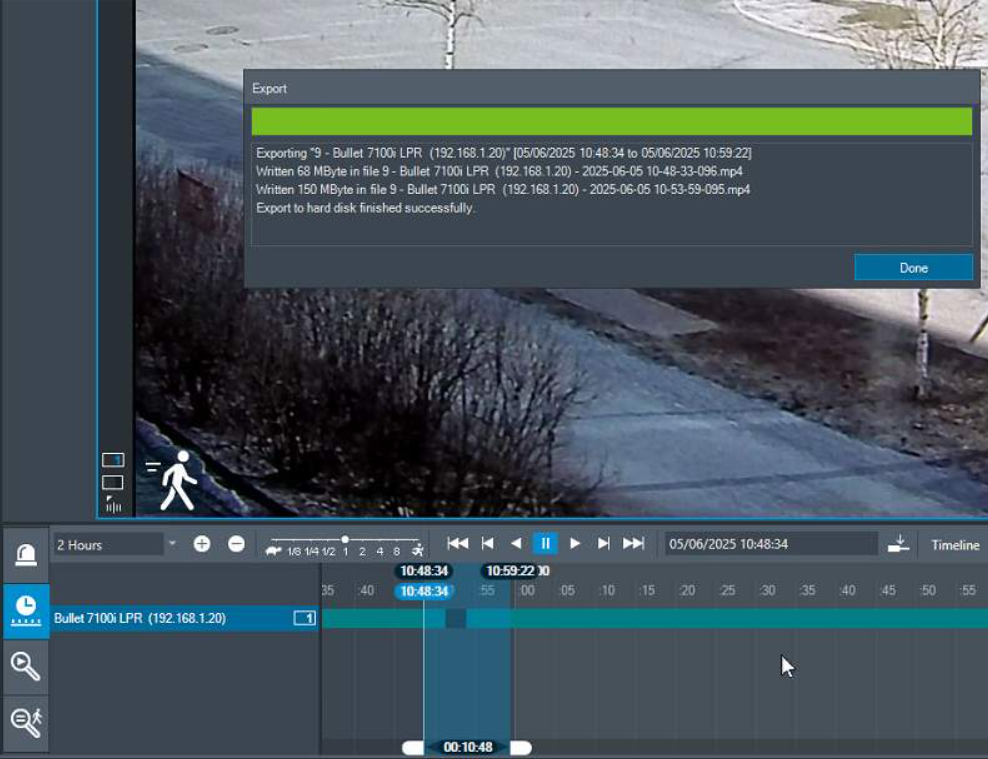
Note: Only one file created even a gap is in-between. The recording gap was excluded by the new BVMS 13.0 export process.