
Possible causes and solution(s)
-
Causes
-
-
DIVAR IP 7000 server stopped recording suddenly
-
VRM service was stopped and it did not start when tried to start it manually
-
-
Solution
If VRM services are not starting, there might be something corrupt in your configuration.
Do the following steps to make the VRM service run again:
-
Please make sure that the VRM services are stopped.
-
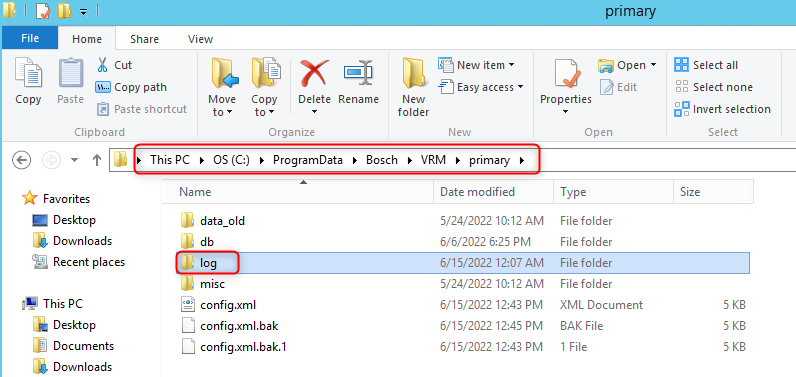
Go to C:\Program Data\Bosch\VRM\primary on the VRM server.
-
Please make sure that you have copied the folder 'log' from C:\Program Data\Bosch\VRM\primary in a different location, where you will be able to find them again easily in case we need them for further investigation later.
-
Empty the ‘primary’ folder.
-
Start the VRM services
-
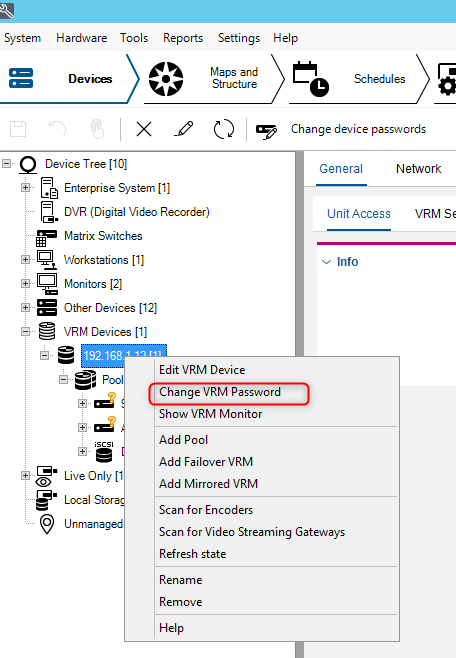
If you had a password configured for VRM, then the VRM device will show up with a red padlock in Config Client. In this case, you will need to edit the password in Config Client.

If the recording issue persists, please refer to the following articles:
-
VRM Ticket requirements
-
What could be the cause of the recording gaps?
-
Other VRM Articles in BT Technical Knowledge Public page