
Possible causes and solution(s)
-
Symptoms
In large parts of the zoom range the camera simply does not focus, this is the same for manual PTZ and pre-sets.
-
Solution
Please proceed with following steps:
-
Update the camera to latest Firmware
-
Power cycle the camera
-
Factory default it
-
-> check behavior, if still poor focus, then:
-
Connect camera directly to a computer in an isolated network (to avoid that a possible connected VMS pushes a config to the camera)
-
Perform a hard reset using the reset button on the camera, see instructions from the manual:
Steps to complete a hardware reset for all camera models
-
Apply power to the camera.
-
Find the IP address of the camera.
-
Log on to the camera using the web browser. (Note: You can use Configuration Manager to identify the IP address.)
-
Find the hardware reset button on the camera. (Refer to the figure below to find the reset button for your camera model.)
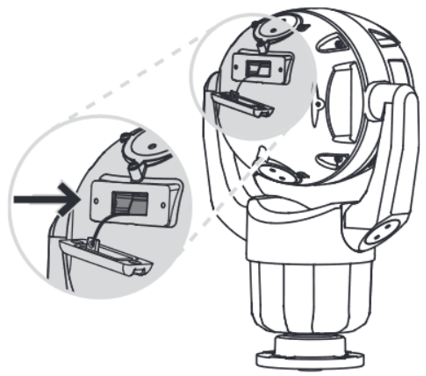
-
Push and hold the reset button for more than 8 seconds. The red LED indicator on the PCBA board will come on to show that the hardware reset started.
Note: You can also use a conductive wire to short the terminal block.
-
Let the camera complete a self-check. When the self-check completes, the red LED will go
-
Find the IP address again.
-
Access the camera using the web browser.
-
Set the initial service-level password for the camera
-
-
->check behavior, If there is still poor focus, then it seems this is HW related. The camera should be repaired/replaced via RMA in that case