
Question
What are the limitations of Privacy overlay in BVMS 12 (Panoramic cameras, h.263 & MPEG, decoder, VSC)?
Answer
-
Panoramic cameras

When Privacy overlay is enabled for panoramic camera, opening this camera in BVMS will result in no video and error message. (Possible improvement in future, with updated detector)
-
h.263 and MPEG
When Privacy overlay is enabled for h.263 or MPEG camera/ stream, opening it in BVMS will result in no video and error message
-
Decoder/ Monitor wall

When an user is trying to display on a decoder camera, where Privacy overlay is enabled, no video will be displayed (Workaround: in combination with CPP13 cameras, BVMS will only display on decoder stream with Privacy Protection enabled)
See chapter "decoders" within this lesson for details.
-
Mobile/ VSC

When Privacy overlay is enabled for a camera, opening it in Video Security Client or mobile App will result in no video displayed
-
Privacy overlay is not supported, when using DIVAR IP (AIO) as the Operator Client
-
Privacy overlay can be used (enable feature license) in DIVAR IP (AIO) based systems, but only if it runs on a separate Operator Client workstation according to hardware and GPU specification.
-
Privacy overlay is not available for BVMS Viewer
The following Nvidia cards are recommended to use for the privacy overlay feature:
-
Nvidia Quadro P2000
-
Nvidia Quadro P4000
-
Nvidia Quadro RTX A2000
-
Nvidia Quadro RTX 4000
-
Nvidia Quadro P2200
-
Nvidia Quadro T600
-
Nvidia Quadro T1000
Please check the most up to date datasheet of BVMS for a list of supported GPU's in BVMS (in general w/o privacy overlay).
Performance limitations:
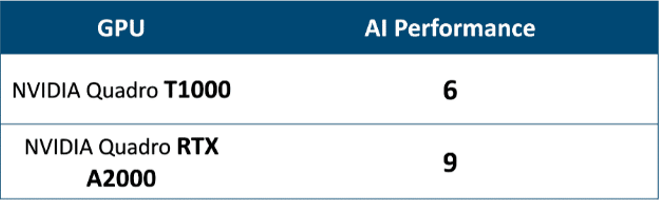
AI Performance indicates how many cameras can be processed simultaneously, with Privacy overlay enabled, on a single workstation, equipped with specific GPU.
Criteria:
-
As a result of frames being dropped with workstation load, fps should not be lower than 20
-
Applicable for resolutions from SD up to 5Mpx. In case of higher resolutions (4K) general decoding performance is a limiting factor
Some recommendations to get the pest performance:
-
Ensure workstation with compatible and capable GPU
-
Consider limitations for # of displayed cameras in system design
-
Lowering down fps of displayed stream might give better results

-
Privacy overlay in Enterprise Environment
-
Privacy overlay for a camera displayed on a decoder/monitor group
-
Comparison: Privacy mode in CPP13 cameras and Privacy overlay in BVMS