
Question
What could be the cause of the missing bookmark option from the dewarped view in Milestone after upgrading the SmartSuite plugin?
Answer
If, after upgrading the SmartSuite plugin, the bookmark option in Milestone is not available when using a dewarped window but works in standard windows, this behavior is typically related to version compatibility between the plugin and the Milestone XProtect system.
Be aware that, before upgrading the plugin on your system, the Minimum System Requirements listed in the plugin release notes must be met.
For example, if you have Xprotect Expert 2023 R3 and you upgraded the SmartSuite for Milestone XProtect to v1.0.2:
|
IPPM |
v1.0.2 |
the Minimum System Requirements shown in the release note PDF, on page 4, are not met by the Xprotect Expert 2023 R3 server.
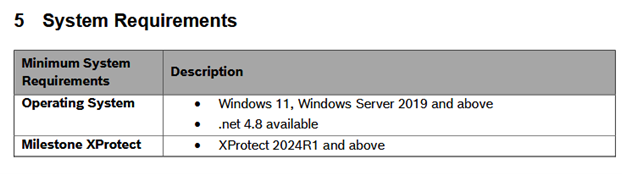
In this case, certain features may be unavailable or not function as expected. Bookmarking may still work from the standard camera view, while the dewarped view has functional limitations due to platform compatibility rather than a malfunction.
Due to incompatibility between the Milestone XProtect version and the SmartSuite plugin version, additional behavior may be observed when using dewarped views of panoramic cameras during recorded playback. In some cases, live video displays correctly in dewarped mode, while recorded video playback from the dewarped view may appear delayed or lagging.
To use SmartSuite for Milestone XProtect v1.0.2, the minimum Xprotect smart client 2024 R1 must be used.
To understand whether this limitation applies, it is always recommended to review the SmartSuite plugin release notes and verify compatibility with the installed Milestone XProtect version.
The latest Milestone Plugin is available on Download Store (Apps & Tools menu).