
Question
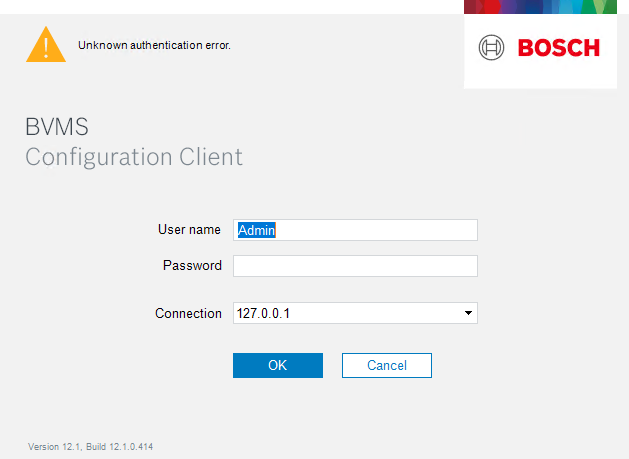
What to do if ‘Unknown authentication error’ is displayed when connecting in BVMS 12.1 Configuration Client?
Answer
When attempting to connect using the BVMS v12.1 Configuration Client, some users may encounter the message “Unknown authentication error.” This issue is known and can be resolved by applying the cumulative patch.
|
BVMS |
12.1 |
Installing this patch resolves the authentication issue and ensures stable operation of the Configuration Client.
⚠️ Important
Before installing, please make sure to read the patch Readme carefully.
It contains additional essential information related to the update process and system compatibility.
__________
Bosch VMS Patch for BVMS-12.1.0.414: 448513 - BVMS Cumulative Patch 3
Patch ID: 448513 (including: 445686, 441937, 440029)
Patch Title: BVMS Cumulative Patch 3
Patch Target Version: BVMS-12.1.0.414
Patch Details:
This patch fixes issue 448513 by improving the login of Operator Client.
Important hints:
The Patch for issue 448513 needs to be installed on the Management Server. On Operator Client machines only if the issue is faced.
NOTE: Manual action required:
After installing the patch, it is necessary to initiate a configuration change on the server side, activate the new configuration, and then log in again with your user account.
Additionally, make sure to restart all running Operator Client instances to apply the newly activated configuration.
This patch fixes issue 445686 by improving the session handling for the PTZ connection.
This patch fixes issue 441937 by improvements in the area of mov-/mp4-exports.
This patch fixes issue 440029 by filtering out same zoom commands and optimizes PTZ command frequency with granularity adjustment.
The granularity for pan and tilt movements can be set in the OperatorClient.exe.config file. The key is "PtzGranularity" and its default value is "10".
It specifies the smallest step size for the pan and tilt speed adjustments.
Lower values allow for finer control, while higher values result in coarser adjustments.
Important hint:
Please use only allowed values for the "PtzGranularity", which are: 1, 2, 4, 5, 10, 20, 25, 50, 100
Problem Details:
Issue 448513 caused the problem that the login of the Operator Client has a very high delay.
Issue 445686 caused the problem of a delay in starting the first PTZ movement.
Issue 441937 caused the problem that in mov- or mp4-exports the video is shown with low frame frate and either delayed or no audio.
Issue 440029 caused the problem that the Video Stream stops while giving PTZ commands.
Affected Bosch VMS Components / Machines:
-
Bosch VMS Management Server
-
Bosch VMS Operator Client
-
Bosch VMS Configuration Client
-
Bosch VMS Cameo SDK
Uninstallation of the Patch:
Logon as a User with 'Administrator rights' or as the 'Administrator' itself
Open 'Control Panel' 'Programs' 'Programs and Features' 'View installed updates'
Select the Patch in the list and press 'Uninstall'
or
Start cmd.exe with 'RunAs Administrator'
Run the following command
msiexec.exe /I {2010EC92-D5F0-46A1-8B7A-027505ACB849} MSIPATCHREMOVE={6C3E6321-805B-467B-9022-94B2FAF3B260} /qb
__________

For legacy firmware or software requests, you can contact: KEENFINITY Video support - Firmware and Software requests