
Possible causes and solution(s)
Symptoms
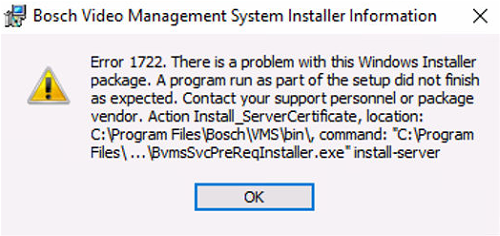
When trying to upgrade BVMS from version 12.x to 13.0 on a virtual machine, the installation fails during the certification check step and displays 1722 error message.
-
The same error also occurs during an installation of BVMS 13.0 on a newly created Virtual Machine.
-
The option with the validation of Management Server certificates is missing
-
After the error message is displayed, the installer performs a rollback
-
No changes after the server is removed from domain
-
Even though the installation does not complete successfully, the VRM component is installed.
-
The issue persists even when:
-
Testing with different Windows Server versions: 2016, 2019 and 2022
-
Using local Administrator account
-
Running the installer as administrator
-
Firewall and antivirus are disabled
-
Causes
This error may be caused because one or more certificates on the system were issued without a proper Subject Name - which is unusual and can lead to validation or trust issues in certain components.
To verify this, a PowerShell script.ps1 can be used to scan the LocalMachine certificate stores, especially:
-
My (Personal / Machine Certificates)
-
Root (Trusted Root Certification Authorities)
The script identifies certificates with an empty or invalid Subject field, displays the results in the console window, and exports the public part of any affected (broken) certificates to:
C:\Temp\DetectedCerts
Solution
The issue is resolved by installing the following patch: BVMS1300292 – Patch Cumulative 2
-
This patch fixes issue 493460 by allowing BVMS services to work even in case of problems with certificates on the machine.
|
Hints from the ReadMe note:
Manually execute the "Patch_493460.ps1" script as a User with 'Administrator rights' and in 64-bit environment. It may happen that you need to grant permission to be able to execute Powershell-Scripts.
|