
1 Scope
The scope of this article is to explain how to do search and replay on Bosch VIP devices and the Video Recording Manager(VRM). The article shall focus on different search and replay scenarios, like search time starts before the slice starts and ends before the slice ends, or replay time starts within a slice and not exactly at the beginning of a slice and some more. On top of that, the different ways of re-play: direct, VRM and transcoded replay shall be described.
In the search section the document deals with RCP+ commands because the information of recorded media data can only be retrieved with the help of RCP+ command. The examples in the document use the RCP+-SDK. In the replay section however the document shows replay and replay control via RTSP. Slice and file is used synonymously for recordings.
Note: for examples oriented more towards Rcpp over CGI, check this paper: How to search for camera recordings or for camera recordings over VRM with RCPP over CGI?
Step-by-step guide
2 Search
In order to playback recordings, a search needs to be performed first to locate the recordings.
To enable searching on a recorded video stream a correct setup of the RTSP replay connection is pre-conditioned. Replay of recorded video via RTSP works for locally managed recordings or centrally managed (VRM) recordings, but require VRM version 3.0 or higher and firmware version 5.70 or higher. Furthermore it also supported for DIVAR IP 2000.
The track, the search is performed on, is specified in the setup of the RTSP replay connection.
For detailed information how to set up a RTSP replay connection please see:
Perform a search
In case of requesting the file list of a VRM it is mandatory to get the track list including the Track ID of the cameras (VRM_TRACK_LIST) that are managed by the VRM. The track ID is necessary to establish a correct replay session. To perform a search, a replay session is, as mentioned above, preconditioned. For Bosch VIP devices this first step can be skipped, because a Bosch VIP device can either have one track, if single recording is active, or two tracks, if dual recording is active.
1. Get Track List (VRM only)
VRM_TRACK_LIST (0xD007)
|
Tag code |
Num Descriptor |
Message |
|---|---|---|
|
0xD007 |
no |
yes |
|
|
Datatype |
Description |
|---|---|---|
|
Read |
p_octet |
Get a list of accessible tracks (cameras) on the VRM |
|
Write |
p_octet |
not supported. |
Request
Payload Structure
|
1 |
2 |
3 |
4 |
|---|---|---|---|
|
flags |
reserved |
||
Flags:
0x01 primary recording
0x02 secondary recording
0x04 backups recording
0x08 receive HTTP URLs (only if internal URL will be received).
0x10 receive HTTPS URLs (only if internal URL will be received).
Sending the request without payload is equivalent to flags = 1.
Response
Payload Structure
The response payload consists of multiple entries with the following layout if flag 8 is not set:
|
1 |
2 |
3 |
4 |
|---|---|---|---|
|
length of entry |
track id |
||
|
ip address |
|||
|
flags |
line |
Camera Name (wchar) … |
|
with the flag 8 set, the response layout is:
|
1 |
2 |
3 |
4 |
|---|---|---|---|
|
length of entry |
track id |
||
|
ip address |
|||
|
flags |
line |
Camera Name (wchar) … |
|
|
device group name (wchar …) |
|||
|
device url without username/ password (wchar …) |
|||
The URL is normally the internal URL, that the VRM uses to connect to the device. If HTTP or HTTPS URL was requested by setting one of the flags, the URL is adapted to the correct protocol and port. Setting these flags has no effect when accessing the VRM from remote and port forwarding is enabled. In this case the port forwarding URL is received with the same protocol as the connection from the client to the VRM is (either HTTP or HTTPS).
Flags:
value 1 The track is a backup of the camera.
value 2 secondary recording.
value 4 track is removed from VRM (message only).
value 8 add device group information (deprecated: group information is written at any time)
Example:
// instantiation of a RCP+-client
m_rcpClient = new RcpClient(URL, 0, 0);
//get the trackList
m_rcpClient.sendRequest(0, unchecked((OpCode)0xD0070C30),
getTrackList, 0);
private void getTrackList(object obj, RcpHeader rcpheader, RcpInputStream ris)
{
while (ris.available() > 10)
{
uint payloadLength = ris.readUShort(); uint trackID = ris.readUShort();
uint ip = ris.readULong(); uint flags = ris.readOctet(); uint line = ris.readOctet();
String name = ris.readWString(); String devGroup = ris.readWString(); String url =
ris.readWString();
}
}
2. Establish a RTSP replay connection
Bosch VIP devices
-
rtsp://<Device IP>/?rec=1&rdn=718
VRM
-
Rtsp://<Device IP>/?rec=1&trackid=<TrackID>&rnd=718
For detailed information how to set up a RTSP replay connection please see:
3. Get the session ID (CONF_GET_RTSP_SESSION_ID)
Get the session ID with the help of the random number specified in the URI to request the re-corded video stream via RTSP.
Note: this step is not needed for recording search of physical camera over VRM. In that case it is done only with 0x0901 and num=<hereTheTrackId> of the camera in interest
CONF_GET_RTSP_SESSION_ID (0x0ae8)
|
Tag code |
Num Descriptor |
Message |
SNMP Support |
|---|---|---|---|
|
0x0ae8 |
Random value from (RTSP session setup) |
no |
no |
|
|
Datatype |
Access Level |
Description |
|---|---|---|---|
|
Read |
t_dword |
l_live |
Gets the rcp session id of the rtsp session |
|
Write |
t_dword |
l_user |
not supported. |
Example:
// instanciation of a RCP+-client
m_rcpClient = new RcpClient(URL, 0, 0);
// create the payload
RcpOutputStream payload = new RcpOutputStream();
payload.writeULong(m_randomNumber);
//get the session ID
m_rcpClient.sendRequest(0, unchecked((OpCode)0x0ae80830), payload,
getSessionID, 0);
private void getSessionID(object obj, RcpHeader rcpheader,RcpInputStream ris){
m_sessionID = ris.readULong();
}
4. Instantiate a RCP+-client with the session ID
Example:
//instantiation of a RCP+-client with session ID
m_rcpSearchClient = new RcpClient(URL, m_sessionID, 0);
5. Get the list of files/slices of a replay session
CONF_HD_PARTITION_FILE_INFO (0x0901)
|
Tag code |
Num Descriptor |
Message |
SNMP Support |
|---|---|---|---|
|
0x0901 |
no |
no |
no |
|
|
Datatype |
Access Level |
Description |
|---|---|---|---|
|
Read |
p_octet |
noprot |
Returns a list of files of a replay session (session id needed). |
|
Write |
void |
l_user |
not supported. |
Request
Payload Structure
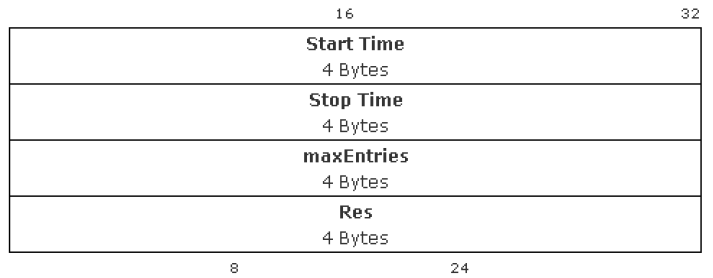
Start Time: start time in seconds since Jan. 1st 2000, midnight.
Stop Time: stop time in seconds since Jan. 1st 2000, midnight.
maxEntries: Max Number of entries
Res: reserved
Request
Payload Structure (sequence of)
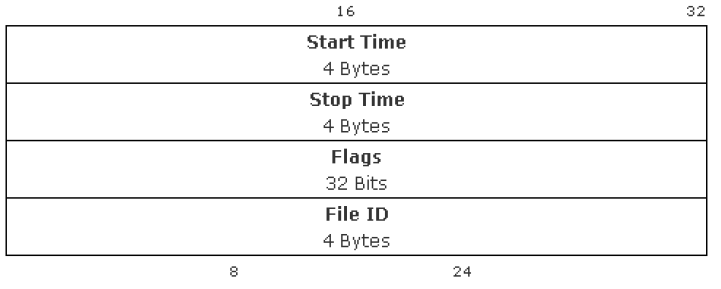
Start Time: start time in seconds since Jan. 1st 2000, midnight.
Stop Time: stop time in seconds since Jan. 1st 2000, midnight.
Flags:
Bit 0
Recording Running (actual recording is running on this file or recording not closed regularly)
Bit 1
Recording Overwriting (recording takes place in a ring and old recording data will be overwritten)
Bit 2
Alarm Input (there are input alarms in this file)
Bit 3
Alarm Motion (there are motion alarms in this file)
Bit 4
New Alarm (obsolete)
Bit 5
Video Loss (there are video loss in this file)
Bit 6 - 7
Recording mode: 1 - time recording, 2 - alarm recording (pre alarm), 3 - alarm recording (post alarm) value 2 and 3 only in CONF_SPAN_PARTITION_FILE_INFO distinguishable, for CONF_PARTITION_FILE_INFO these two values have the meaning of a full alarm rec file
Bit 8-15
Track Fill Level (fill level in percent, always 100 % on filled ring recording)
Bit 16
Alarm Remote (there are virtual/remote alarms in this file, see CONF_HD_MGR_SIGNAL_ALARM)
Bit 17
Audio (there are audio data in this file)
Bit 18
Meta (there are meta data in this file)
Bit 19-20
Reserved
Bit 21
Offline (VRM only)
Bit 22
Protected (VRM only)
Bit 23-28
Time Zone (Quarter hours)
Bit 29
Time Zone Sign
Bit 30-31
Reserved
Example:
// instantiation of a RCP+-client with session ID
m_rcpSearchClient = new RcpClient(URL, m_sessionID, 0);
// create the payload
RcpOutputStream payload = new RcpOutputStream();
// start time 22.09.2014 07:00:00 -464684400(sec. since 2000) – 0x1BB28570
// end time 24.09.2014 11:30:00 -> 464873400 (sec. since 2000) – 0x1BB567B8
// 4 bytes start time
payload.writeOctet(0x1B); payload.writeOctet(0xB2); payload.writeOctet(0x85);
payload.writeOctet(0x70);
// 4 bytes end time
payload.writeOctet(0x1B); payload.writeOctet(0xB5); payload.writeOctet(0x67);
payload.writeOctet(0xB8);
// 4 bytes maxEntries
payload.writeOctet(0x00); payload.writeOctet(0x00); payload.writeOctet(0x00);
payload.writeOctet(0x00);
// 4 bytes Res
payload.writeOctet(0x00); payload.writeOctet(0x00); payload.writeOctet(0x00);
payload.writeOctet(0x00);
// get the slices
m_rcpSearchClient.sendRequest(0, unchecked((OpCode) 0x09010C30), payload,
getSlicesReply,0);
private void getSlicesReply(object obj, RcpHeader rcpheader, RcpInputStream ris){
m_startTimeSecondsSince2000 = ris.readULong(); m_endTimeSecondsSince2000 = ris.readULong(); m_flag
= ris.readULong();
m_fileID = ris.readULong();
}
Example rcpp over CGI:
2.1. Different search scenarios at a glance

2.1.1 Start time of the search within a slice
If the start time of the search is defined within a slice, then the start time of the first reported slice is equal to the start time defined in the search.
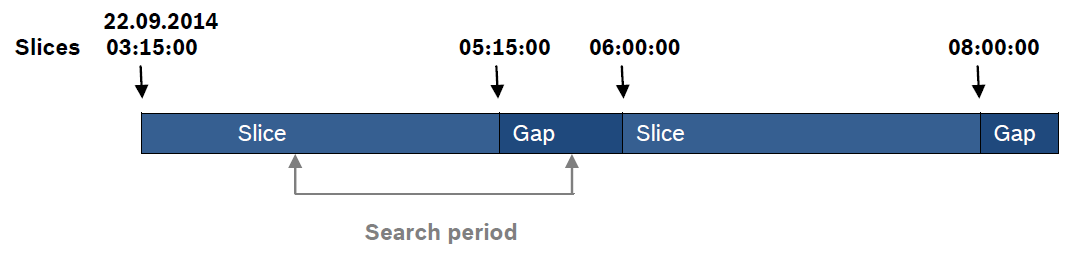
E.g. file starts at 22.09.2014 03:15:00, but start time of the search is defined from 22.09.2014 04:15:00, then the start time of the first reported file/slice is 22.09.2014 04:15:00.
2.1.2 Start time of the search before start time of the first slice
If the start time of the search is defined earlier than the start time of the first recorded slice, then the start time of the first reported slice is its real start time, independent of the start time defined in the search.
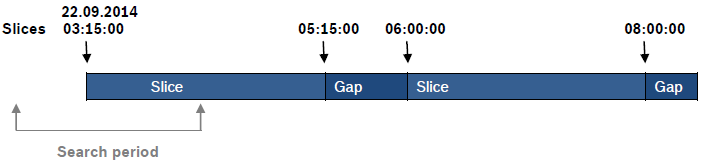
E.g. file starts at 22.09.2014 03:15:00, but start time of the search is defined from 22.09.2014 02:15:00, then the start time of the first reported file/slice is 22.09.2014 03:15:00.
2.1.3 End time of the search before end of the last recorded slice
If the end time of the search is defined earlier than the end time of the last recorded slice, then the end time of the last reported slice is equal to the end time defined in the search.
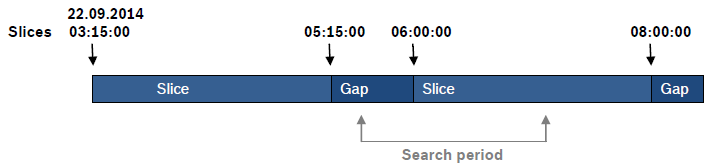
E.g. file ends at 22.09.2014 08:00:00, but search is defined till 22.09.2014 07:00:00, then the end time of the last reported file/slice is 22.09.2014 07:00:00
2.1.4 End time after end of the last recorded slice
If the end time of the search is defined later than the end time of the last recorded slice, then the end time of the last reported slice is its real end time, independent of the end time defined in the search.
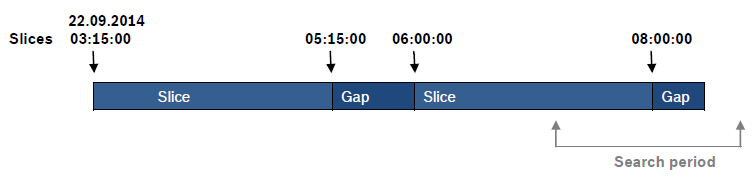
E.g. slice ends at 22.09.2014 08:00:00, but search is defined to 22.09.2014 09:00:00, then the end time of the last reported file is 22.09.2014 08:00:00.
2.1.5 No start and end time specified (max values)
If no time frame is specified the max search period is from 0x00000000 to 0xFFFFFFFF means 01.01.2000 to 07.02.2136. All recorded slices will be reported in chronological order, oldest recording is the first reported one.
2.1.6 Start time earlier than end time
If the start time is before the end time all recorded slices will be reported in a chronological order. Oldest recording is the first reported one.
2.1.7 Daylight saving time (DST)
Daylight saving time clock shifts should be given particular attention, because in case of shifting the clock backwards it could be possible, that there are two recordings available with the same timestamp.
To distinguish between the slices it is necessary to take a closer look at the payload of the reply HD_PARTITION_FILE_INFO. Daylight saving time is signaled in the flag. So if there are two recordings of the same time due to DST, the search will return 2 slices. In the flag the Bit 23 to 31 include the information of Daylight Saving time.
Bit 23-28
Time Zone (Quarter hours)
Bit 29
Time Zone Sign
Example:
// Payload of the reply of HD_PARTITION_FILE_INFO
// 0x1bdf1f191bdf202f04000040000000011bdf1fea1bdf203d0200004100000002
// First Slice -DST off
// 4 bytes start time
1b df 1f 19 // seconds since 2000: 467607321 -> 26.10.2014 02:55:21
// 4 bytes end time
1b df 20 2f // seconds since 2000: 467607599 -> 26.10.2014 02:59:59
// 4 Byte flag
04 00 00 40 // time zone: 4 quarter hours; Time zone sign: off
// 4 bytes file ID
00 00 00 01
// Second Slice -DST on
// 4 bytes start time
1b df 1f ea // seconds since 2000: 467607530 -> 26.10.2014 02:58:50
// 4 Byte end time
1b df 20 3d // seconds since 2000: 467607613 -> 26.10.2014 03:00:13
// 4 bytes flag
02 00 00 41 // time zone: 4 quarter hours; Time zone sign: on
// 4 bytes file ID
00 00 00 02
3 Replay
There are different kinds of replay. It is distinguished between direct replay, VRM replay and transcoded replay.
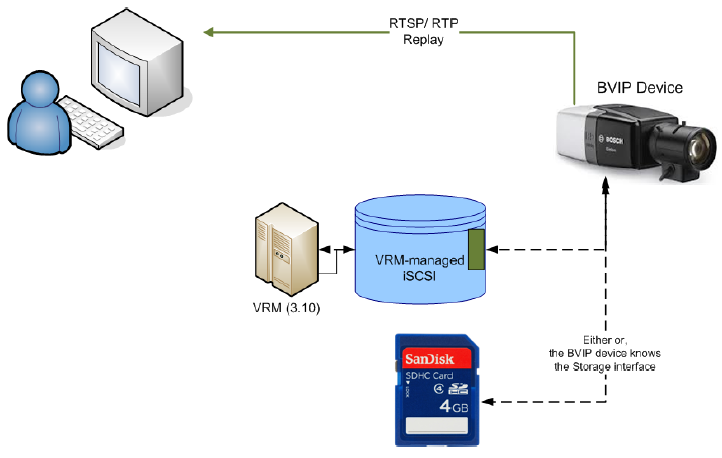
Direct Replay
Depending on the setup, the client can fetch the media data by consuming streamed RTP packets with TCP/UDP as transport protocol directly from the device, either from iSCSI or local storage.
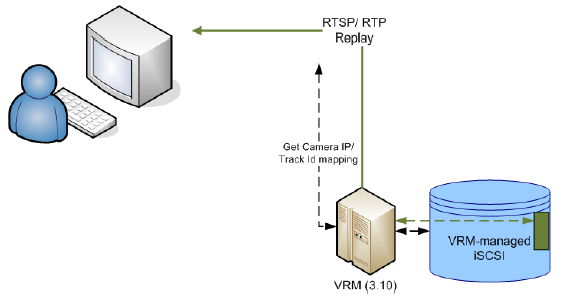
VRM Replay
If the device is managed by a VRM, the client can fetch the media data by consuming streamed RTP packets with TCP/UDP as transport protocol directly from the VRM, even if the device is offline.
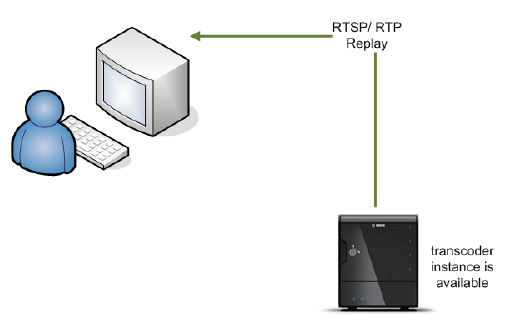
Transcoded Replay
Some BVIP devices and services support transcoding, i.e. they can decode live and recorded media data with high bit rate and encode the frames with a lower bit rate before streaming to a client.
The client fetches the media date by consuming RTP packets with TCP/UDP as transport protocol via device/transcoder
Since FW 5.90 some RTSP parameters to control the transcoder functionality have been added to the transcoder in-terface and in addition also an RTSP input interface was added. Such an interface allows the transcoder to act as an RTSP client and basically transcode any RTSP/RTP H.264 video source.
For detailed information how to set up a replay connection with a transcoder via RTSP please see:
Seek parameters
With FW 5.90 an additional RTSP parameter for seeking to a certain point in time of a recording has been added. The seek time is given in ‘local time’ of the device and is calculated in seconds since Jan. 1st 2000, midnight.
|
Parameter |
seek |
|---|---|
|
Values |
Number (seconds since Jan. 1st 2000); special values: 0x0 = first available file 0xFFFFFFFF = last available file |
|
Example |
RTSP://<DeviceIP>/?rec=1?seek=0x0 |
Replay speed
With FW 5.90 an additional RTSP parameter for controlling the speed of a replay session has been add-ed. The speed is controlled in percent, where a value of 100 represents ‘real time’. Negative values rep-resent a replay in reversed direction. This is a best effort approach and once the device is not able to catch up with a set replay speed the packets are sent out as fast as possible. Values above 1000000 are interpreted as iFrame only mode, which allows for speed manipulation through the addition of the replay speed percentage to this value.
That means that a value of 1000100 requests an iFrame only stream in real time, whereas a value of 1001000 requests an iFrame only stream in 1000% of the real time speed (10 x real time).
|
Parameter |
seek |
|---|---|
|
Values |
-2000 … 2000 (replay speed as percentage of realtime; negative values trigger playback in reverse direction; 100 represents realtime) -1009000 … -1000000 and 1000000 … 1009000 (replay speed of an iFrame only stream; the result of ‘abs(value)-1000000’ is interpreted as replay (as percentage of realtime) speed of the iFrame only stream with the same mapping as above) |
|
Example |
RTSP://160.10.0.1/?rec=1&speed=200 RTSP://160.10.0.1/?rec=1&speed=1003000 |
3.1 Different replay scenarios at a glance
The following recordings are the reference for the examples below.
Start time 30.09.2014 04:25:03 – 465366303 (seconds since Jan. 1st 2000, midnight.) 1BBCED1F
End time 30.09.2014 09:09:34 – 465383374 (seconds since Jan. 1st 2000, midnight.) 1BBD2FCE
Start time 30.09.2014 09:54:04 – 465386044 (seconds since Jan. 1st 2000, midnight.) 1BBD3A3C
End time 30.09.2014 09:57:32 – 465386252 (seconds since Jan. 1st 2000, midnight.) 1BBD3B0C
3.1.1 Seek time before the start time of the recording
If the seek time is chosen before the start time of the recorded slice, the replay starts at the start time of the recorded slice in direction of replay.
e.g. seek time is 30.09.2014 03:00:00 speed = 100%
-
RTSP://<DeviceIP>/?rec=1?seek=0x1BBCD930&speed=100
Replay starts at the beginning of the next available recording in direction of replay, 30.09.2014 04:25:03
e.g. seek time is 30.09.2014 09:50:00 speed = -100%
-
RTSP://<DeviceIP>/?rec=1?seek=0x1BBD3948&speed=-100
Replay starts at the end of the next available recording in direction of replay, 30.09.2014 04:25:03
3.1.2 Seek time within the recorded slice
If the seek time is chosen within a recorded slice, the replay starts at the desired time.
e.g. seek time is 30.09.2014 08:00:00
-
RTSP://<DeviceIP>/?rec=1?seek=0x1BBD1F80
Replay starts at, 30.09.2014 08:00:00 even if the start time of the recording is 30.09.2014 04:25:03
3.1.3 Seek time exactly at the start time of the recorded slice
If the seek time is chosen exactly at the start time of the recorded slice
e.g. seek time is 30.09.2014 04:25:03
-
RTSP://<DeviceIP>/?rec=1?seek=0x1BBCED1F
Replay starts at the desired time, 30.09.2014 04:25:03
In general:
If a recording is available replay starts at the desired time. Just in case no recording is available at the desired time the first available recording in direction of replay (forward/backward) is replayed.
3.1.4 Daylight Saving Time
Daylight saving time clock shifts should be given particular attention, because in case of shifting the clock backwards it could be possible, that there are two recordings available with the same timestamp.
It is of course possible to playback both slices, but this is not yet supported via RTSP. For seeking and playing back the slices it is necessary to use the RCP+-SDK (CONF_HD_REPLAY_SEEK_TIME). This document only describes the payload for seeking via RCP+-SDK. For further information on controlling the replay, receiving and processing the data via RCP+-SDK please refer to BSS_RCP_SaS_Sample.
In the extended payload of CONF_HD_REPLAY_SEEK_TIME there are 2 Bytes reserved for daylight saving time purposes, 1 Byte (REPLAY_SEEK_TIME_TZ_INCLUDED) to signal if the time zone is included and one for defining the time zone in quarter hours (time zone in quarter hours).
CONF_HD_REPLAY_SEEK_TIME (0x0905)
|
Tag code |
Num Descriptor |
Message |
SNMP Support |
|---|---|---|---|
|
0x0905 |
no |
yes (every second) |
no |
|
|
Datatype |
Access Level |
Description |
|---|---|---|---|
|
Read |
p_octet |
noprot |
See detailed de-scription |
|
Write |
p_octet |
l_user |
See detailed de-scription |
Payload Structure
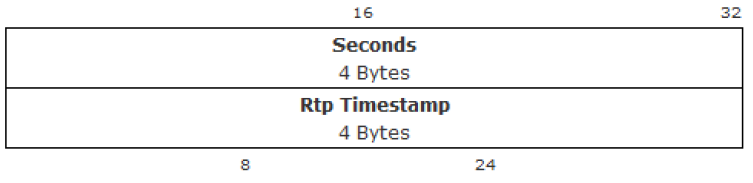
Seconds: Absolute time in seconds since Jan. 1st 2000, midnight.
Rtp Timestamp: Only in message. RTP timestamp of the first replayed RTP packet of this second.
Extended payload Structure (optional, instead of above payload structure; for write direction only)
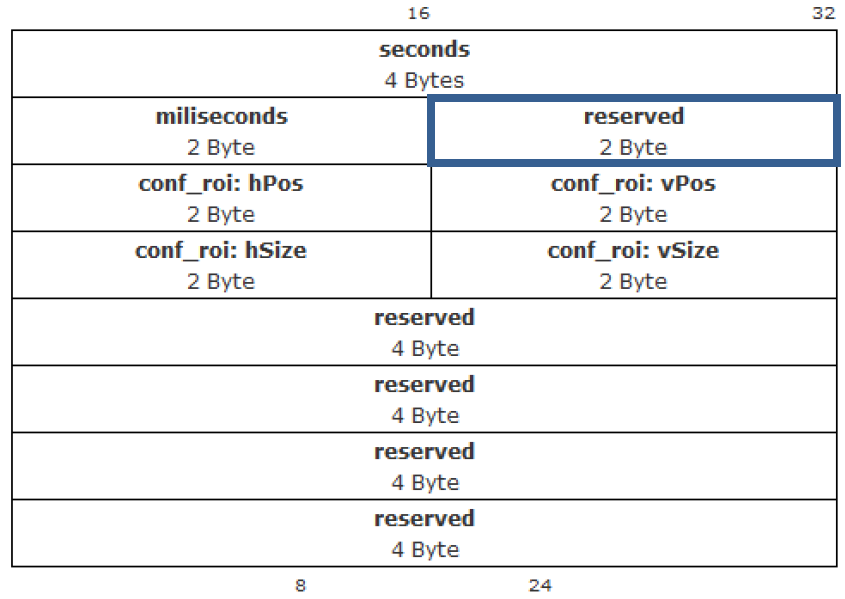
Seconds: Absolute time in seconds since Jan. 1st 2000, midnight.
Milliseconds: milliseconds
Reserved: Relevant bytes for Daylight Saving Time
|
REPLAY_SEEK_TIME_TZ_INCLUDED
|
Timezone in quarter hours
|
|---|
REPLAY_SEEK_TIME_TZ_INCLUDED: 1 included, 0 not included
Timezone quarter hours: time zone offset in quarter hours
conf_roi: select region of interest hPos,vPos,hSize,vSize (each entry 2 bytes): starting left upper edge, each 2bytes 0..32768, vSize==0 means keep aspect ratio
Example:
// create the payload for seek
RcpOutputStream payload = new RcpOutputStream();
// --- extended payload start ---
// 4 bytes seek time
payload.writeULong(secondsSince2000);
// 2 bytes mili seconds
payload.writeUShort(0x0);
// 2 bytes reserved
// 1 byte time zone included
payload.writeOctet(0x01); // use time zone included
// 1 byte timezone in quarters
payload.writeOctet(0x4); // use 4 quarter hours
// 4 x 2 bytes for ROI
payload.writeUShort(0); payload.writeUShort(0); payload.writeUShort(0); payload.writeUShort(0);
// 16 x 1 byte reserved (4 x 4 byte )
payload.writeULong(0); payload.writeULong(0); payload.writeULong(0); payload.writeULong(0);
// --- extended payload end ---
// seek
m_streamer.sendRequest(0, unchecked((OpCode) 0x09050C30), payload,
response, 0);