
Question
How to search for camera recordings or for camera recordings over VRM with RCPP over CGI?
📚Overview:
Answer
Here are the example Rcpp commands send via the Http. There are short explanations. For more details check How to do search and replay on Bosch VIP devices and Video Recording Manager (VRM)?
Get the list of files/slices of a replay session
CONF_HD_PARTITION_FILE_INFO (0x0901)
0x0901
Request
Payload Structure
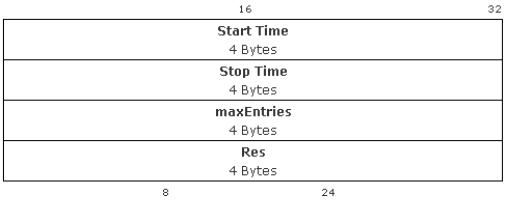
Start Time: start time in seconds since Jan. 1st 2000, midnight. - 0x00000000 (means 01.01.2000)
Stop Time: stop time in seconds since Jan. 1st 2000, midnight. - 0xFFFFFFFF (means 07.02.2136)
maxEntries: Max Number of entries
Res: reserved
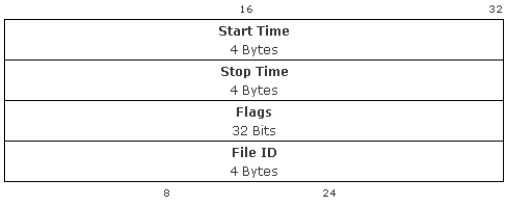
Payload Structure (sequence of)
Example Requests:
Request to a camera
a. Open VLC and start RTSP session - rtsp://172.16.50.10/?rec=1&rnd=777
b. In a browser request the sessionId – http:// 172.16.50.10/rcp.xml?command=0x0ae8&type=T_DWORD&direction=READ&protocol=TCP&num=777
Or – http://172.16.50.10/rcp.xml?command=0x0ae8&type=T_DWORD&direction=READ&protocol=TCP
Seems the camera does not need the rtsp session.
0x0ae8 2792 T_DWORD READ 0 0x000000002TCP 0x4c880039 1283981369
This XML file does not appear to have any style information associated with it. The document tree is shown below.
<rcp>
<command>
<hex>0x0ae8</hex>
<dec> 2792</dec>
...
</command>
<type>T_DWORD</type>
<direction>READ</direction>
<num>0</num>
<idstring/>
<payload/>
<sessionid>0x00000000</sessionid>
<auth>2</auth>
<protocol>TCP</protocol>
<result>
<hex>0x4c880039</hex> this is the sessionId hex
<dec> 1283981369</dec> this is the sessionId decimal
...
</result>
...
</rcp>
c. http://<camera_ip>/rcp.xml?command=0x0901&type=P_OCTET&direction=READ&protocol=TCP&sessionid=0x4c880039&payload=0x00000000FFFFFFFF0000000400000000
payload is 0x00000000FFFFFFFF0000000400000000
✔ Start: 0 (year 2000)
✔ End: max (all recordings)
✔ maxEntries: 4
<rcp>
<command>
<hex>0x0901</hex>
<dec> 2305</dec>
...
</command>
<type>P_OCTET</type>
<direction>READ</direction>
<num>0</num>
<idstring/>
<payload/>
<sessionid>0x4c880039</sessionid>
<auth>2</auth>
<protocol>TCP</protocol>
<result>
<len>64</len>
<str>31 4c 06 b2 31 4c 0d 19 02 00 00 40 00 00 00 01 31 4c 1e 27 31 4c 26 b0 02 00 00 40 00 00 00 02 31 4c 28 d2 31 4f f4 9a 02 00 00 40 00 00 00 03 31 4f f4 c5 31 4f f5 f9 02 00 00 40 00 00 00 04 </str>
...
</result>
...
</rcp>
How to read the result:
Entry 1
Start: 0x314C06B2
End: 0x314C0D19
-
Start ≈ 2025-03-27 06:11:30
-
End ≈ 2025-03-27 06:38:49
Entry 2
Start: 0x314C1E27
End: 0x314C26B0
-
Start ≈ 2025-03-27 07:41:27
-
End ≈ 2025-03-27 08:16:16
Entry 3
Start: 0x314C28D2
End: 0x314FF49A
-
Start ≈ 2025-03-27 08:27:30
-
End ≈ 2025-03-27 23:16:10
Entry 4
Start: 0x314FF4C5
End: 0x314FF5F9
-
Start ≈ 2025-03-27 23:16:53
-
End ≈ 2025-03-27 23:21:29
Request to VRM
It is done only with 0x0901 and num=<hereTheTrackId> of the camera in interest
"num=<hereTheTrackId> instead, e.g. camera that has trackID0169 use the following:
https://172.16.50.102/rcp.xml?command=0x0901&type=P_OCTET&direction=READ&num=169&payload=0x00000000FFFFFFFF0000000400000000
payload is 0x00000000FFFFFFFF0000000400000000
✔ Start: 0 (year 2000)
✔ End: max (all recordings)
✔ maxEntries: 4
Example result:
<result>
<str>31 64 2b d1 31 64 2d f1 84 04 63 40 05 d3 00 00 31 64 30 11 31 64 41 11 84 04 63 40 05 d4 00 00 31 64 43 31 31 68 34 9f 84 04 63 40 05 dd 00 00 31 68 38 e0 31 6a 01 e1 84 04 63 40 01 f1 00 00 </str>
</result>
</rcp>
Decoded Details
-
Time Format: The times are in seconds since January 1st, 2000.
Example (Slice 1):
Start: 0x31642BD1 ≈ July 5, 2026, 11:47:29 AM.
End: 0x31642DF1 ≈ July 5, 2026, 11:56:33 AM.
Duration: Approximately 9 minutes and 4 seconds.