
Possible causes and solution(s)
Symptoms
After upgrading FLEXIDOME IP 3000i IR (NDE-3502-AL) cameras from firmware 7.83.0027 to 7.90.0098, the following error message may appear:
-
“RcppSDK: Response timeout”
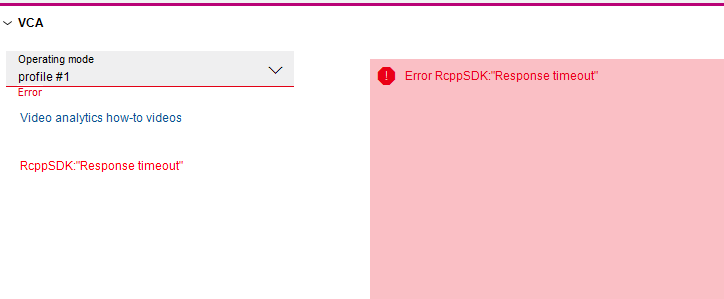
Additional symptoms:
-
The issue occurs on all cameras upgraded from firmware 7.83.0027 to 7.90.0098
-
VCA menu is not accessible
-
Other menus are really slow or not responsive (both in Configuration Manager and in the camera web browser).
-
The issue persists after reboot
-
Same behavior is observed:
-
when accessing from multiple PCs
-
when using different versions of Configuration Manager
-
Causes
This issue may occur due to a network or communication problem with the camera.
Solution
To resolve the issue, perform a factory default as this ensures that all firmware changes are fully applied.
If the camera is not accessible after factory default (via web GUI or Configuration manager), perform a hardware reset.
Hardware reset procedure:
-
Locate the hardware reset button on the camera block (next to the audio and alarm in / out connectors).
-
To access the reset button, remove the camera bubble
-
Press and hold the reset button for more than 8 seconds. The red LED indicator on the PCBA board will come on to show that the hardware reset started.
-
Wait for the camera complete a self-check. The red LED will turn off once finished.
-
Search again for the IP address. Access the camera using the web browser. Set the initial password for the camera.
After performing these steps cameras become accessible again.
Note: If the hardware reset does not restore access to the camera, the cameras has likely encountered a fault that requires the intervention of the RMA repair team.
For more details regarding the RMA process please refer to this article.
Additional Information
-
The firmware upgrade from 7.83 → 7.90 does NOT require intermediate versions
-
Downgrading back to 7.83 is supported if needed