Question
Which functions are supported for an ONVIF Profile-G camera in BVMS v13.0?
Answer

What was available before BVMS 13.0?
-
ONVIF Profile S/T camera support, connected through Video Streaming Gateway (VSG), recording managed by the Video Recording Manager.
What is new in BVMS 13.0?
-
ONVIF Profile G (local SD-Card or NAS recording) support:
-
A ONVIF Profile G camera needs to be added to a Video Streaming Gateway as part of a Video Recording Manager (VRM) pool, even though the VRM does not manage the recording of this camera (just local recoding).
-
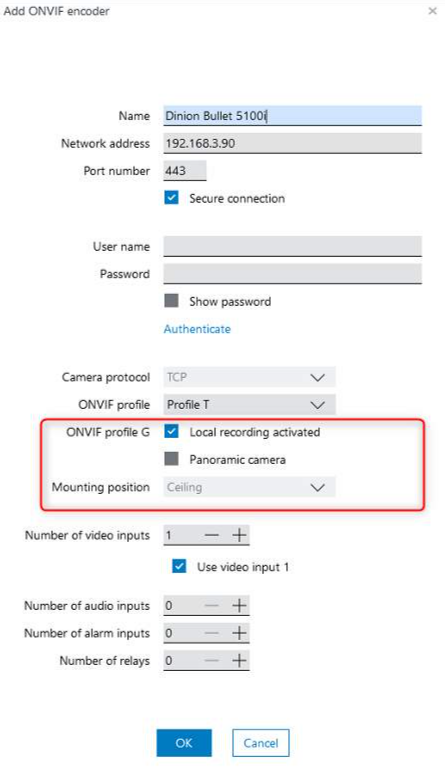
New setting on the Add ONVIF camera dialog: Profile G Local recoding activated.
-
The camera needs to be configured locally (vendor webpage or through ONVIF config interface) for activating the SD-Card/NAS recording.
-
It is possible to open an ONVIF Profile-G camera in BVMS playback mode, even though the red-dot recoding symbol is not shown on the camera in Logical Tree of the Operator Client (Status of the recoding is not know to the Management Server/VRM as camera is not managed by both).
-
Feature Details and Restrictions:
-
The camera needs to be configured locally (vendor Webpage or ONVIF config interface) for the SD-Card/NAS local recording.
The red-dot recording indication in Operator cannot be shown as the recording is not managed by VRM (just local SD-card/NAS ring-buffering).
-
All playback actions are supported: Play, Pause, Forward, Backward, Single step, etc.
-
The timeline control shows a single bar marking the start and the end of the total recording of the camera:
-
Gaps in-between the start and the end of the recoding are not shown in the bar even if available (just available first recording and available last recording is considered for the timeline bar display). Recommendation: Format the SD-Card before starting the continuous local recoding on the ONVIF camera.
-
-
The following functions are NOT supported for a ONVIF Profile-G camera:
-
Instant playback
-
Unsynch/Synch from timeline (Button is invisible)
-
Show Content Analysis Rules
-
Show Video Content Analysis
-
New BVMS 13.0 feature: Deactivate Video analysis (only possible for Profile S/T)
-
-
The following context menu on a timeline for a ONVIF Profile-G camera is NOT supported:
-
Show Content Analysis
-
Switch to a transcoded stream
-
Additional timeline actions: protect, unprotect, restrict, authenticate, delete
It is possible to select these actions on a profile G camera timeline but a corresponding message is displayed after execution: Action not supported
-
-
BVMS viewer does not support Profile G just T/S

This is how the configuration looks like for adding an ONVIF encoder, with new setting to inform BVMS that local recording has been activated for this Profile G camera beforehand: