
Question
Why does the decoder’s (VJD-7533) monitor show a different layout than the one selected in BVMS Operator Client?
Answer
This behavior typically occurs when the decoder’s display settings, such as aspect ratio (4:3, 16:9) or orientation (Landscape/Portrait), do not match the layout capabilities currently activated on the device. When the display is set to Portrait, for example, certain layouts like 2x2, 3x3, or 4x4 may not be available, causing the system to automatically shift to the closest supported layout.
-
BVMS Operator Client offers the same layout choice no matter which orientation.
-
Decoder does not offer 2x2, 3x3, 4x4 when set in Portrait, this can be seen in the config Configuration Client or Configuration Manager.
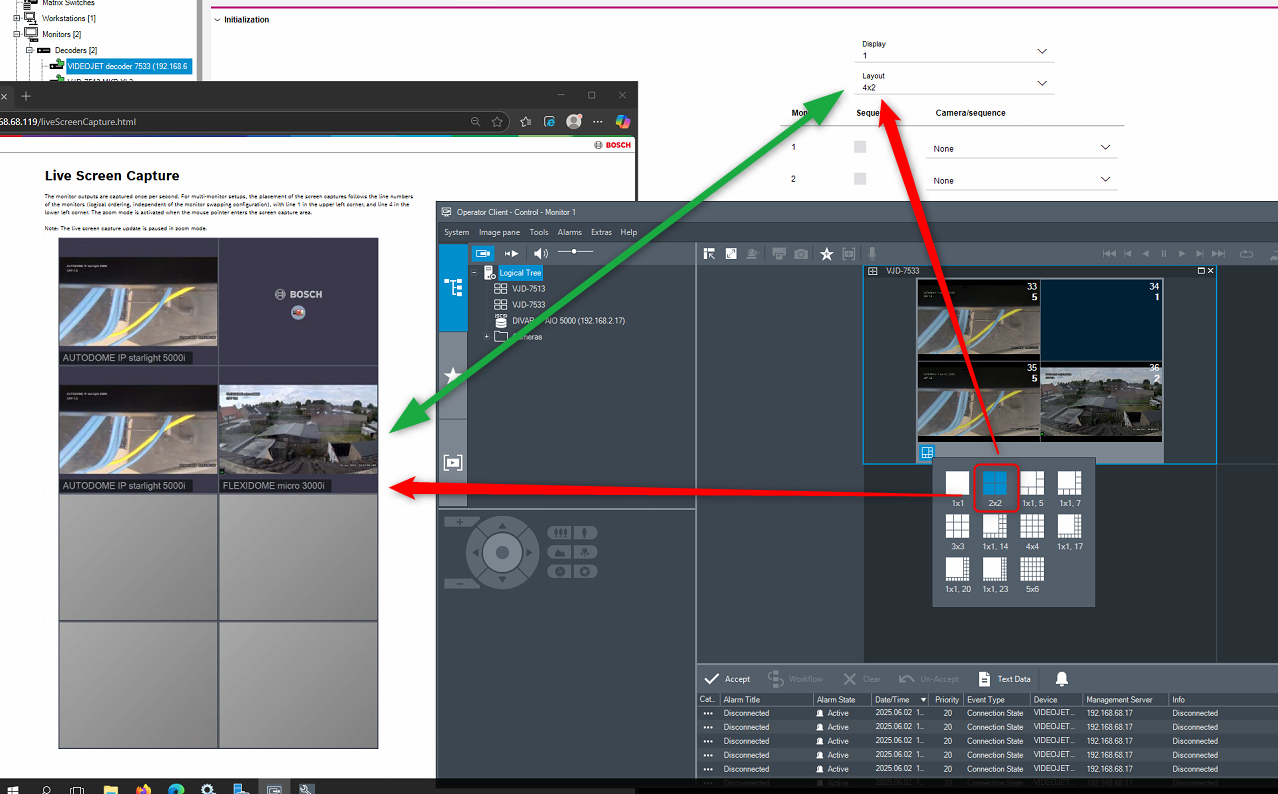
If the display ratio or orientation has been changed, BVMS may prompt for a device restart. After this restart, it’s important to update and save the device capabilities again. Once the capabilities are refreshed and the configuration is saved and activated, the selected layouts will display correctly.
Updating the device capabilities resolves the issue entirely, and all layouts work as expected.
