
Question
How can I reduce noise and nighttime bandwidth on CPP14 cameras without affecting daytime image quality?
Answer
If your CPP14 camera shows a much higher bitrate at night compared to daytime, this can happen because the scene becomes darker, causing the camera to increase gain and introduce image noise. Noise increases the amount of detail the encoder must process, which leads to higher bandwidth consumption, even when the scene is static.
Cameras evaluate lighting conditions individually. If one scene is fully lit and the other is darker, the darker camera may automatically switch to black-and-white mode to improve visibility, creating different noise levels and bitrate output between units.
High noise increases the complexity of the video stream. As a result, the bitrate rises significantly, even though no motion is present.
Therefore, it might happen that the bandwidth of cameras reaches around 3 Mbit/s at night. This can occur in low-light conditions if noise filtering is not optimally configured. With many cameras, this can lead to a high storage load.
If you have more cameras with the same H.265 profile, identical encoding profiles do not guarantee identical bitrate. Bitrate depends heavily on scene illumination and noise levels. A darker scene produces more noise, which results in a higher bitrate.
Tests show that switching between H.264 and H.265 alone does not significantly reduce the bitrate if the root cause is image noise.
Firmware CPP14_FW_9.80.0087 introduces an improved “Dark level boost” slider. Updating to this version has been shown to significantly reduce nighttime bandwidth and noise.
Therefore, it is recommended to upgrade your camera to CPP14_FW_9.80.0087.fw.
Reduce noise and nighttime bandwidth without affecting daytime image quality:
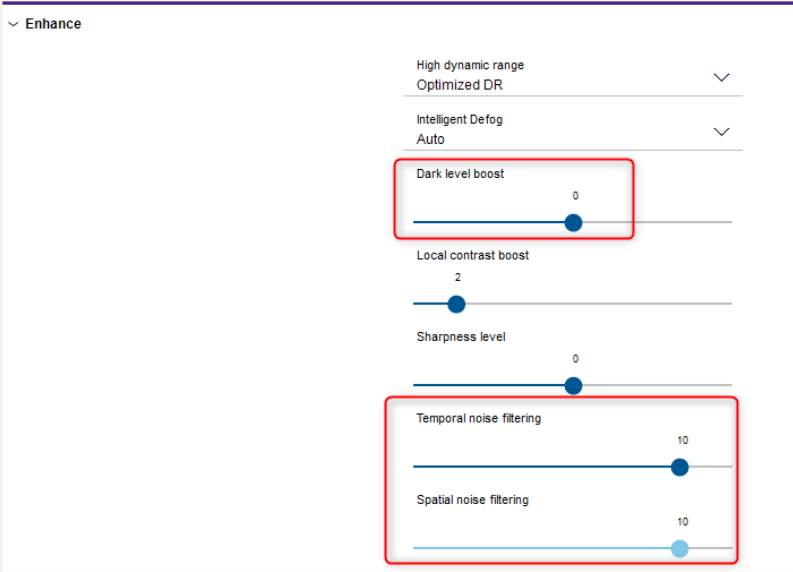
You can adjust the camera’s noise-reduction settings, especially:
-
Temporal noise filtering
-
Spatial noise filtering
-
Dark level boost
Start with the default scene mode, then increase Temporal and Spatial noise filtering gradually (for example, test values between 1–10 during nighttime). Make adjustments while viewing the live image to see the immediate effect.
Increasing “Dark level boost” may actually amplify noise. Reducing this slider usually lowers noise levels.
Expected results
Users have reported up to 50% reduction in data volume during nighttime after:
-
Upgrading to firmware 9.80
-
Adjusting the noise reduction and dark level boost sliders