
🕒 This procedure takes in average ~2 min to complete
Warning message showing “The BvmsAuth certificate is expiring soon. Activate the configuration to refresh the certificate”

In BVMS 12.2 and 12.3 the BvmsAuth cert is set to refresh after not before, resulting in the certificate only being refreshed 1 month after it expired.
Note: The BvmsAuth Certificate is only used for OICD (IdP) authentication.
The BvmsAuth certificate is not relevant for BVMS authentication via user credentials or configured to use LDAP, so there is no side effect after the certificate has expired.
Step-by-step guide
How to regenerate a new certificate:
-
First the current BvmsAuth Cert needs to be removed from the Local Machine Cert Store
-
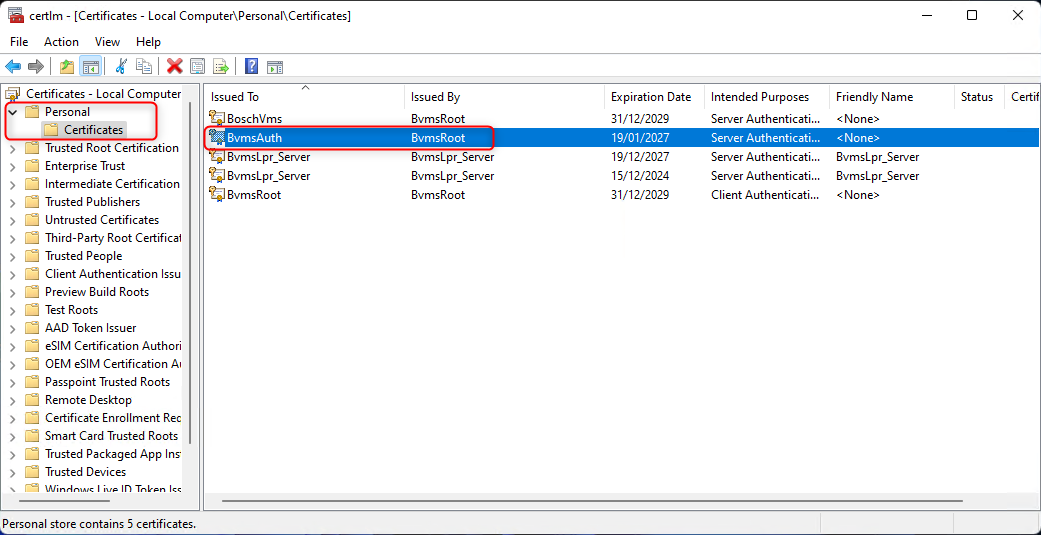
Open the certificate manager via console - certlm.msc
-
Navigate to: Personal - Certificates
-
Select the "BvmsAuth" certificate and delete it.
-
-
Restart the BVMS Central server
-
Open the service manager
-
Stop all "BVMS" services.
-
Then Select only the "BVMS Central Server" and restart the service.
-
-
Check that the certificate has been recreated
-
Refresh the certificate manager and check that the "BVMSAuth" is recreated with a date in the future.
-
-
Restart the rest of the BVMS services again.