
Possible causes and solution(s)
Symptoms
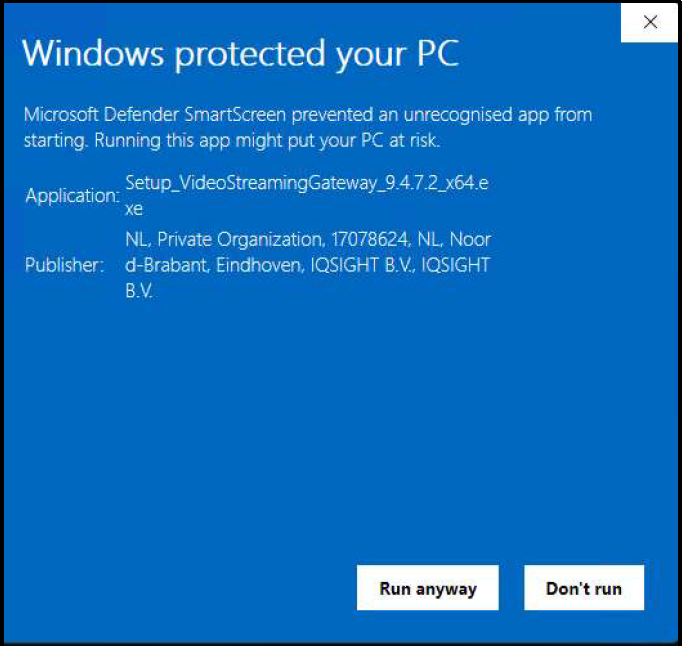
When installing or running BVMS 14.0, some users may encounter a Microsoft Defender SmartScreen warning dialog stating that the application is “unrecognized” or that “Windows protected your PC.” The warning identifies the publisher as “IQSIGHT B.V.” and appears because this publisher has not yet accumulated sufficient download-based reputation in Microsoft Defender Threat Intelligence database for BVMS 14.0.
Customer Action Required

Affected Products
The following product families are within scope of this notice. See Material Lists at the end of this document for full CTN/SAP enumeration.
|
Product family / line |
Affected versions |
|---|---|
|
DIVAR IP all-in-one 5000 (DIP-52xx) |
All models |
|
DIVAR IP all-in-one 7000 (DIP-72xx) |
All models |
|
DIVAR IP all-in-one 7000 R3 (DIP-73xx) |
All models |
|
DIVAR IP all-in-one 7000 (DIP-74xx) |
All models |
|
DIVAR IP all-in-one 4000 (DIP-44xx) |
All models |
|
DIVAR IP all-in-one 6000 (DIP-64xx) |
All models |
|
BVMS |
14.0 |
Technical Details
Considered Common Vulnerabilities and Exposures (CVE)
Not applicable.
Vulnerability Details
The Microsoft Defender SmartScreen warning does NOT indicate a security vulnerability in BVMS. The following facts confirm the software is safe:
-
The BVMS 14.0 installer is signed with a valid, legitimate code-signing certificate issued by DigiCert
Root CA to IQSIGHT B.V. -
The warning is a reputation-accumulation delay, not a detection of malware or malicious code.
-
No CVE (Common Vulnerabilities and Exposures) identifier has been assigned, this is not a software security defect.
-
Microsoft has been notified. Reputation will accumulate automatically as more users download BVMS 14.0.
-
BVMS contains no known security vulnerabilities related to this issue.
Why this affects IQSIGHT products
Microsoft Defender SmartScreen evaluates two signals before allowing a downloaded executable to run:
-
Publisher reputation: whether the code-signing certificate belongs to a publisher with sufficient clean download history.
-
File hash reputation: whether this specific file hash has been run by enough users without security incidents.
-
BVMS 14.0 is properly signed with a valid code-signing certificate issued by DigiCert Root CA to IQSIGHT B.V. Because BVMS 14.0 is a new release, the publisher identity is new in Microsoft Defender SmartScreen’s reputation database and has not yet reached the download-volume threshold required for automatic trust. This is standard, expected behavior for any newly released signed application — it is not an indicator of malicious content.
Solution and Mitigations
End-User Workaround
When the Microsoft Defender SmartScreen dialog appears, follow these steps:
-
Click “More info” in the lower-left area of the Microsoft Defender SmartScreen dialog.
-
Verify the publisher shown is “IQSIGHT B.V.” and the application name is BVMS. This confirms that the installer is authentic.
-
Click “Run anyway” to proceed with the installation.
Long-Term Resolution
The Microsoft Defender SmartScreen warning will resolve itself automatically as BVMS 14.0 gains wider adoption. Once the file hash and publisher certificate accumulate sufficient clean-download history in Microsoft Defender Threat Intelligence database, the warning will no longer appear. No further action will be required from end users or customers.
IQSIGHT B.V. has already notified Microsoft. This behavior will also be documented in the BVMS 14.0 Release Notes.
References
-
Microsoft — SmartScreen Reputation (official documentation)
-
Microsoft Security Intelligence File Submission